. A complete Parts List is available at www.MillerWelds.com
OM-253392 Page 31
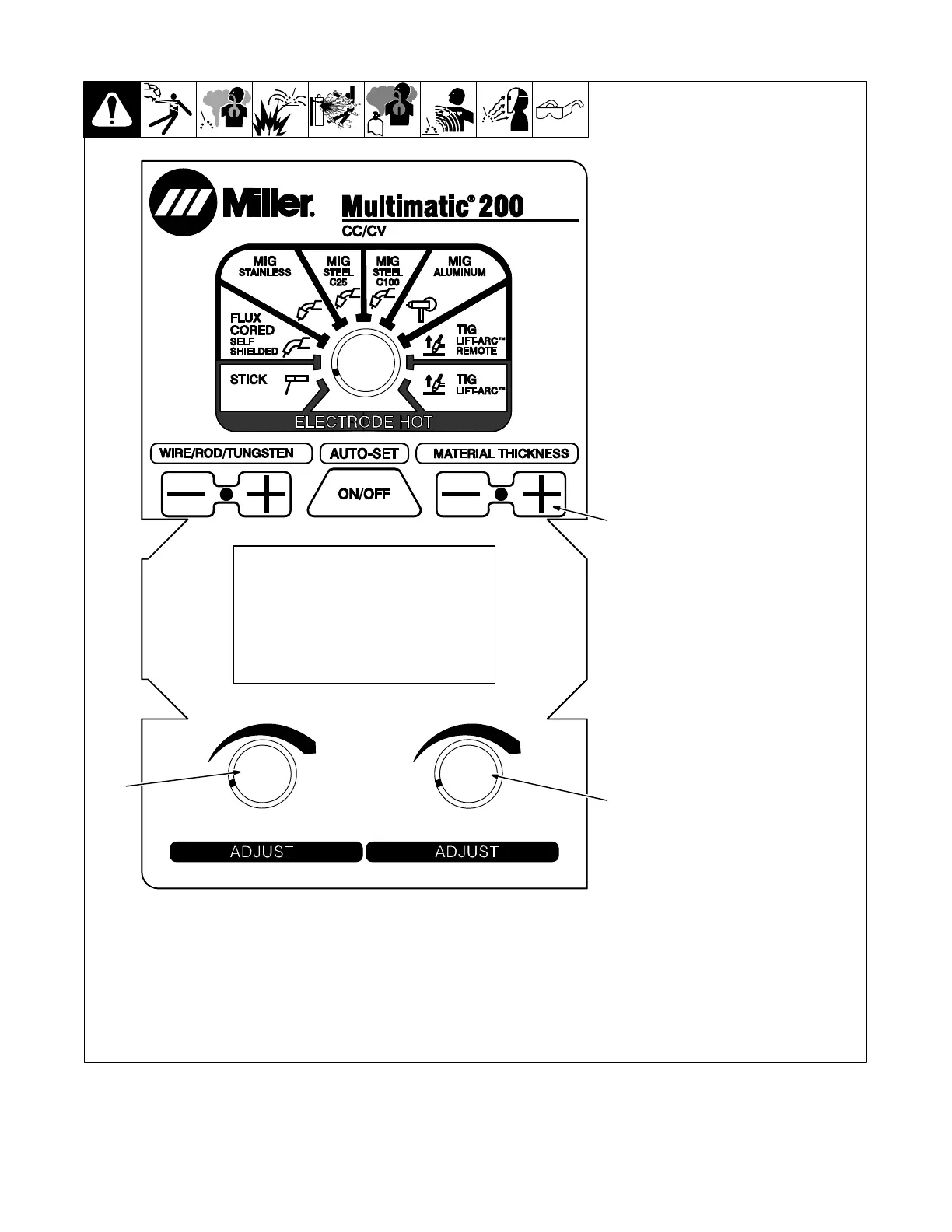
6-4. Adjusting Display Contrast (Menu 1 Of 10)
1 Adjustment Knob
2 Material Thickness Plus (+)
Button
Follow instructions in Section 6-3 to
enter the setup menu.
The Display Contrast should now ap-
pear on the display.
To adjust display contrast, turn either
Adjustment knob.
Cycle through menu items using the
Material Thickness Plus (+) button or
cycle unit power to save settings and
exit menu.
. Cycle unit power before welding to
complete initialization process.
Ref. 249 632-F
1
1
2
6-5. Calibrating Drive Motor (Menu 2 Of 10)
. The unit’s internal drive motor is calibrated at the factory. No calibration is needed unless drive motor or user interface board is changed. Contact
nearest factory authorized Service Agent or Miller Electric Mfg. LLC Service department.












 To Next Page