
 To Next Page
M
Michael BerryAug 14, 2025
What does EXCHANGE UV LAMP mean for Millipore Simplicity?
- DDr. Kristi BenjaminAug 14, 2025
The 'EXCHANGE UV LAMP' message means that the operational lifetime of the UV lamp has expired. Replace the UV lamp.

What does EXCHANGE UV LAMP mean for Millipore Simplicity?
The 'EXCHANGE UV LAMP' message means that the operational lifetime of the UV lamp has expired. Replace the UV lamp.
What does CHECK UV LAMP mean on Millipore Water Filtration Systems?
The 'CHECK UV LAMP' message indicates a defective UV lamp. This occurs when the UV lamp doesn’t light anymore.
Why RESISTIVITY < SP in Millipore Simplicity Water Filtration Systems?
If the resistivity is below the set point, it could be due to an empty reservoir, in which case you should fill it. Alternatively, you may need to install new purification cartridges.
What to do if the Simplicity system is in PRODUCT mode but does not produce any or very little water Millipore?
If your Simplicity system isn't producing water in PRODUCT mode, several issues could be the cause. The tank might be empty, so you should fill it. Ensure the tank is correctly positioned. A clogged SimFilter could be the problem, so replace it. Check if the tank vent filter is plugged; remove the tank lid, and if the flow rate improves, replace the vent filter. Finally, air might be trapped in the SimPak and SimFilter; remove the SimFilter and purge the system.
What does EXCHANGE PACK mean on Millipore Simplicity?
The 'EXCHANGE PACK' message indicates that the operational lifetime of the purification pack has expired, and you should change it.
What to do if there is no electrical power to Millipore Simplicity?
If there's no electrical power to your system, check the source of power. Also, ensure the power cord is properly plugged into the wall.
How to fix PACK OUT error in Millipore Simplicity Water Filtration Systems?
The 'PACK OUT' error indicates that the Pak has not been installed properly or has been removed. Put the Pack back in place.
What to do if Millipore Simplicity Water Filtration Systems switches automatically from PRODUCTION mode to STANDBY mode?
The system is pre-set to produce continuously for a maximum of 10 minutes. Refill the reservoir if necessary and press the OPERATE button.
How to fix EEPROM ERROR on Millipore Water Filtration Systems?
The 'EEPROM ERROR' indicates that the unit needs to be initialized. Press the OPERATE button twice.
Describes warning symbols and their meaning for important information.
Explains that illustrations are referenced in the text and located at the back.
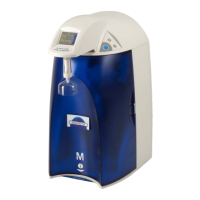
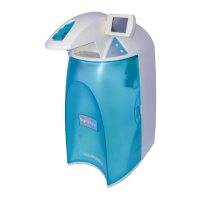
Provides an overview of the Simplicity water purification system and its quality.
Details purified water quality parameters and flowrates for the system.
Lists operating and storage environmental conditions for the system.
Outlines the electrical requirements, voltage, and consumption.
Lists the materials used for various system components.
Provides physical dimensions and weight specifications for the system.
Explains safety symbols and crucial warnings for system operation.
Details the items to be found after unpacking the shipping container.
Guides on choosing the optimal location for placing the Simplicity system.
Step-by-step instructions for filling the integral water reservoir.
Describes the procedure for installing the reservoir vent filter.
Outlines the steps for inserting the purification pack into the unit.
Guides on safely connecting the system to a power source.
Explains how to set the display language for the system interface.
Describes the process of hydrating the ion exchange resin in the SimPak.
Details the procedure for installing the final SimFilter.
Advises on refilling the reservoir to maintain optimal performance.
Briefly mentions system operating modes and how they are activated.
Provides instructions for cleaning the exterior of the Simplicity system.
Refers to the troubleshooting section for system messages.
Explains basic keypad functions for operating and measuring.
Details how to check the remaining life of the purification pack and UV lamp.
Explains how to select the display for resistivity without temperature compensation.
Guides on changing the display unit between resistivity and conductivity.
Explains the process for changing the system's display language.
Refers to the maintenance section for resetting the UV lamp counter.
Step-by-step guide for replacing the SimFilter and SimPak.
Instructions for replacing the UV lamp, including safety precautions.
Details the procedure to reset the UV lamp usage counter.
Provides guidance on how to shut down the system for extended periods.
Lists common problems, their causes, and recommended solutions.
Lists available system models and their part numbers.
Lists replacement consumables and their part numbers.
Outlines the warranty terms and conditions for Millipore products.
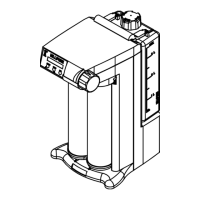
Displays the schematic diagram of the Simplicity water flow.
Illustrates the components included in the system packaging.
Depicts the process of filling the integral reservoir.
Illustrates the steps for installing the purification pack.
Illustrates the procedure for installing the SimFilter.
Illustrates the steps for removing and replacing the UV lamp.
 General
| TOC | < 5 ppb |
|---|---|
| Bacteria | < 1 CFU/mL |
| Pyrogens (Endotoxins) | < 0.001 EU/mL |
| Output Water Quality | Ultrapure Type 1 Water |
| Resistivity | 18.2 MΩ·cm |
| Pore Size | 0.22 μm |
| Operating Temperature | 4-40°C (Feed Water) |
| Power Supply | 100-240 VAC, 50/60 Hz |
| Filter Material | Polyethersulfone (PES) |