3300 ICP General Information Guide
42
• Supported Mitel IP or Digital Phone (see the Live Business Gateway Engineering Guidelines
for a complete list)
• Layer 2 Ethernet Switch
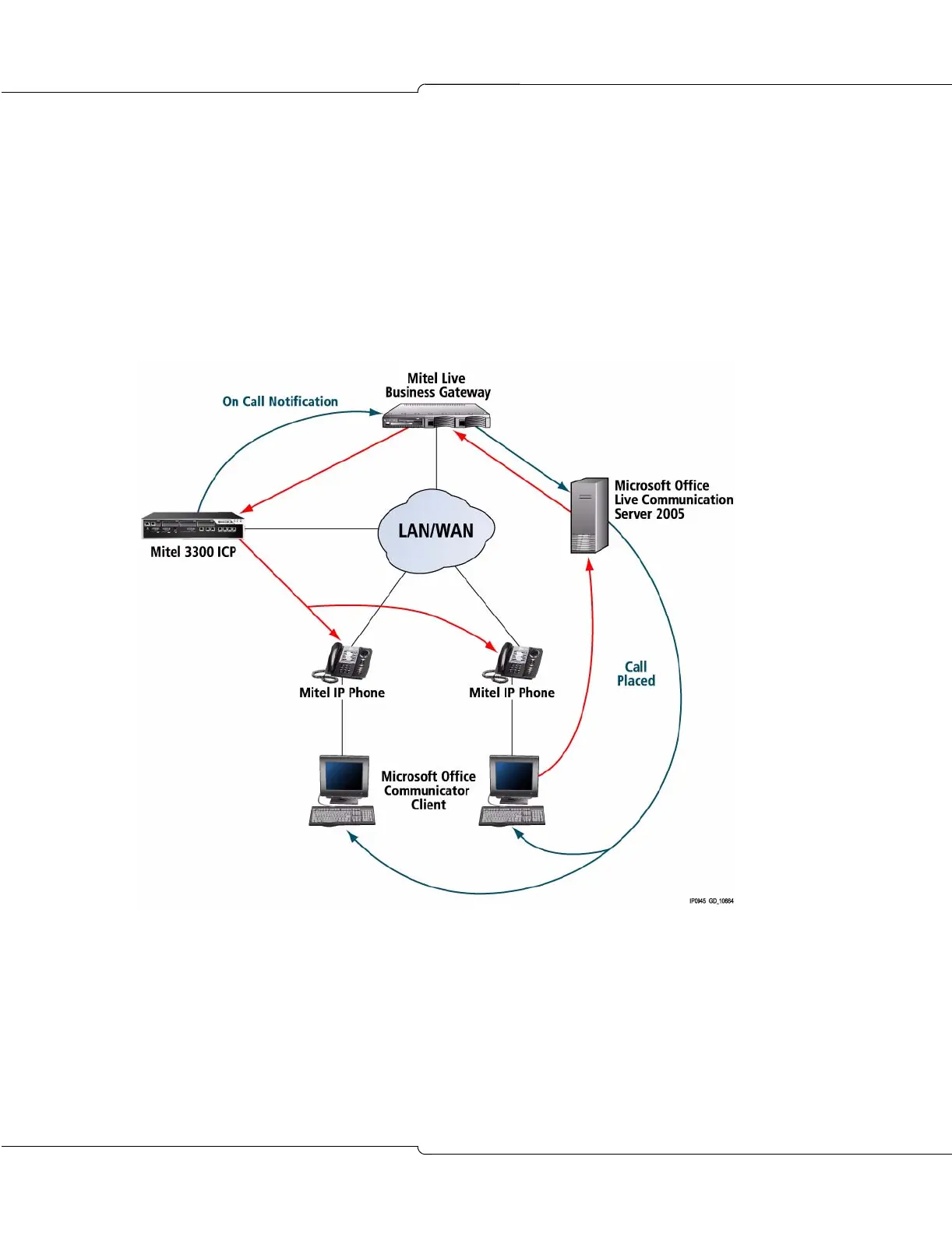
The Live Business Gateway integrates into a typical 3300 ICP office environment as shown in
the following figure. In this diagram, the call placed from Microsoft Office Communicator signals
the Live Communication Server, which then signals the Live Business Gateway. The Live
Business Gateway conveys a message to the 3300 ICP that then rings the two phones. Once
the call is connected, the 3300 ICP signals the Live Communications Server via the Live
Business Gateway to tell all Communicator clients that those two parties are now in a call.
Communicator 2005 PC-to-Phone Support
PC-to-Phone provides support for SIP integration between Microsoft Office Live
Communications Server 2005 and Mitel 3300 ICP without the need for a third party gateway.
An end user is therefore capable of placing calls from Communicator 2005, acting as a basic
SIP softphone, to or from a Mitel deskphone, the PSTN, or any other network-connected PBX.
A Communicator 2005 user will be able to dial through the Find field, a Buddy list or the office
suite of products as defined by the Live Communications Server 2005 specifications.













 To Next Page