15
S
PECIFICATIONS
CHAPTER 2 ABOUT EX CONTROLLER
Figure 2.7: Unit with Single Power Supply
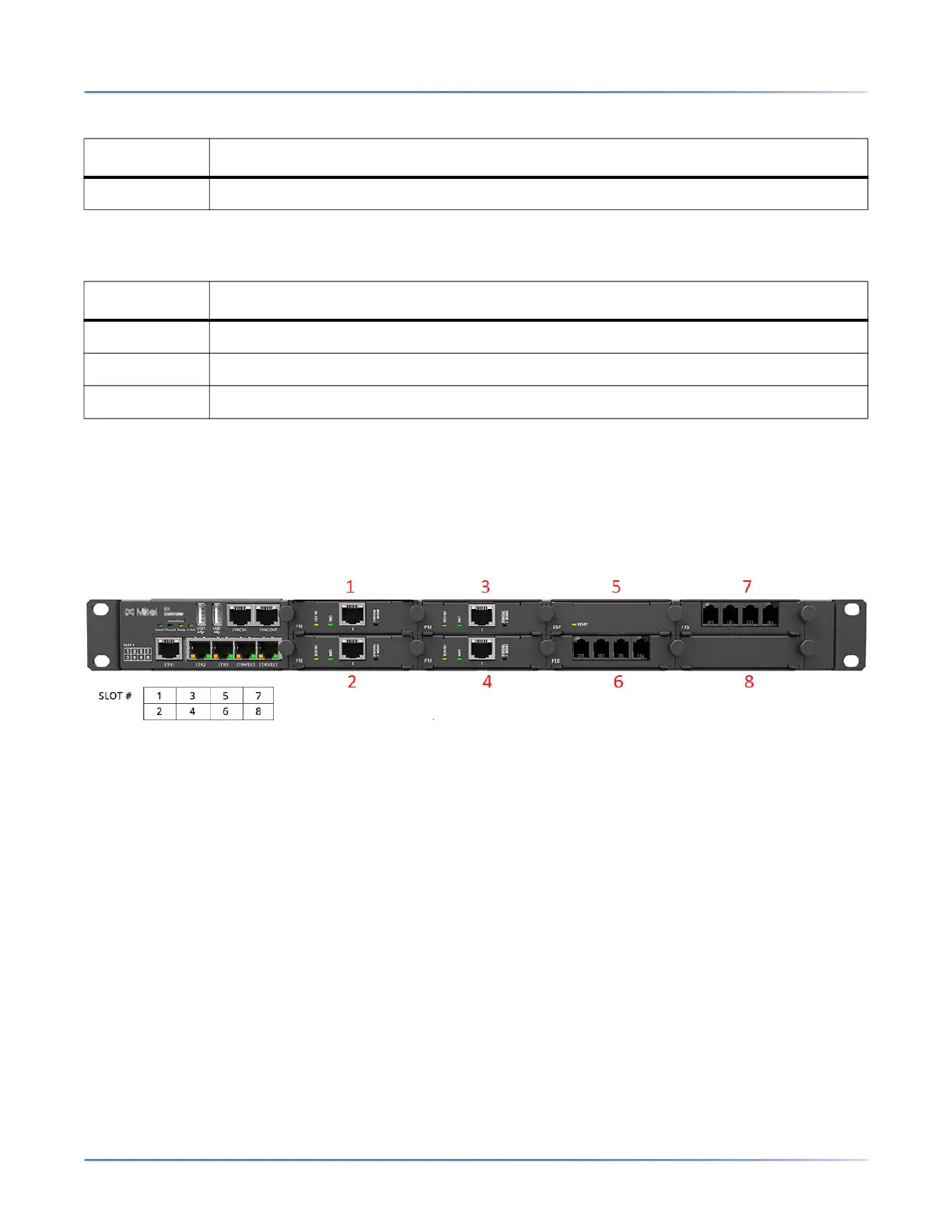
Slots Order
IMPORTANT: The order and the slots in which you install the cards are crucial for the controller to work prop-
erly. The numbers in the following graphic indicate the slots and the order in which you must install the
cards.
• Slot numbers are displayed on the front, left-bottom corner of the controller.
• Cards must be installed from slot 1 sequentially, without leaving empty slots between the cards.
• There must not be any empty slot between cards.
• Install all PRI card(s) first, sequentially starting from slot 1.
• If you have an FXO or FXS card to install, then install a DSP card.
• Install a DSP card in the first slot available after the PRI card(s) or in the next slot available after the
FXO or FXS card.
• If there is no PRI card, then install the DSP card in slot 1.
• Install FXO and FXS cards in the next available slots after the DSP card.
• If there are no PRI or DSP cards, then all the slots must remain empty.
3 Grounding screw
Table 2.5:
# DESCRIPTION
1 Power 1 connector
2 Power switch
3 Grounding screw
Table 2.4: (Continued) (Sheet 2 of 2)
# DESCRIPTION
咨询订购:400-010-8885、 Support@mitel.com.cn



 To Next Page