46
C
ONFIGURE THE SERVER USING SERVER CONSOLE
CHAPTER 5 MAINTENANCE
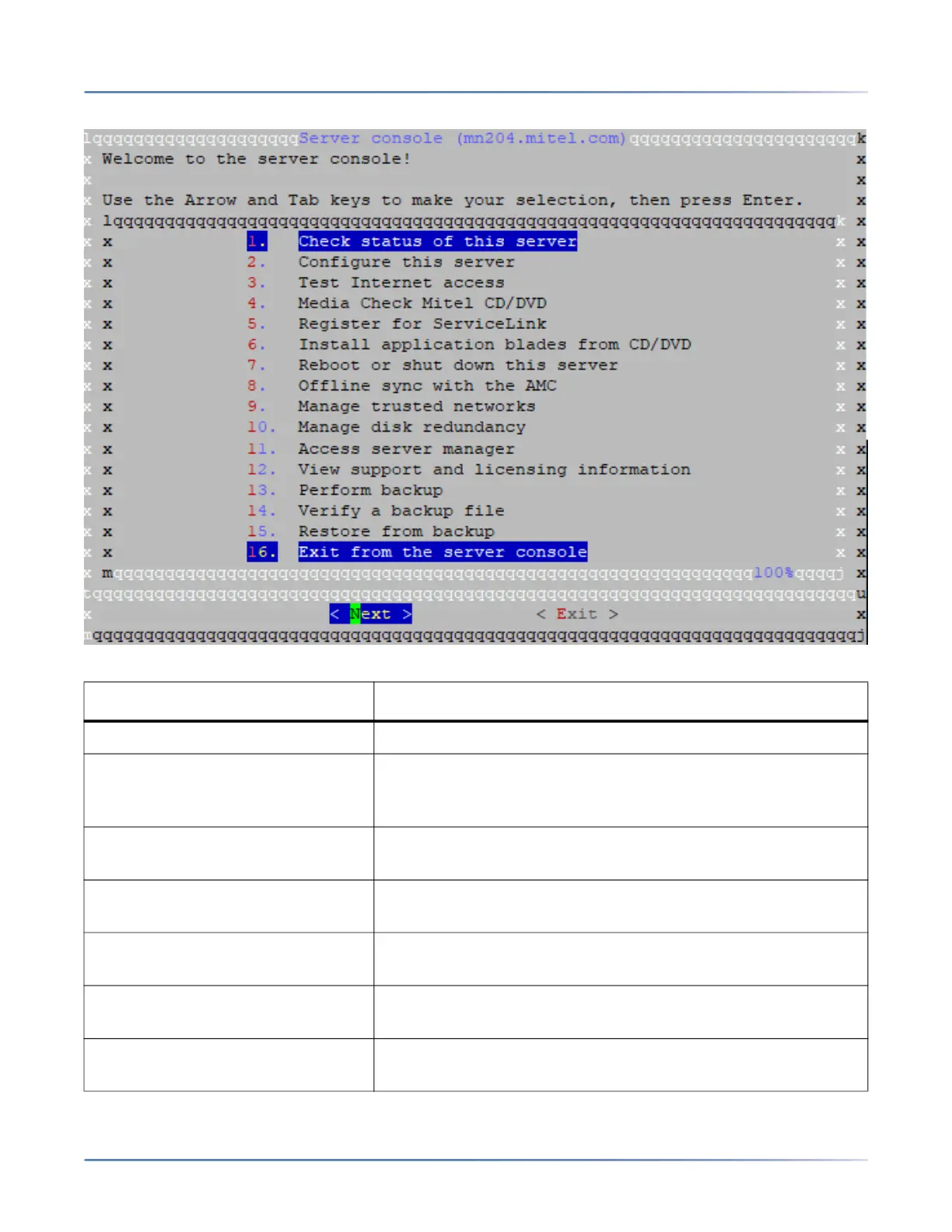
Figure 5.1: Server Console
From the Server Console, you can view the following information and perform the following tasks.
Option: Use this option to:
Check status of this server View uptime information about the server.
Configure this Server View and modify the configuration information entered during
installation (Ethernet cards, IPv4 and IPv6 address information,
DHCP, DNS, domain names, etc.).
Test Internet access Test your connection by contacting Mitel Corporation via
Internet
Media Check Mitel CD/DVD Test a Mitel application CD/DVD (supported only for
applications that have embedded checksum values.)
Register for Service Link Activate ServiceLink on the AMC via text mode browser;
(normally you would use the web-based server manager)
Install application blades from
CD/DVD
Install application software blades from CD/DVD. Your
application documentation specifies when to use this option.
Reboot or shut down the server Reboot or shut down the server. Configuration settings in effect
at the time of reboot are re-applied.
咨询订购:400-010-8885、 Support@mitel.com.cn



 To Next Page