Planning and Installation Guide Mitel SIP-DECT Multi-Cell for MiVoice Connect
24
CONFIGURING SWITCHES
Switch configuration is required on the Mitel system to work with the Mitel SIP-
DECT Depending on the switch type, Mitel Voice Switches, and Virtual Phone
Switches support variable numbers of SIP Proxies and IP Phones, and can be
verified on the Switch page of Mitel Connect Director.
To configure Mitel Switches:
1. Open a browser and navigate to http://<Server name or IP address>/
Director/login.asp to launch Mitel Connect Director.
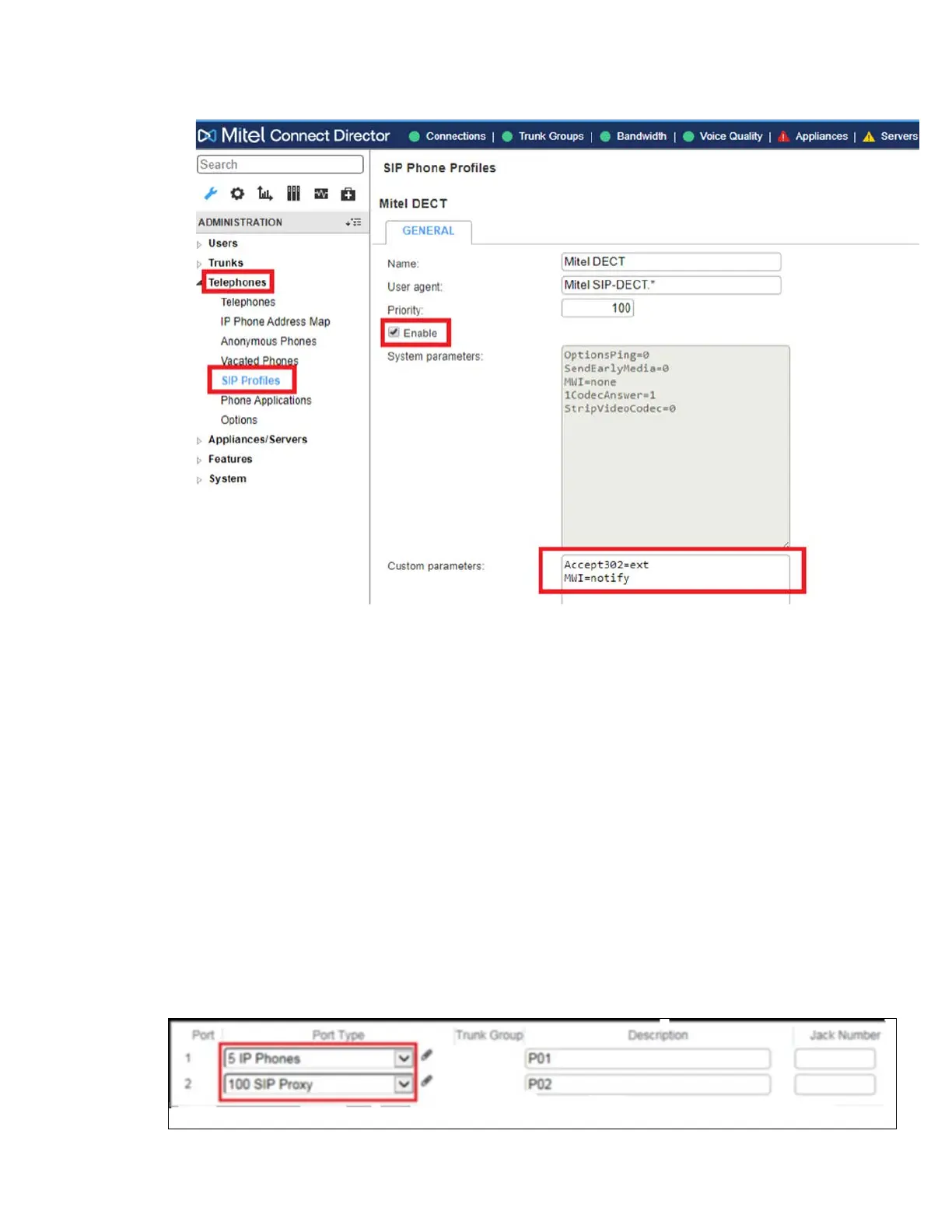
2. Navigate to Administration > Appliances/Servers > Platform Equipment > Switch.
3. Mitel Switches with processing resources that support Digital and Analog ports can be
reallocated to support 100 SIP Proxies. The Mitel Administrator can define one of the
“Port Type” settings from the available ports to “100 SIP Proxy”, as well as sufficient
“IP Phone” ports to support the total number of Mitel SIP-DECT. The following
example shows Port allocation designated on a Mitel Switch for IP Phones and SIP
Proxy resources


 To Next Page