Planning and Installation Guide Mitel SIP-DECT Multi-Cell for MiVoice Connect
34
CONFIGURING USERS
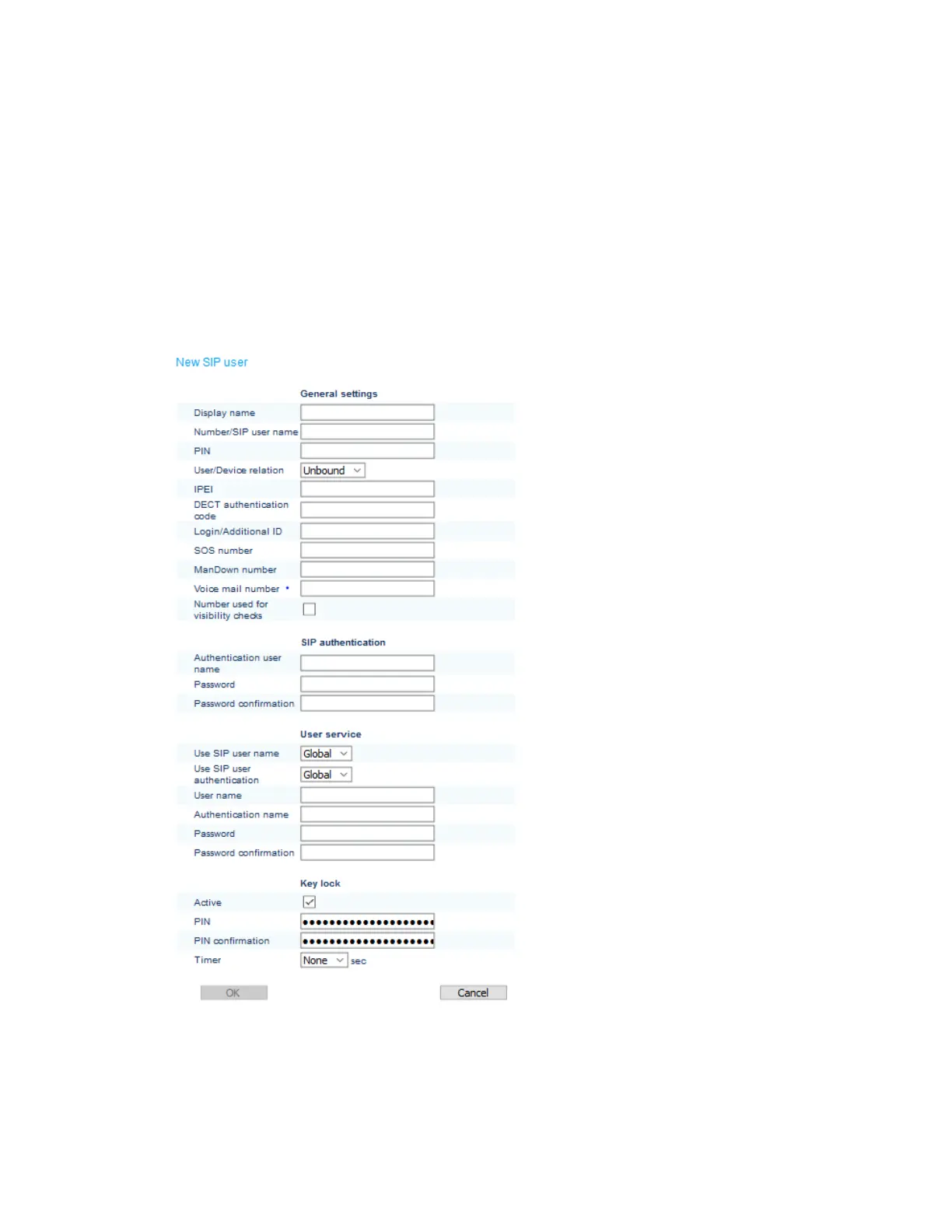
To add a new user:
1. Log into the OMM
2. Click SIP Users/Devices > Create a new SIP User/Device.
3. Select the Advanced checkbox in the top bar.
4. Click New.
• Display name: Extension
Name
• Number/SIP user name:
SIP user that was created
in the Connect Director
• User/Device relation:
Select Fixed
• IPEI: Handset hardware
identifier
• DECT authentication code:
Code for Handset
subscription. If this field is
left empty, the system-wide
DECT authentication code
is used
SIP authentication
• Authentication user name:
SIP user name
• Password: SIP Extension
password
• Password confirmation
User service
• User name
• Authentication name
• Password
• Password confirmation
5. Click OK.
The user is now subscribed.


 To Next Page