© MOBATIME 56 / 120 800652.11
6.5.20 E-mail
E-mail alarm messages via SMTP.
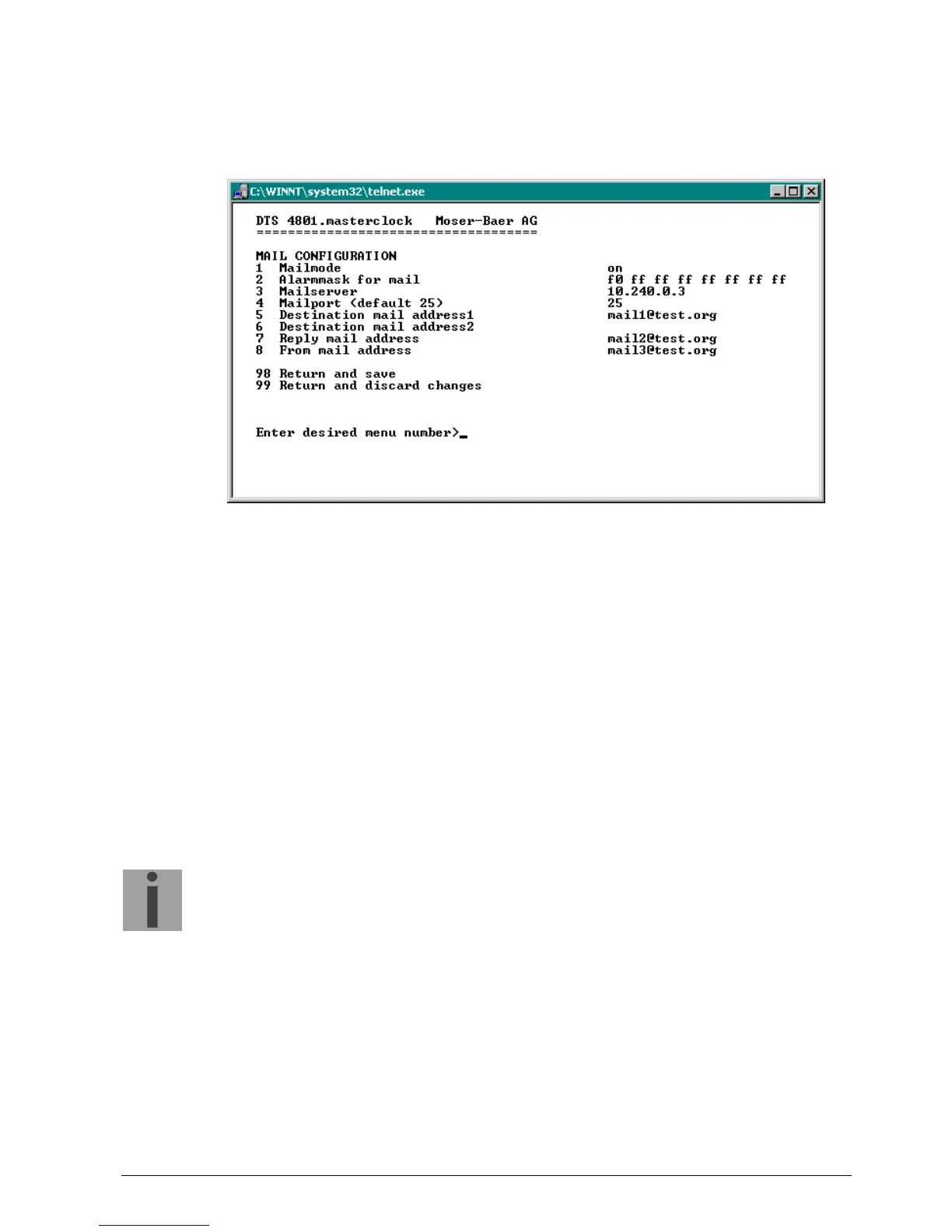
E-mail configuration page 1:
1. E-mail function on or off.
2. Alarm mask for e-mail notifications (see chapter "6.5.19 Alarm mask")
Changes are stored or reset on the overlying menu page “MAIL
CONFIGURATION".
3. IP address of the mail server e.g. 10.249.34.5
ENTER without entering an address will delete the entry.
4. Mail server port (often 25)
5.-6.Destination e-mail address
ENTER without entering an address will delete the entry.
7. Reply address (e.g. support, administrator...)
ENTER without entering an address will delete the entry.
8. Sender address (important for authentication through the mail server)
ENTER without entering an address will delete the entry.
Press ENTER to change to page 2.
Important:
Configuration of a gateway is required for sending e-mails (see chapter
"6.5.23 Network"). This can be set via DHCP or manually.



 To Next Page