2.5 Installing the Lens Units - D12D Standard
The standard models of the MOBOTIX D12 are delivered with a pre-mounted dome.
Lens units (lens mount, image sensor and lens) are delivered separately and
need to be installed as described in the following:
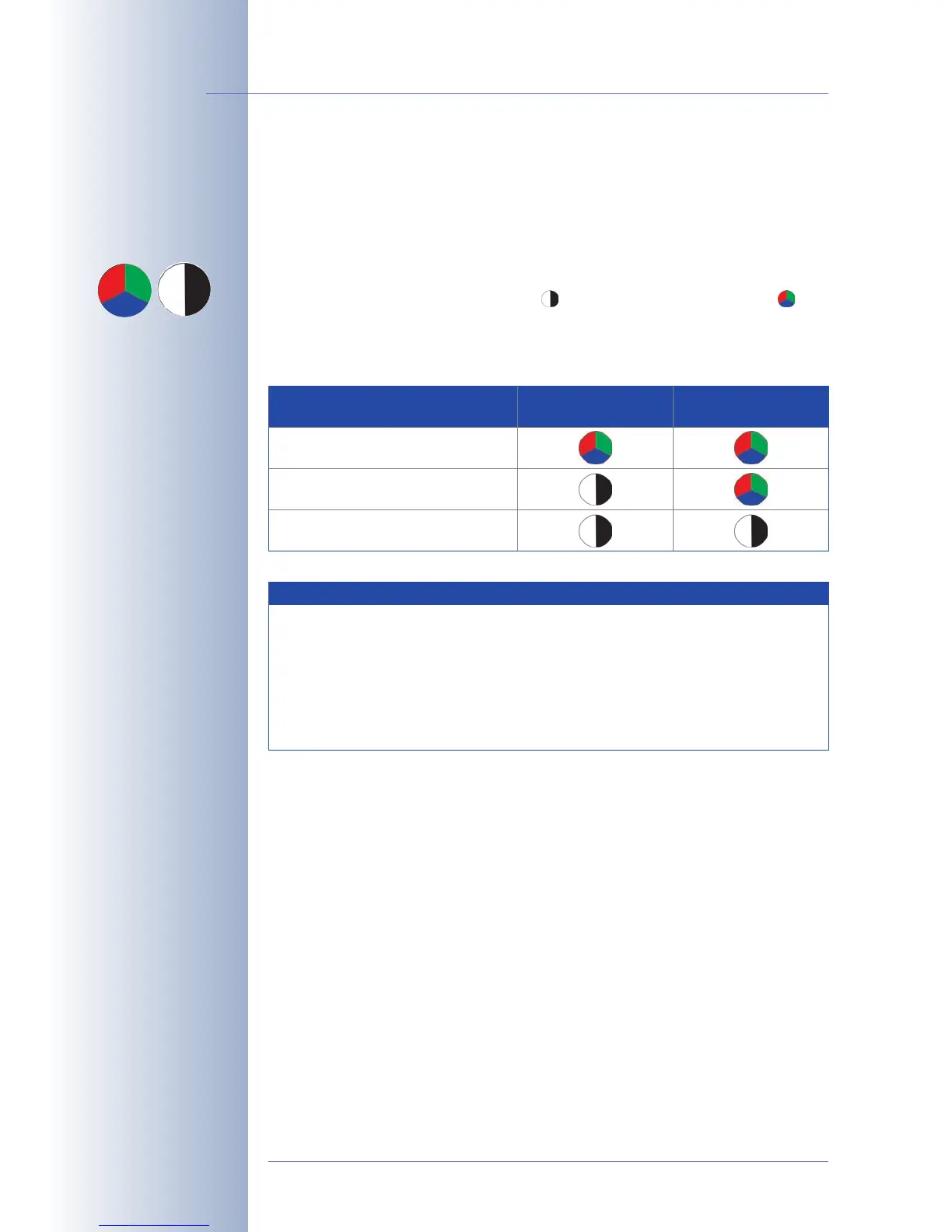
The ribbon cables for connecting the image sensors are marked by the letters L
(left) and R (right). Depending on the type of sensor used, the sensors (mounted on
the lens units) are marked either by the icon (BW, black & white) or the icon
(RGB, color).
The following combinations of ribbon cables (L, R) and sensors (color, black &
white) are possible:
© MOBOTIX AG • Security-Vision-Systems • Made in Germany
www.mobotix.com • sales@mobotix.com
40/132
D12 Camera Manual Part 1
Designation of the lens
units
Possible image sensor
combinations for the MO-
BOTIX D12D Standard
Image Sensor Combination Ribbon Cable
L
Ribbon Cable
R
Color/Color
Color/Black & White
Black & White/Black & White
Notes
Make sure that you only use the combinations of sensors and ribbon
cables listed in the table!
When setting up the camera, the installed combination of image sen-
sors has to be set in the camera's user interface. This is done either
automatically in the Quick Installation wizard or manually by opening
the Admin Menu> Image Sensor Configuration dialog.
RGB
BW



 To Next Page