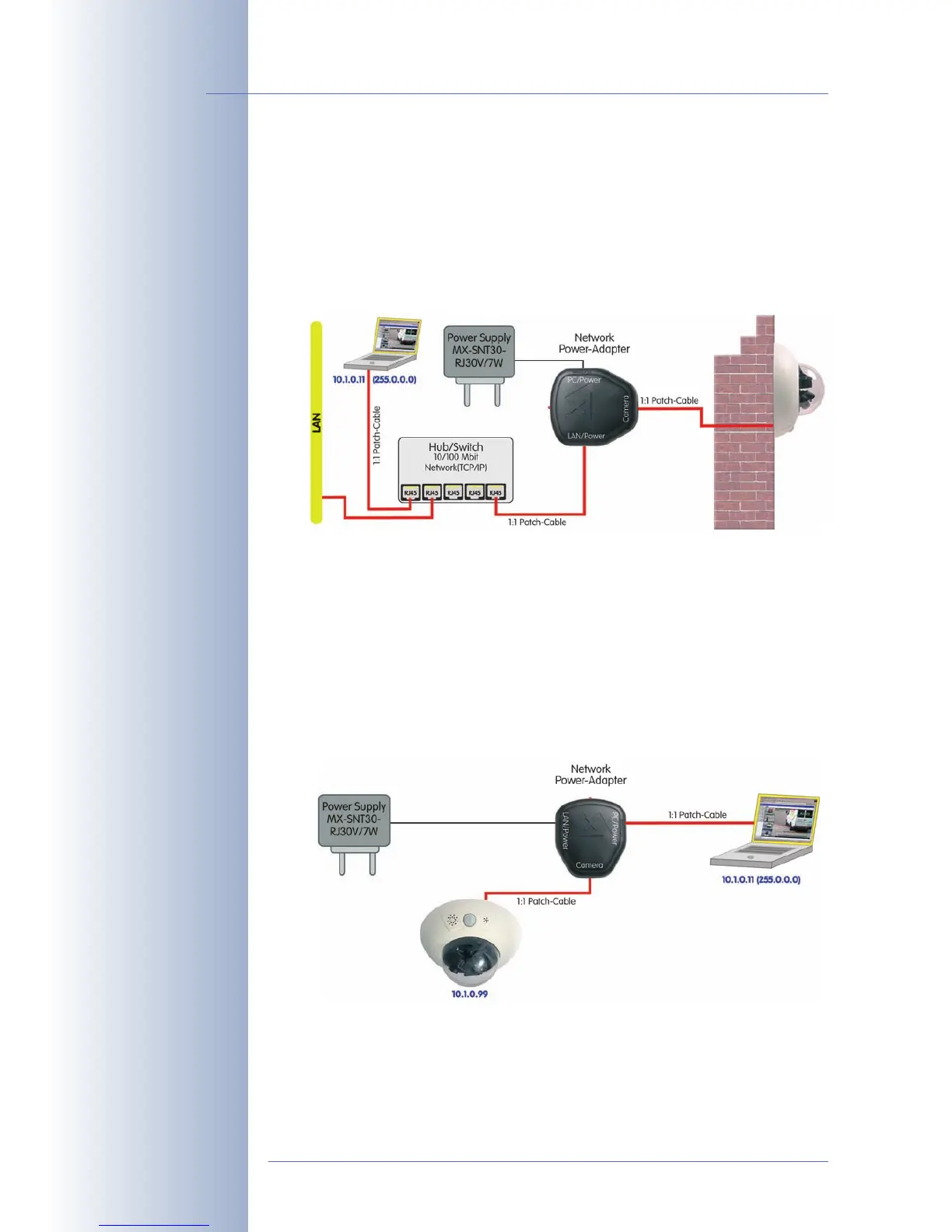
3.2.3 Power Supply (MxPoE) Using a Switch
(1) Connect the 10BaseT/NET connector of the camera to the Camera connector
of the Network Power Adapter.
(2) Connect the LAN/Power connector of the NPA to an Ethernet connector of
the switch/router or the Ethernet wall outlet.
(3) Plug the RJ45 connector of the external power unit into the PC/Power con-
nector of the Network Power Adapter.
3.2.4 Power Supply (MxPoE) When Connected Directly to a Computer
(1) Connect the 10BaseT/NET connector of the camera to the Camera connector
of the Network Power Adapter.
(2) Connect the PC/Power connector of the Network Power Adapter to the Ether-
net port of the computer.
(3) Plug the RJ45 connector of the external power unit into the LAN/Power con-
nector of the Network Power Adapter.
© MOBOTIX AG • Security-Vision-Systems • Made in Germany
www.mobotix.com • sales@mobotix.com
88/132
D12 Camera Manual Part 1
MOBOTIX power supply
and Network Power
Adapter required
MOBOTIX power supply
and Network Power
Adapter required
The Network Power
Adapter replaces the
crossover cable when di-
rectly connecting to a
computer



 To Next Page