58
Q26 Camera Manual: Installation
Selecting an Appropriate Camera Position
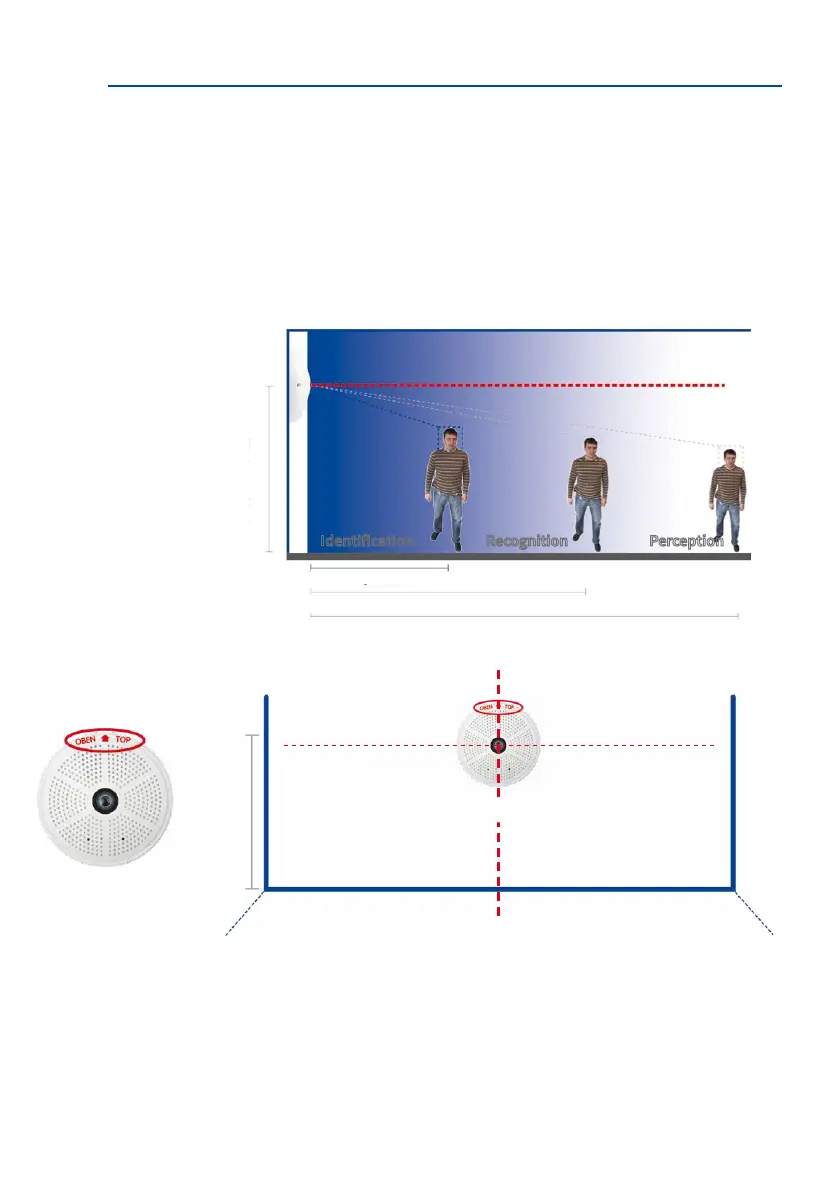
The Q26 is primarily suited to providing an excellent overview, and less suitable for more
exact details. For active operation, the camera should be mounted at a (out of direct reach)
height ranging from 2.5 to 3.5 m. People, for example, may be identied very well at distances
of up to 1.5 m, and with suicient detail at up to 3 m. Objects can be recognized even at
distances of 5 m and more from the camera. During installation, ensure that the camera is
focused on the most important areas of the room as directly as possible, in order to provide
the desired level of detail recognition. For wall installation, use of the 10° On-Wall Set is
ideal in many cases.
Hint: The Q26 should always be installed on a wall such that the arrow on the camera housing
marked OBEN / TOP points towards the ceiling of the room.
1.50m/5
3m/10
2.5to3.5m/8to11.5
5m/16.4
Identication Recognition Perception
Camera focus (best image quality) - standard installation
2.5to3.5m/8to11.5
Mounting at the center of the wall
Wall Mount: Mounting
the camera at the
center of the wall
The OBEN / TOP label
is only visible when the
outer shell is removed



 To Next Page