Moon Control Products Ltd. Tel.: +44 (0)1202 599922 www.mooncontrolproducts.com Page | 10
3.1.3 Start Communicaon
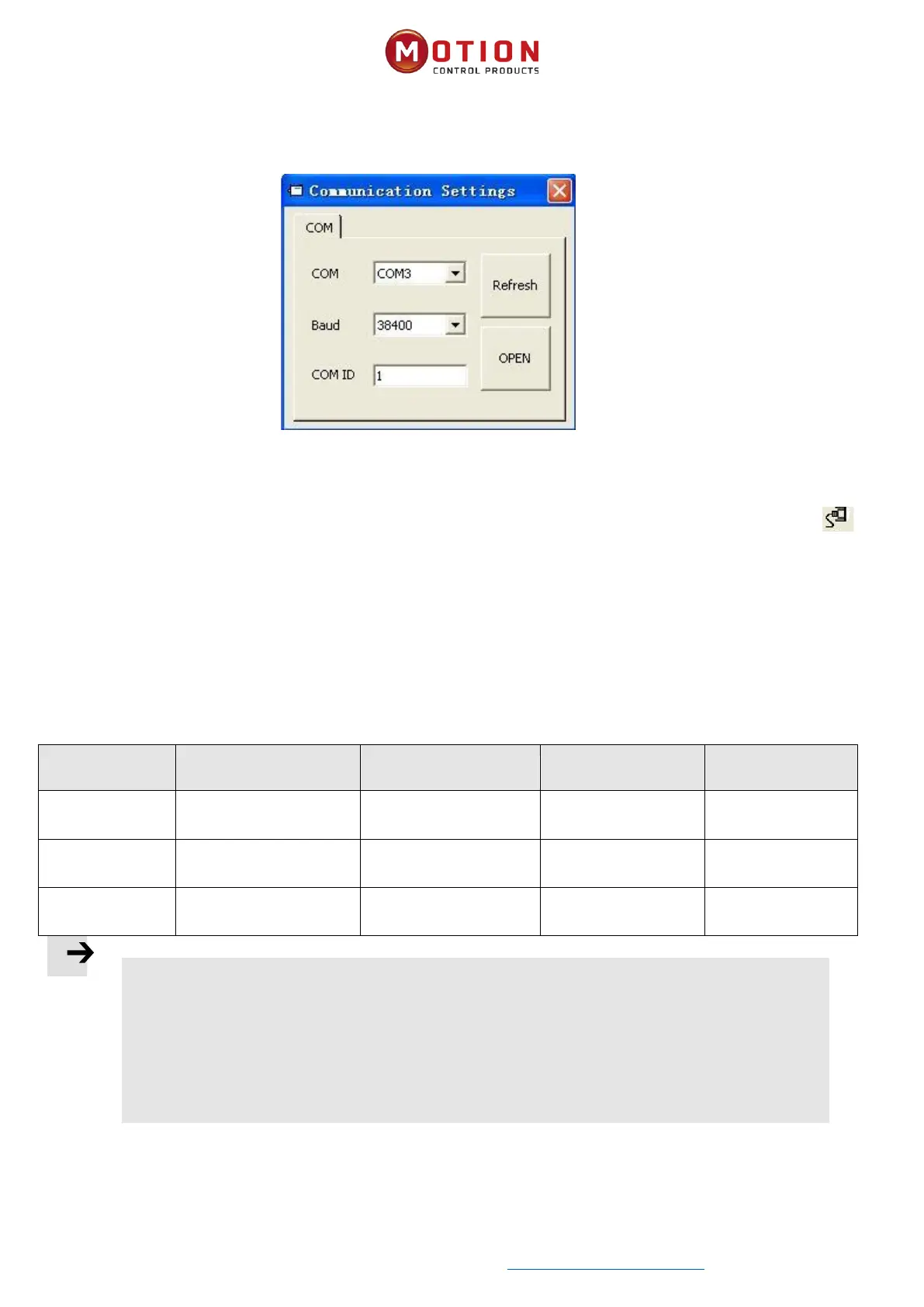
Click menu item Communicaon->Communicaon sengs. The following window appears:
Select the right COM port (if it’s not shown click the “Refresh” buon), baud rate (Default 38400) and COM ID (Node ID),
and then click the "OPEN” buon.
Once communicaon has been established with the driver, communicaon can be opened or closed by clicking the
buon.
3.1.4 Node ID And Baud Rate
The drive’s Node ID can be set by the DIP switch on the drive, please refer to the silkscreen on the product for seng.
The drive’s Node ID can be set via menu item Driver->Driver Property.
Table 3-2 Instrucons for Node ID and baud rate
Note
⚫ iWMC integrated servo wheel does not have RS232 debugging serial port, so you will need to use
the RS485 communicaon port (RS485 protocol defaults to RS232 communicaon protocol) to
connect with the computer. RS485 communicaon terminal denion refer 2.2.1 for details.
⚫ Node ID and baud rate seng are not acvated unl aer saving and reboong.


 To Next Page