Moon Control Products Ltd. Tel.: +44 (0)1202 599922 www.mooncontrolproducts.com Page | 12
Note
Aer compleng the Inialise Control Parameters, it is recommended to store the control
parameters to save the default parameters in the drive.
3.3 Load Firmware
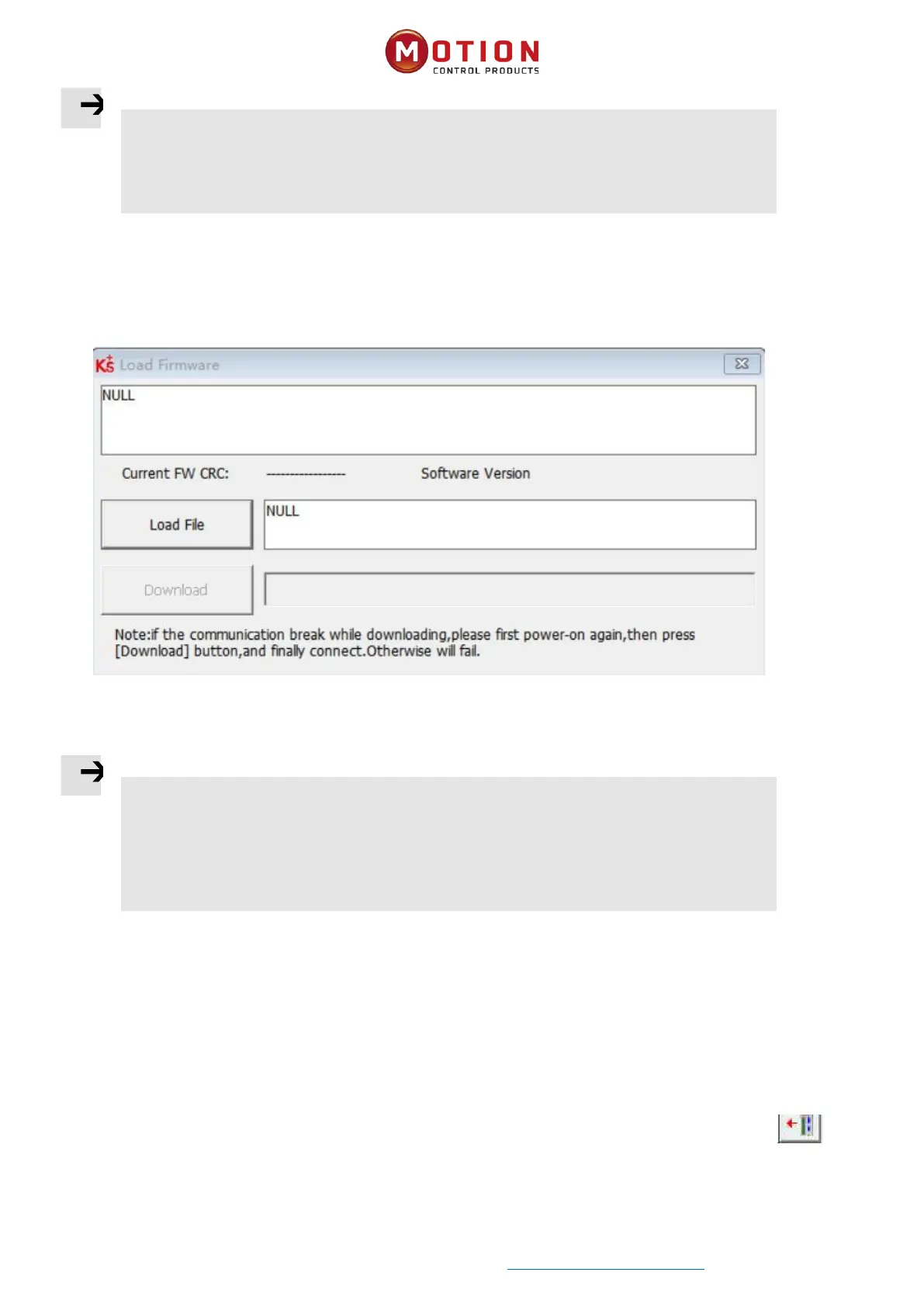
In general, the rmware of the driver is always up to date, but if for some reason you need to update the driver rmware,
please click menu bar “Driver”>“Load Firmware”
Figure 3-5 Load Firmware
Click "Load File" to select the rmware version (kinco), and then click "Download" to start updang the drive rmware.
Note
If the download is aborted for some reason, please rst turn power o. Then power up the drive,
select the rmware version and click Start Download, and nally turn on communicaon and
connect to the computer.
3.4 Read/Write Drive Conguraon
This funcon can be used to read / write mulple parameters simultaneously for large producon lots, to avoid seng the
drive parameters one by one.
3.4.1 Read Driver Conguraon
Click on the menu bar "Tools" -> "R/W Diver Conguraon" - > "Read Sengs from Driver", or click the buon , the
following window appears:


 To Next Page