Moon Control Products Ltd. Tel.: +44 (0)1202 599922 www.mooncontrolproducts.com Page | 14
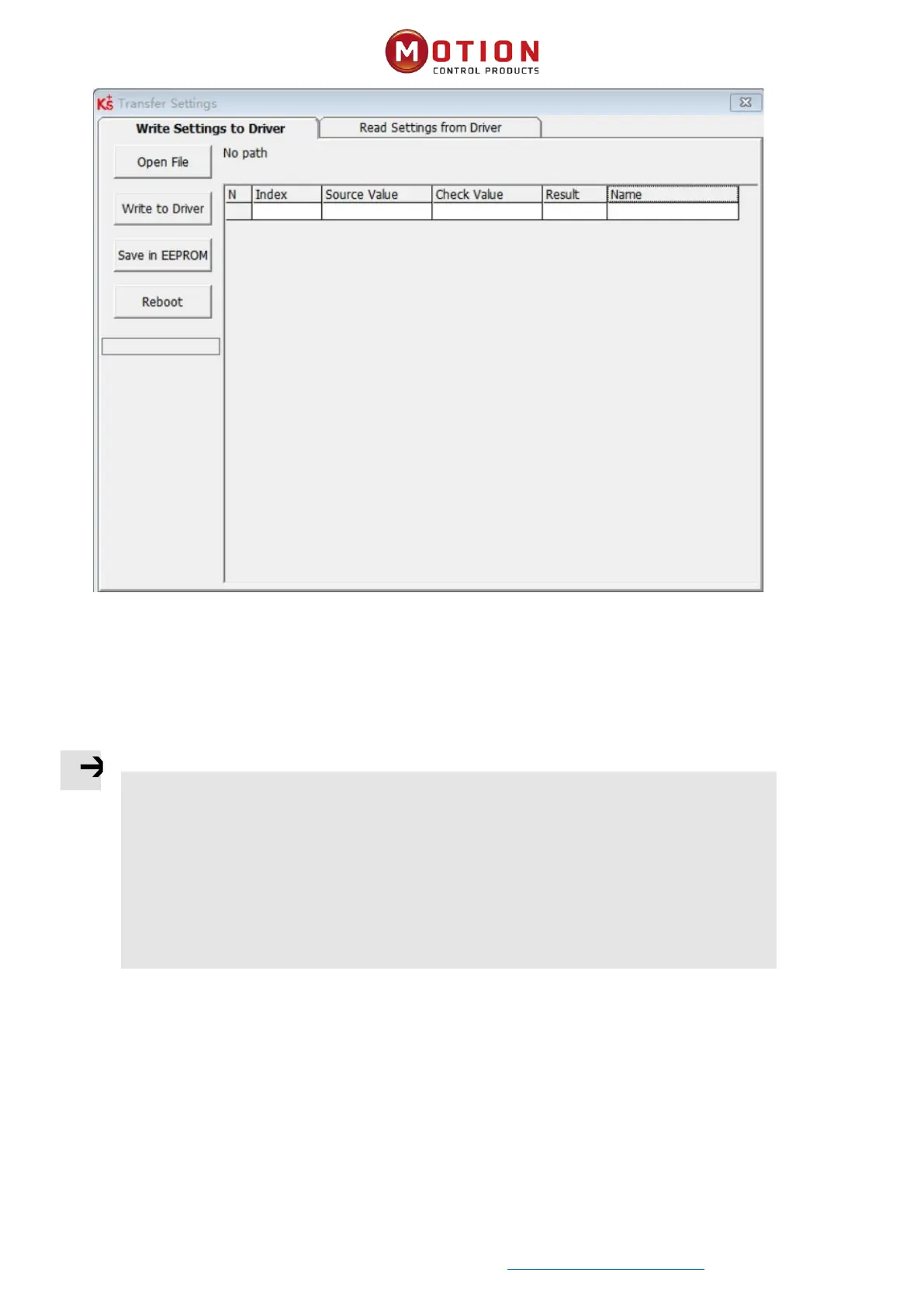
Figure 3-7 Write Driver Conguraon
Click "Open File" to select a parameter le (.cdi) , and the parameters will be displayed in the window on the right.
Click "Write to Driver" to get "Check Value" and "Result", "Result" is "False" to indicate that the parameter was not wrien
successfully, most likely the parameter does not exist in the current driver.
Click "Save in EEPROM" and then "Reboot" for all parameters to take eect.
Note
⚫ When reading the driver conguraon, if the object does not exist in the drive, the result
will be "False" and marked in red. Only the parameters with the read result of "Ture" will be
saved in the .cdi le.
⚫ Disconnect the 485/CAN/EtherCAT bus and disable the drive before wring sengs to the
drive, as this may prevent some objects from being wrien successfully.


 To Next Page