Moon Control Products Ltd. Tel.: +44 (0)1202 599922 www.mooncontrolproducts.com Page | 19
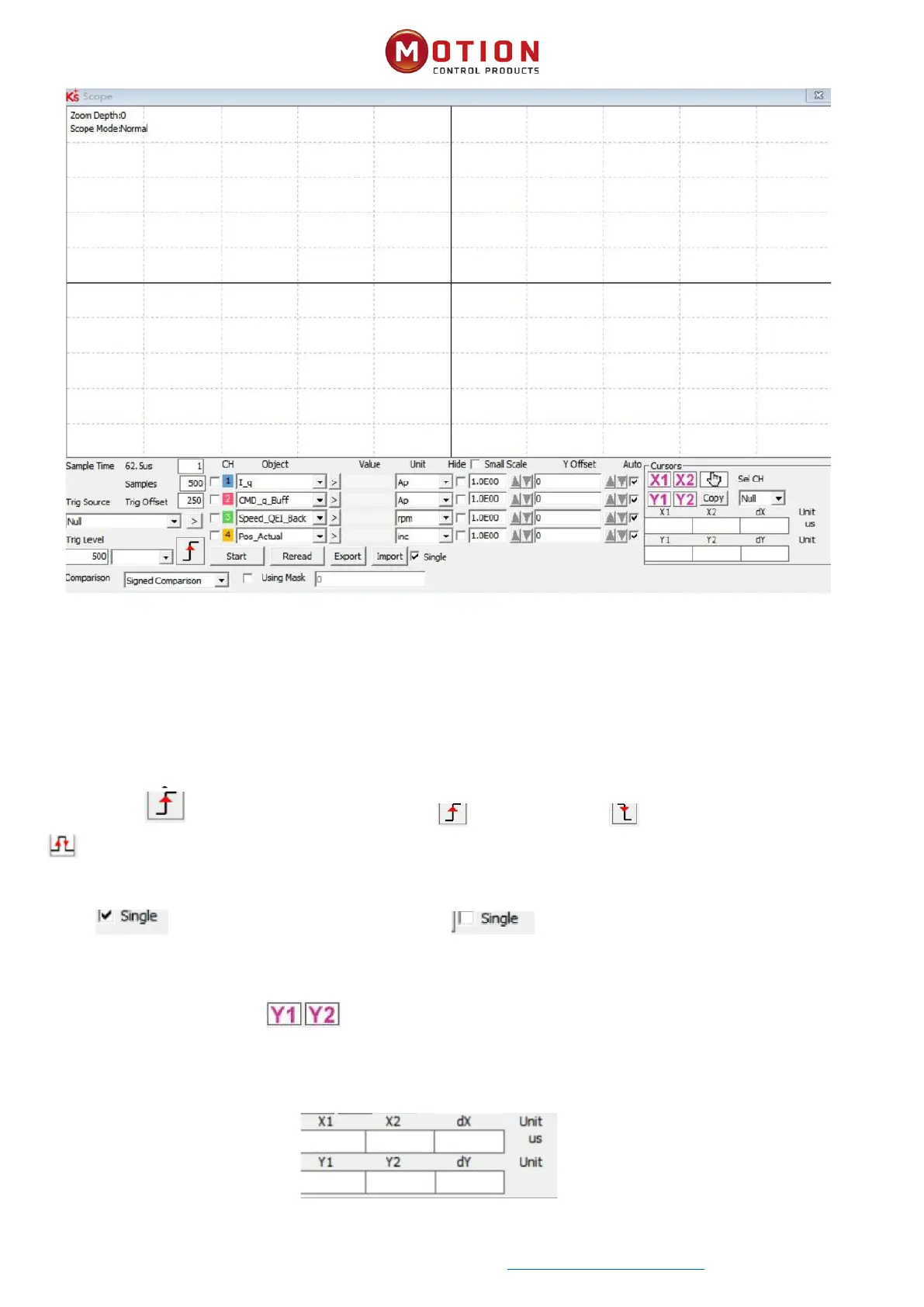
Figure 3-11 Scope Window
Sample Time: The period of data collecon, set to 1 represents one data collecon every 62.5us.
Samples: Indicates how many data are collected in this sampling, and seng it to 500 indicates that 500 data are collected.
Trig Oset: Number of samples before the trigger event occurs.
Trig Source and Trig Level: The trigger condion is set in Figure 3-11 to start collecng data when the eecve target current
q rises to 100DEC, DEC is an internal unit, which can be switched to a current un
Trigger edges: Click to change to a rising edge trigger 、Falling edge trigger or upper and lower edge triggers
.
Object: Maximum 64-bit length data can be taken in one sample, e.g.: 2 Int32 objects bit or 4 Int16 objects.
Single: means sample for one trigger event only. means sample connuously.
Zoom in / zoom out the oscillogram: Hold down the right mouse buon and drag the mouse to the lower right to enlarge
the scope or drag the mouse to the upper le to zoom out.
Cursors: By clicking on the buon can select the corresponding cursor, The cursor will appear on the oscilloscope
and select the channel to be observed in the Channel Selecon drop-down menu.
Moving cursor: Hold down the le mouse buon, drag the cursor to move, the sampled data, the dierence between
X1X2 and Y1Y2 will be displayed in the following area:
Copy: Copy the sampled data to the pasteboard, you can open Excel to paste the data directly


 To Next Page