USER MANUAL
compact
MRU GmbH, D-74172 Neckarsulm
7. How to take a Measurement
Every NOVAcompact is capable of making a complete flue gas measurement. How to perform
this is described below.
The description of other optional available measurement programs can be read in additional
flyers.
7.1. Selection of the measurement program
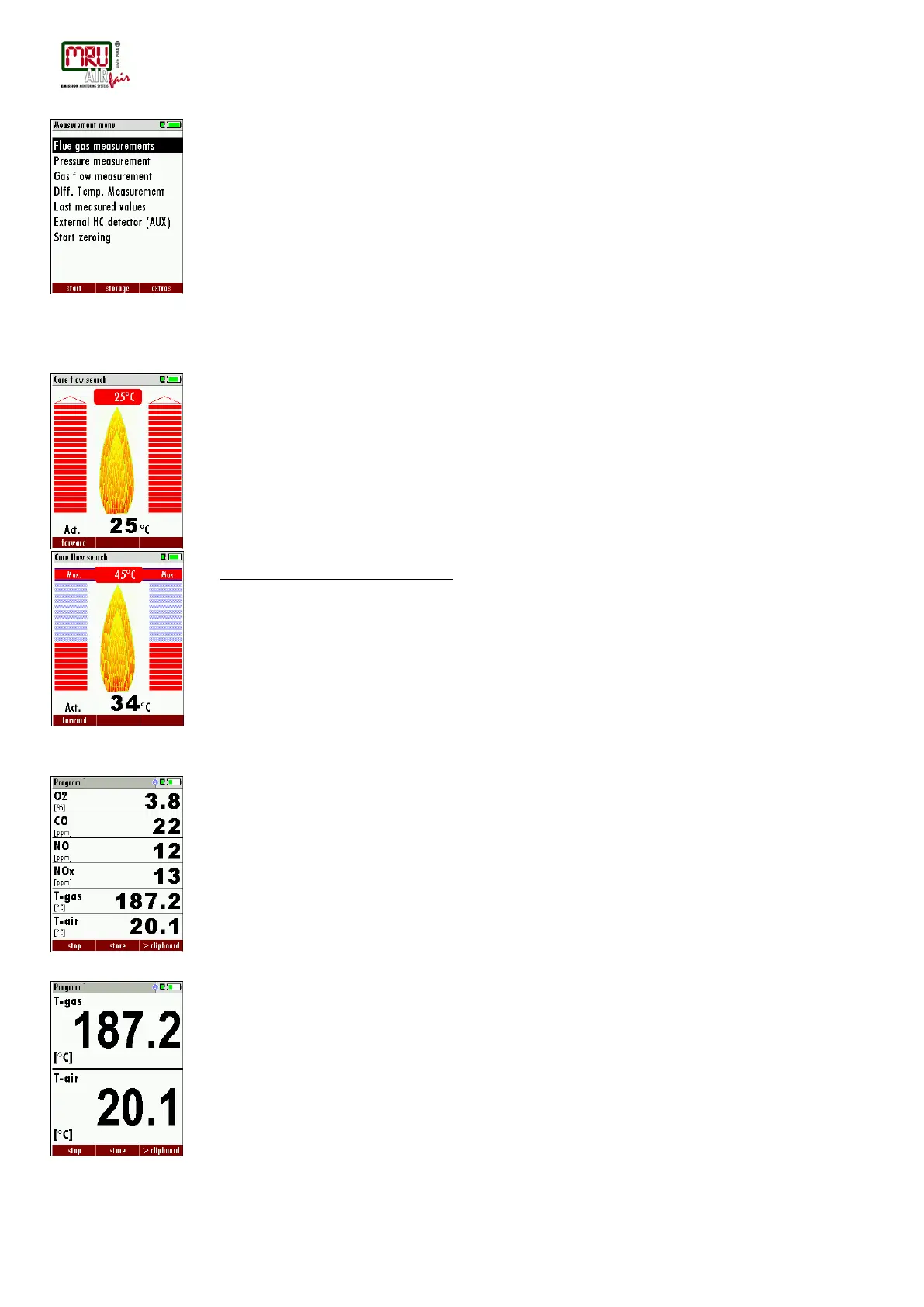
In the measurement menu select “Flue gas measurements” then select one of the available
programs.
If you press the F1 key “Start” in the measurement menu, you will be directed directly into the
measurement screen, using the parameters (program and fuel type) that have been selected
last time the analyzer was used.
7.2. Core flow search
Before using the core flow search it must be switched-ON
(Chapter 4.2).
The core flow search will help you to find the optimal measurement point in the stack. The core
flow can be identified by the maximum flue gas temperature.
In high reaction time the analyzer displays the trend of the flue gas temperature. Insert the
probe pipe slowly into the stack and position your probe tube when you have reached the
maximum flue gas temperature that is displayed.
Positioning the probe in the core flow:
Insert the probe pipe slowly into the stack and position your probe pipe when you have reached
the maximum flue gas temperature that is displayed (see temperature maximum value on the
display – in this case 34°C).
Maximum temperature has been reached when the arrows (left picture) disappear, max. (right
picture) appears in place of the arrow, and the beeper signal stops. Moving away from the max.
temperature will result in the bars moving away from the max. temperature (1 bar is equivalent
to 1°C). Once the right core flow has been achieved, the probe is fixed with the probe cone
screw.
7.3. Measured Value Display
After the core flow search you will see the measurement values on the display.
Measurement values can be organized on three pages, each page displaying 6 measurement
values. The order of the display is operator settable. (see chap. 4.6).
There are direct measured values available such as Oxygen and Temperature as well as
calculated values such as dew point, efficiency and CO
2
. You will also find the same
measurement value in different calculated values such as CO in ppm or CO in mg/kWh.
Values that cannot be displayed are indicated with dashes. Possible reasons for value not
being displayed are:
• Electro chemical sensor was detected as defective during zeroing.
• External temperature sensors are not connected.
• The measurement value T-Gas is usually read at the connector “T-Gas/AUX” (depending on
configuration) or if not available from the connector “T1”
There are three measurement windows available, with the arrow keys left and right moving
between them.
Zoom function, each with two values, is activated by moving the arrow keys up and down.
Moving arrow keys left and right pages between the two zoom windows.



 To Next Page