VS1 Operations and Maintenance Manual Operating the transmitter
Page 2-168 Issue 3.1 2013-10-01
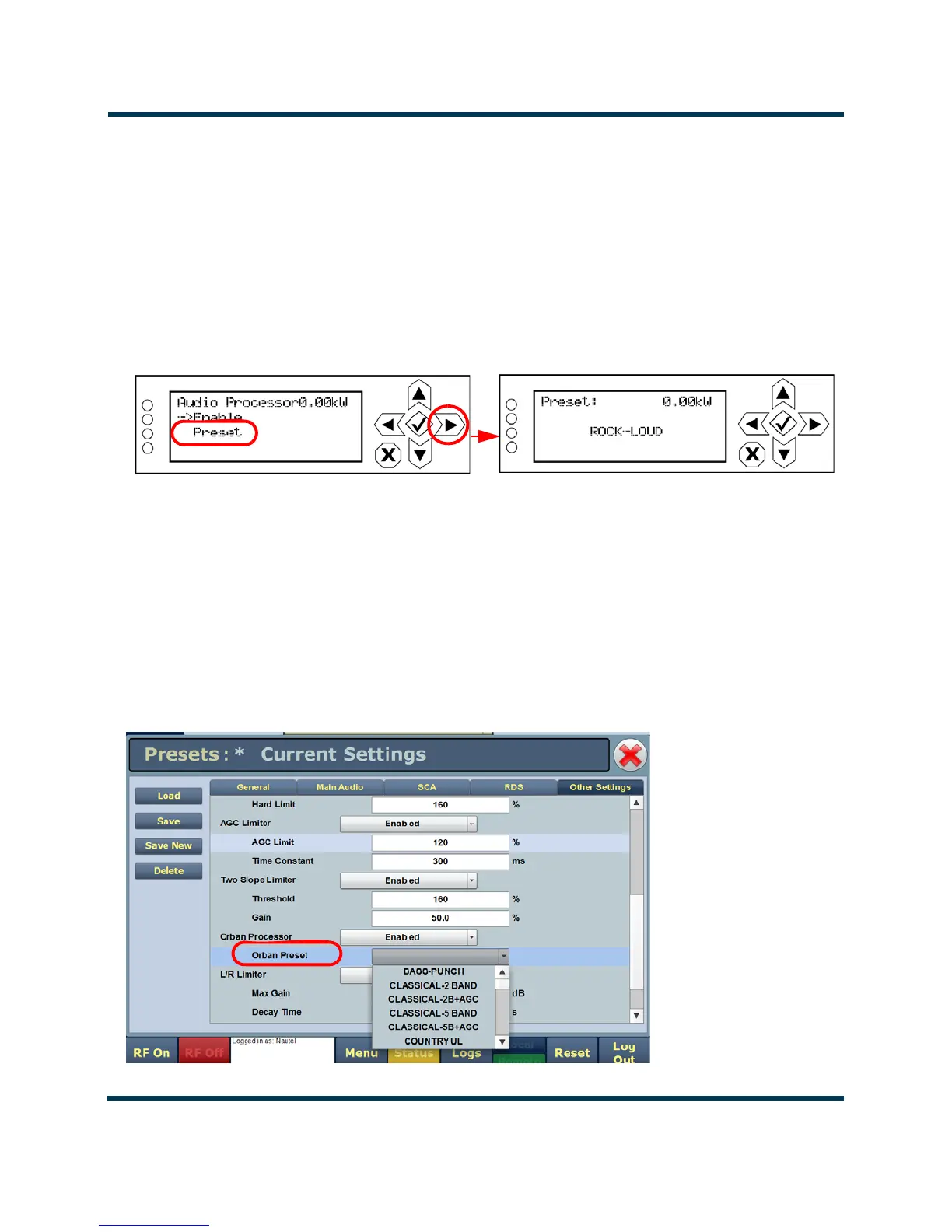
Selecting an Orban Preset - Using the Front Panel
1. From the User Settings -> Edit Presets -> (Select desired preset to edit) -> Main Audio >
Audio Processor
menu (see Figure 2.150), select Preset.
2. Use the up and down arrows to scroll through the list of available Orban presets (e.g.,
ROCK-LOUD, etc). Select the desired preset and press the 'accept' (checkmark) button to
activate. Refer to the Orban Optimod 5500 manual for detailed information on the factory
programmed presets available.
Figure 2.150: Selecting an Orban Preset - Front Panel UI
Selecting an Orban Preset - Using the Remote AUI
1. From the AUI's Main Menu -> Presets page, click on the Other Settings tab (see
Figure 2.151).
2. From the Orban Preset drop-down list, select the desired Orban preset (e.g., ROCK-LOUD,
etc). Refer to the Orban Optimod 5500 manual for detailed information on the factory
programmed presets available. Click Save to store the change. To create a new Orban preset,
see Managing an Orban Audio Processor Preset on page 2-169.
Figure 2.151: Selecting an Orban Preset - Remote AUI



 To Next Page