VS1 Operations and Maintenance Manual Non-standard maintenance
Page 4-6 Issue 3.1 2013-10-01
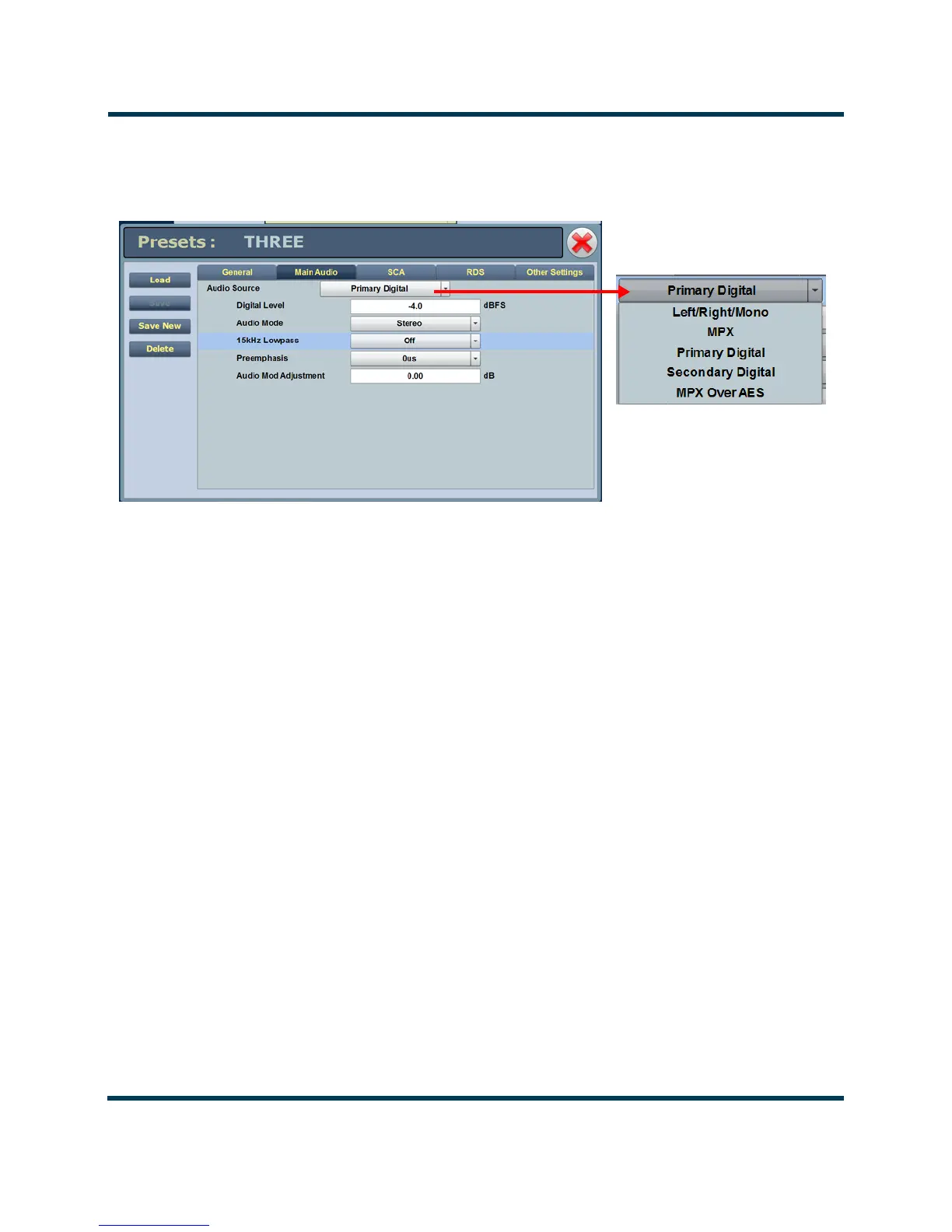
Figure 4.2: Backup Preset Main Audio Screen
3. The setup page for the selected preset should now appear. Click the Main Audio tab (see
Figure 4.2).
4. Click the Audio Source field’s drop-down arrow to view the available audio sources. Select
the desired backup audio source.
5. Configure the other fields associated with your
Audio Source selection.
6. To save your changes without affecting the original template preset’s settings, create a a new
preset as follows (see also Figure 4.3 on page 4-7):
– Click the
Save New button on the left side of the AUI display. The Save New window
will appear.
– A new name field appears. Enter the new name of the backup preset being created (e.g.,
Back Up Audio Preset).
– After naming the new backup audio preset, click the
OK button.
– This will save the preset as a new preset and not effect the original template preset. This
completes configuration of the Backup Audio preset. Return to the home AUI panel.



 To Next Page