VS1 Operations and Maintenance Manual Operating the transmitter
Page 2-16 Issue 3.1 2013-10-01
Advanced user interface
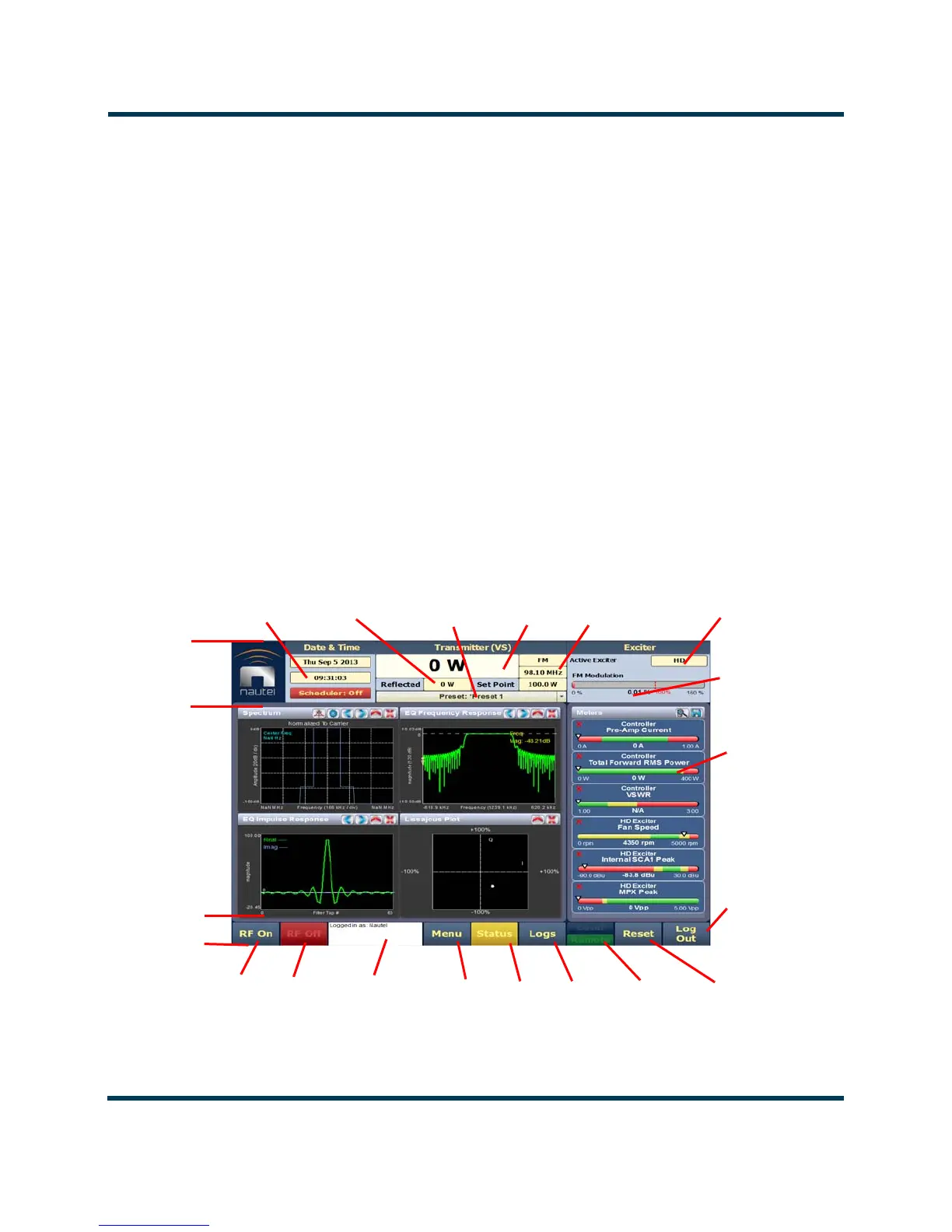
The VS1’s advanced user interface (AUI) (see Figure 2.6) is available via remote connection only. To
access the AUI, you need a PC (and a web browser) that is connected to the VS1 - directly or through
a switch - via its rear panel LAN connection (A1J8A). The AUI has a wide range of displays, including:
– Tool menu panels (spectrum analyzer, signal constellation, Lissajous plot, etc.)
– Real-time meters
– Detailed transmitter status and events log
–Presets
– Hardware configuration
– User accounts
– Software configuration
– Remote input/output configuration
Each AUI page provides information about a specific transmitter function. All navigation through
the AUI pages begins on the main screen (or Home page), shown in Figure 2.6.
Figure 2.6: Using the AUI (Home page shown)
RF On
Menu
Forward
Date,
Time
Modulation
Level
RF Off
Status
Local/
Top
Banner
Bottom
Banner
Events
Remote
Reset
Tool Menu
Panel
Displays
(up to four
on screen
or one full
screen)
Log
Power
Mode,
Frequency
Set Point,
Reflected
Selected
Meters
Active
Exciter
Power
Active
Preset
Log Out
Activity
Window



 To Next Page