Net.DO Lighting Control Equipment Co.,Ltd http://www.netdo.com.cn
FOX1024s Moving Light Controller. PAGE: 11
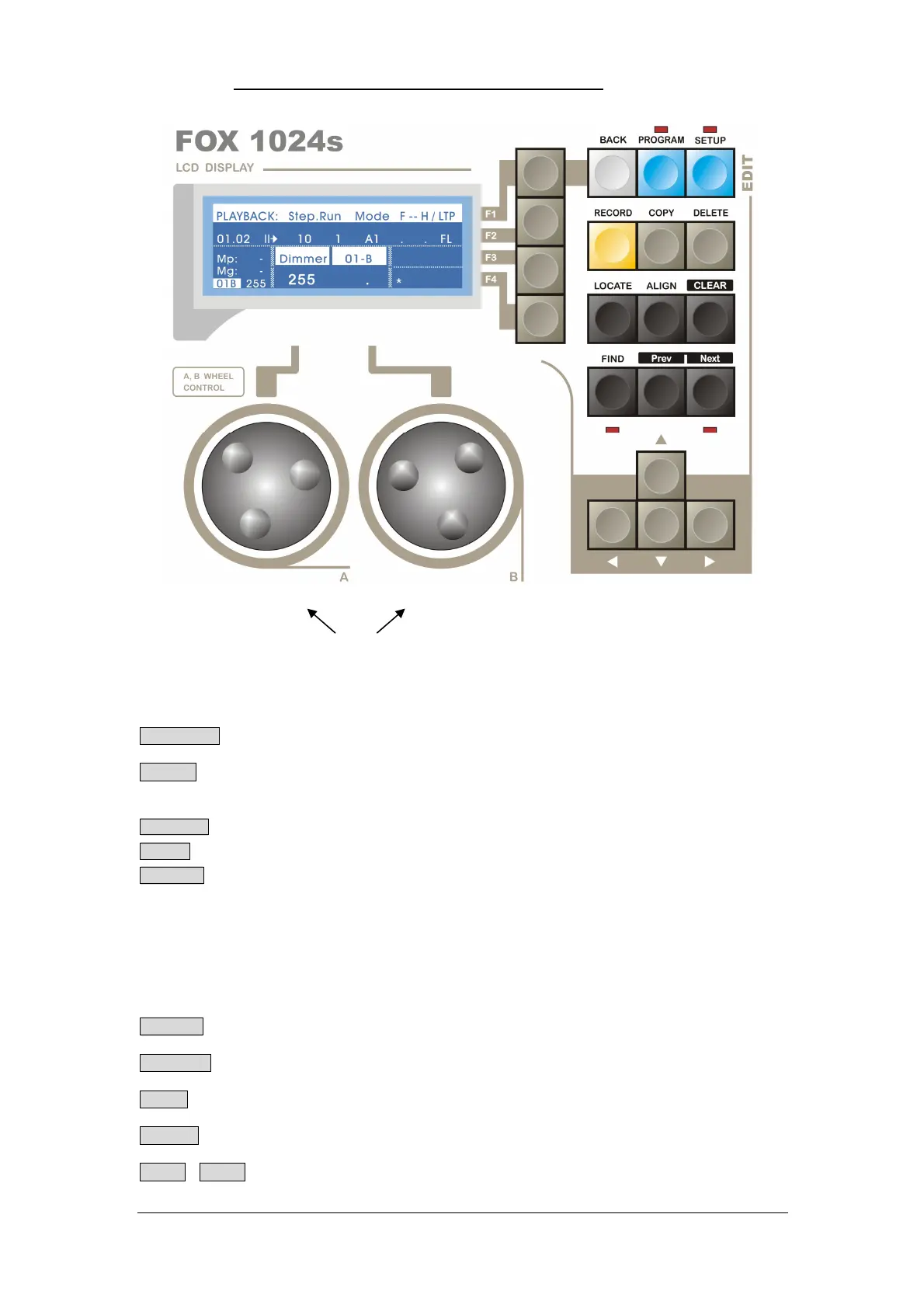
Edit Area
PROGRAM -Used to enter program menu to edit the relevant parameters.
SETUP -Used to enter SETUP menu to set fixtures / libraries and manage files.
RECORD -Used to record data.
COPY -Used to copy data.
DELETE -Used to delete data.
*TIPS: While press and hold one of the three keys above, the indicators of Numeric Key
will show whether there is contents in Playback / Group / Preset / Scene. When
the indicator is bright, it means there is content in that key.
Fixture Edit
CLEAR -Used to clear the selection and value of all manual-run fixtures.
LOCATE -Used to locate and light up the selected fixtures (set value for all channels).
FIND -Used to find the selected fixtures (will not set value nor keep value after quit)
ALIGN -Used to change attributes of selected fixtures to be same as Reference Fixture.
Prev Next -Used to select single / odd / even fixtures among the selected fixtures
Wheel A/B


 To Next Page