Net.DO Lighting Control Equipment Co.,Ltd http://www.netdo.com.cn
FOX1024s Moving Light Controller. PAGE: 14
Build library in the console: libraries can also be built in the console.
NewModel:
The name of new libraries has to be xxx user。
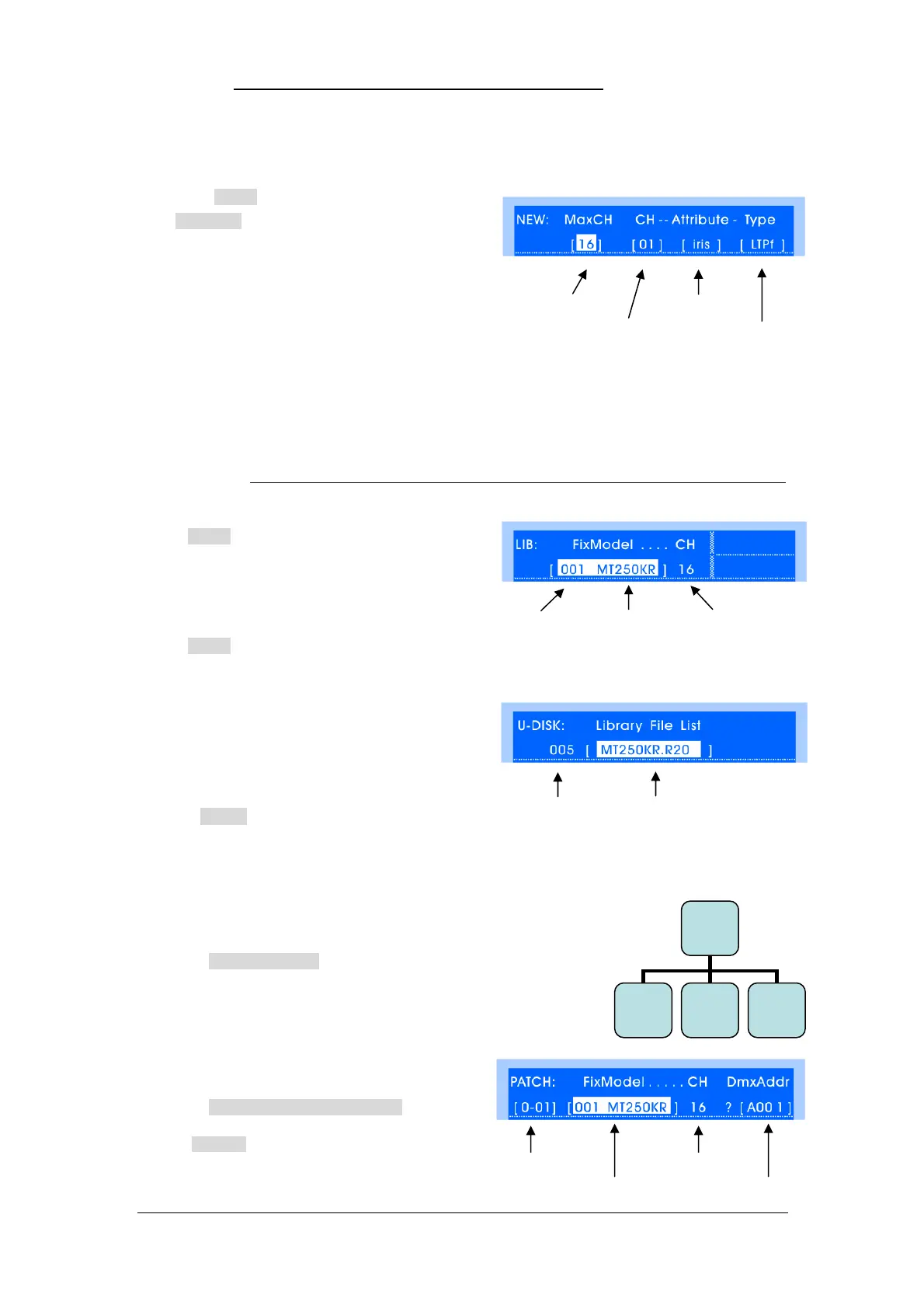
In the Library menu, press NewModel soft key to
enter NewModel menu (As shown on the right.)
Firstly set the total channels according to the
information provided by fixture factories; then set the
attribute of each channel; finally set the type of running
(LTP-inst / LTP-fade / HTP).
LTP-inst: the channel will run by LTP-instant.
LTP-fade: the channel will run by LTP-fade
(Including fade-in / fade-out of playback and fade effect between steps of programs)
HTP: the channel will run by HTP, which means the highest value takes precedence.
(After HTP is set, master and playback faders will control this channel proportionally)
*TIPS: For the detailed introduction of HTP / LTP, please read Chapter “HTP & LTP channel”.
Modify: libraries can be modified.
In Library menu, select the fixture model, press
Modify Soft Key for modification, finally press
BACK to exit, data will be saved automatically.
Delete: libraries can be deleted.
In Library menu, select fixture model, press Delete
Soft Key, the library will be deleted.
Import: libraries can be imported from U-disk.
(TIPS: the R20 library should be copied to the root
directory of U-disk from the PC firstly)
Operation is as follows:
1) In Library menu, insert U-disk, press Import Soft
Key, select library in U-disk by Cursor Key or Wheel A/B.
2) Press Select Soft Key to import library to the console, then it can be used to patch fixtures.
5.3 Fixture Setting
Path: SETUP Fixture
Fixture requires not only library but also being patched to be controlled
by the console. Select fixture model and assign DMX address for the
fixtures, 1 fixture No. can be patched for 1 fixture.
5.3.1 Fixture Patched
Path: SETUP Fixture FixPatch
In FixPatch menu, fixtures can be patched, set
models and assigned DMX address (As shown on the
right)
Total channels Attribute
Channel Type of running
No. Fixture Model total channels
No. Library name
Fixture No. Total Channels
Fixture Model DMX Address
Fixture
FixPatch
(F1)
FixInvert
(F2)
R-Preset
(F4)


 To Next Page