Net.DO Lighting Control Equipment Co.,Ltd http://www.netdo.com.cn
FOX1024s Moving Light Controller. PAGE: 27
1)Press PROGRAM to enter Program menu; (Indicator above Playback Key will be bright if there
is program recorded inside)
2)Press Playback Key to select program;
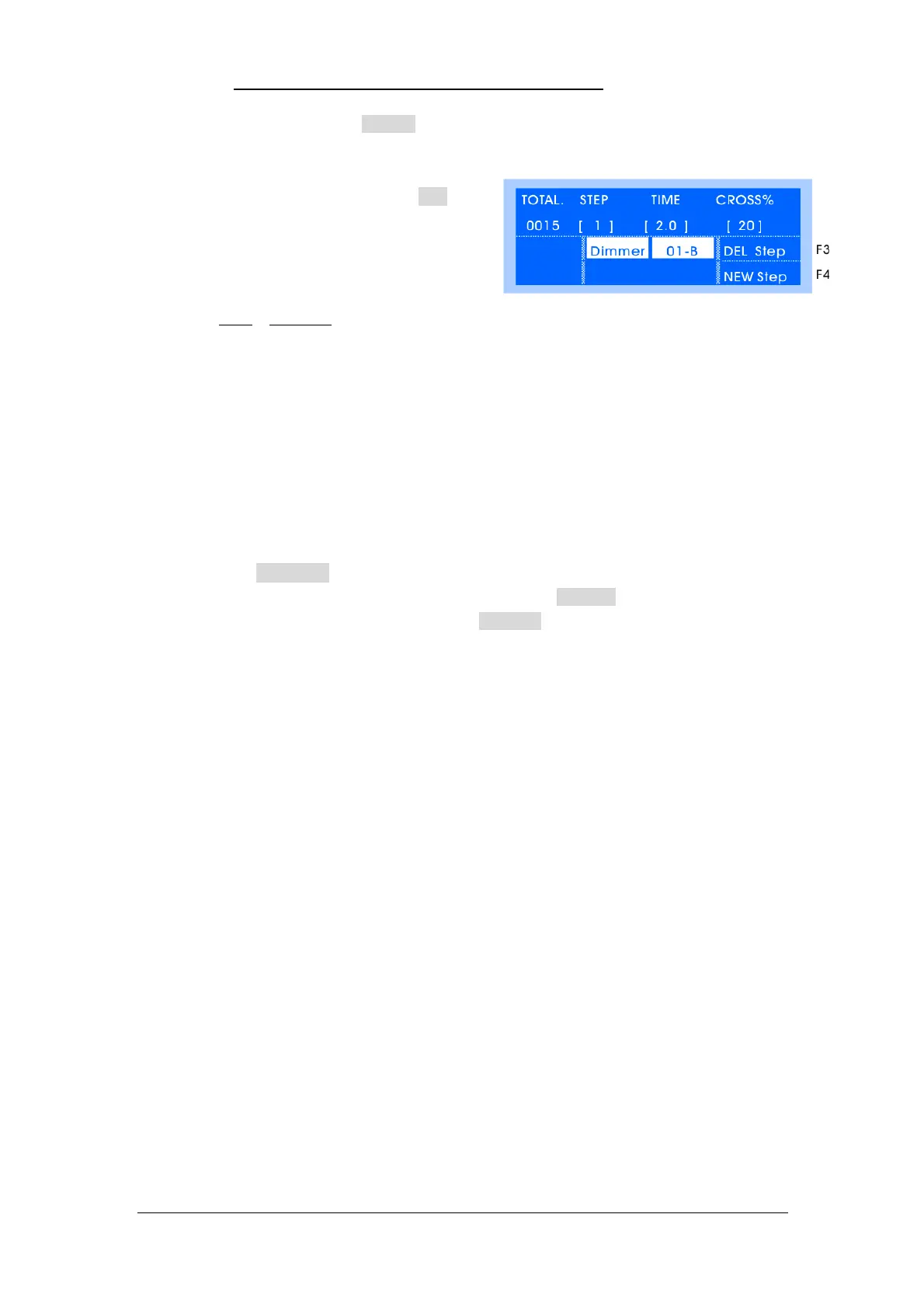
3)Press EditStep soft key(F1) to enter Step menu;
(As shown on the right)
4)If the program is empty, press NEW Step soft
key(F4) to add a new step;
5)Edit lighting effect by Manual-Run Fixture;
6)Set TIME
& CROSS% of current step(Used in Auto2 -- The speed and time of Auto2 mode)
TIME: the time from former step to current step&stay(Range: 0.1~180s), the shorter the
time is, the faster the chase will run and vice versa;
CROSS: speed of crossfade between steps. (Range: 0~100%), 0% is slowest, 100% is
fastest. For example: Cross=60%, it means using 40% of time to crossfade from the
previous step to the current step, then using 60% of time stay in the current step.
*TIPS1: use Cursor Key to select menu item, use Cursor Key to modify item;
*TIPS2: “Single-Step Program” just needs to be edited 1 step. “Multi-Step Program” can be added
new steps. The console will automatically copy the last step to the new one in order for a
coherent chase, data of current step can be cleared by pressing CLEAR if it’s unwanted.
*TIPS3:use SETP key to check data of every step, modified data will be saved automatically.
*TIPS4:new step can be added after current step by pressing NewStep soft key at the current step.
*TIPS5:current step can be deleted by pressing DEL Step soft key.
9.5.1 Copy Step
Operation of copying step is as follow.
Copy a whole program to the next step of current step:
E.g.: copy Program1.01 to the next step of Step3 in Program1.02:
1)In EditStep menu, select Step3 in Program1.02;
2)Press and hold COPY Press Playback Key of Program1.01 to finish copying.
Copy single step --- this function have to be achieved by the assistance of SCENE.
E.g.: Copy Step9 in Program1.01 to Step10 in Program1.02;
1)In EditStep menu, select Step9 in Program1.01 and record it to a SCENE
2)Select Step10 in Program1.02 in EditStep menu, then call the SCENE just recorded.
9.6 Delete Program
Operation of deleting the whole program is as follow:
Press and hold DELETE key Press Playback Key of the program to finish deleting.
9.7 Copy Program
Copy a program to another, the operation is as follow:
Press and hold COPY key Press Playback Key(source) Press another Playback
Key(target); select Playback Page Key first if the target is in another page.


 To Next Page