E2600 Controller-Drive Tray Installation Guide 100
LEDs on the Controller Canister Host Interface Card Subplates
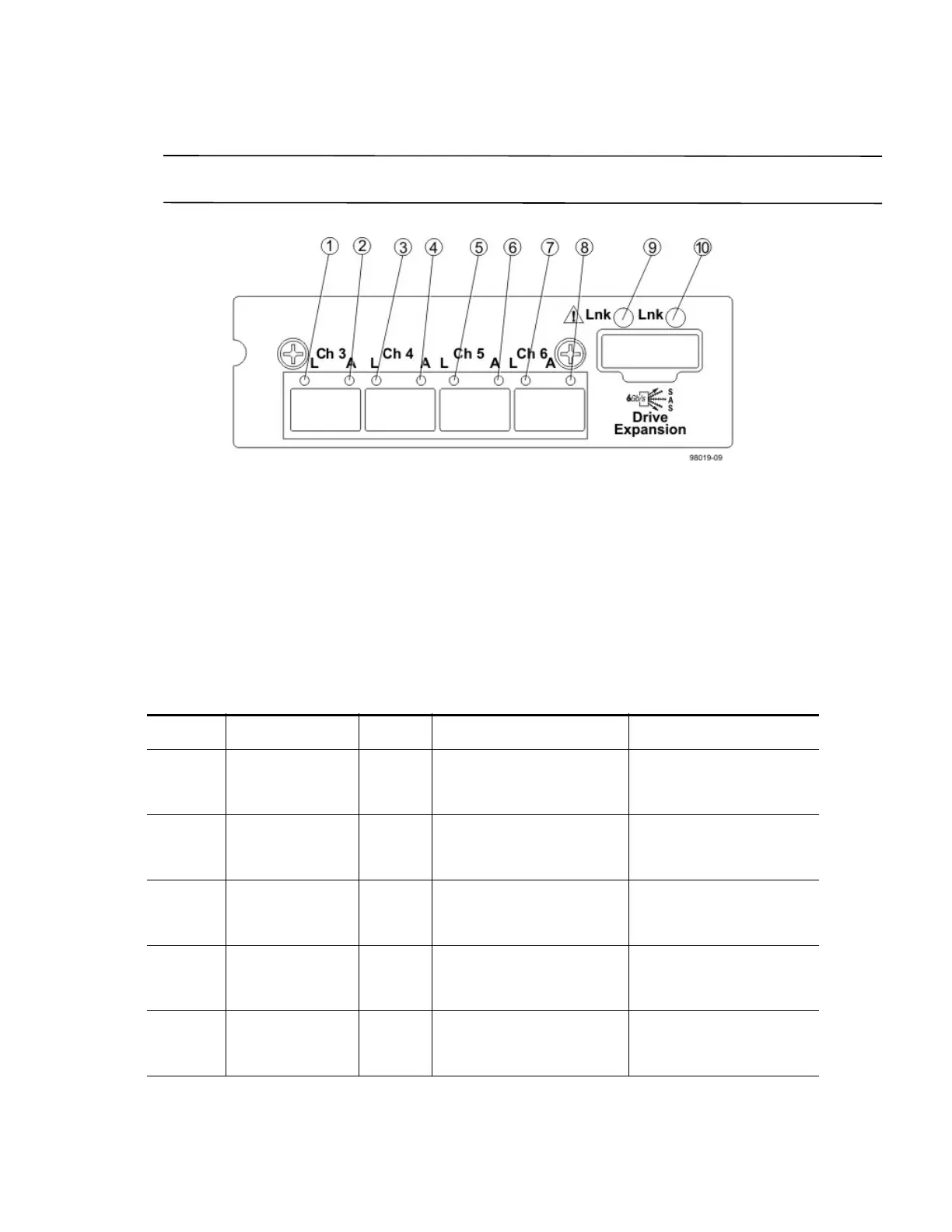
NOTE The following figure shows an iSCSI host interface card (HIC), but the E2600 controller-drive tray also
supports a four-connector FC HIC and a two-connector SAS HIC with comparable LEDs.
Figure 92 LEDs on the Controller Canister Host Interface Card Subplates
1. Host Interface Card Link 3 Up LED
2. Host Interface Card Link 3 Active LED
3. Host Interface Card Link 4 Up LED
4. Host Interface Card Link 4 Active LED
5. Host Interface Card Link 5 Up LED
6. Host Interface Card Link 5 Active LED
7. Host Interface Card Link 6 Up LED
8. Host Interface Card Link 6 Active LED
9. Expansion Fault LED
10. Expansion Active LED
Table 19 LEDs on the Controller Canister Host Interface Card Subplates*
Location LED Color On Off
1 Host Interface
Card Link 3 Up
LED
Green The Ethernet link has
auto-negotiated to 1 Gb/s.
The Ethernet link is down or
does not auto-negotiate to 1
Gb/s.
2 Host Interface
Card Link 3 Active
LED
Green The link is up (LED blinks
when there is activity).
The link is not active.
3 Host Interface
Card Link 4 Up
LED
Green The Ethernet link has
auto-negotiated to 1 Gb/s.
The Ethernet link is down or
does not auto-negotiate to 1
Gb/s.
4 Host Interface
Card Link 4 Active
LED
Green The link is up (LED blinks
when there is activity).
The link is not active.
5 Host Interface
Card Link 5 Up
LED
Green The Ethernet link has
auto-negotiated to 1 Gb/s.
The Ethernet link is down or
does not auto-negotiate to 1
Gb/s.



 To Next Page