BTS User Manual
Neware Technology Ltd.
http://www.newarebattery.com
Click the icon on the primary channel to view the mapping between the main
channel and Aux. Alternatively, right-click a mapped Aux and choose Locate main Channel. As shown in Figure
4-59, the map Aux 12-1 to main channel 1-1.
Figure 4-58 Mapped Figure 4-59 Position Main Channel
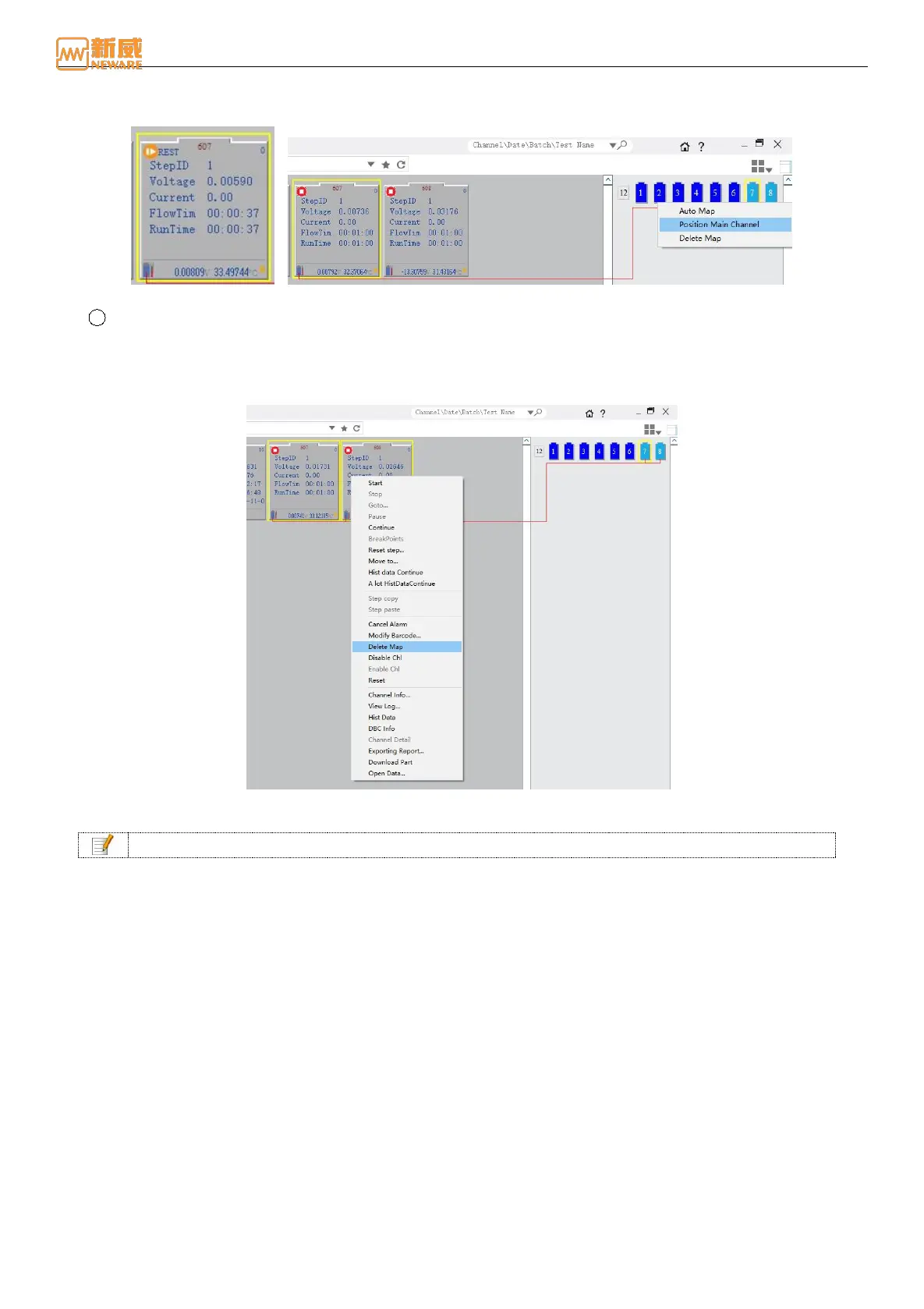
3 Delete map
Right-click the main channel and Aux → choose “Delete Mapping” from the shortcut menu to delete the binding
relationship between the Aux and the main channel, as shown in Figure 4-60. You can delete a mapping and bind
Aux again to modify the mapping relationship.
Figure 4-60 Delete map
Notice: The main channel cannot be in operating when the mapping is deleted.
4.11. Upgrade
Users can upgrade the device software on the client interface. Select the mid-machine upgrade file and upgrade the
matched mid-machine. After the upgrade, the mid-machine will automatically restarts.
Perform the following operation: Right-click the number of the device to be upgraded (mid-machine) → Select Upgrade →
In the Upgrade dialog box that is displayed, load the upgrade file whose suffix is. Enc → Perform the upgrade, as shown in
4-61. If the device cannot be upgraded, load the upgrade file again.



 To Next Page