BTS User Manual
Neware Technology Ltd.
http://www.newarebattery.com
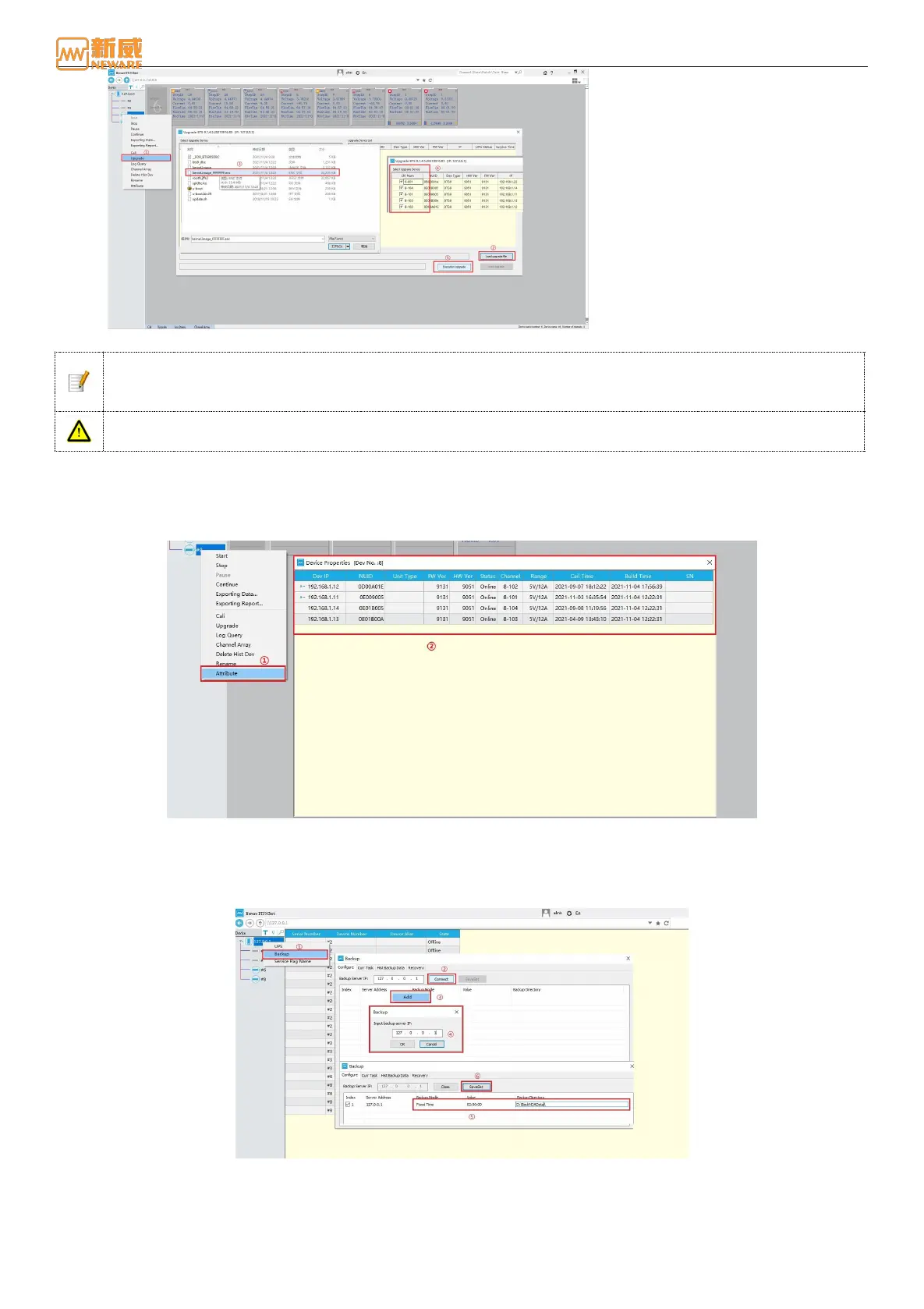
Figure 4-61 Upgrade setting window
Notice: The *.enc file of the upgrade package is provided by NEWARE. The upgrade file automatically
matches the up-gradable device, allowing you to upgrade the specified NUID device. You can select the
upgraded device as your needs.
Warning: Before upgrading the mid-machine, ensure that all tester’ s channels under the mid-machine are
not working; otherwise, the connection operation cannot be performed after upgrading the mid-machine.
4.12. Properties
Right-click the device number → select Properties → in the pop-up "Device Properties" window, you can view the
relevant information of the mid-machine and unit: firmware version, hardware version, NUID, device range, online status,
calibration time, etc., as shown below:
Figure 4-62 Properties display window
4.13. Backup
According to the maximum number of devices connected to the current server and BTS system, data backup can be
completed in real time. Right-click IP address → select "Backup" → set information related to “backup”, as shown in 4-63:
Figure 4-63 Backup window
1. Backup files are in NDA format by default. When the backup is complete, you can use BTSDA to view the data.
2. During data backup, if the storage space is insufficient, the system automatically deletes the earliest backup file by
default to ensure normal data backup.



 To Next Page