57
12 Calibration
To get the most out of your Nexus Network, it is important to
carefully calibrate the Network. The calibration values are stored in
a non volatile memory.
To access calibration mode, press and hold KEY more than 2
seconds.
To select a calibration code, press DOWN, UP and MODE as
required.
To return to normal mode, press KEY when the text return (RET)
is dispyed.
The different calibration routines are divided into five groups:
C10 - calibration of SPEED
C20 - calibration of DEPTH
C30 - calibration of NAVIGATE
C50 - calibration of WIND
C70 - calibration of Network and NMEA settings
To change a calibration value, press KEY.
To select calibration value, press DOWN, UP and MODE as
required.
To lock the selected value, press KEY
12.1 Calibration of speed C10
12.1.1 C10 Return (RET)
To return to normal mode, press KEY.
12.1.2 C11 (Unit KTS)
Unit for speed. Knots (KTS), km/h (K/h) or miles/h (m/h).
12.1.3 C12 (1.25 CAL)
Calibration value for speed and distance (1.00 - 1.99).
Drive the boat a measured distance at normal speed.
Compare the distance with the trip counter.
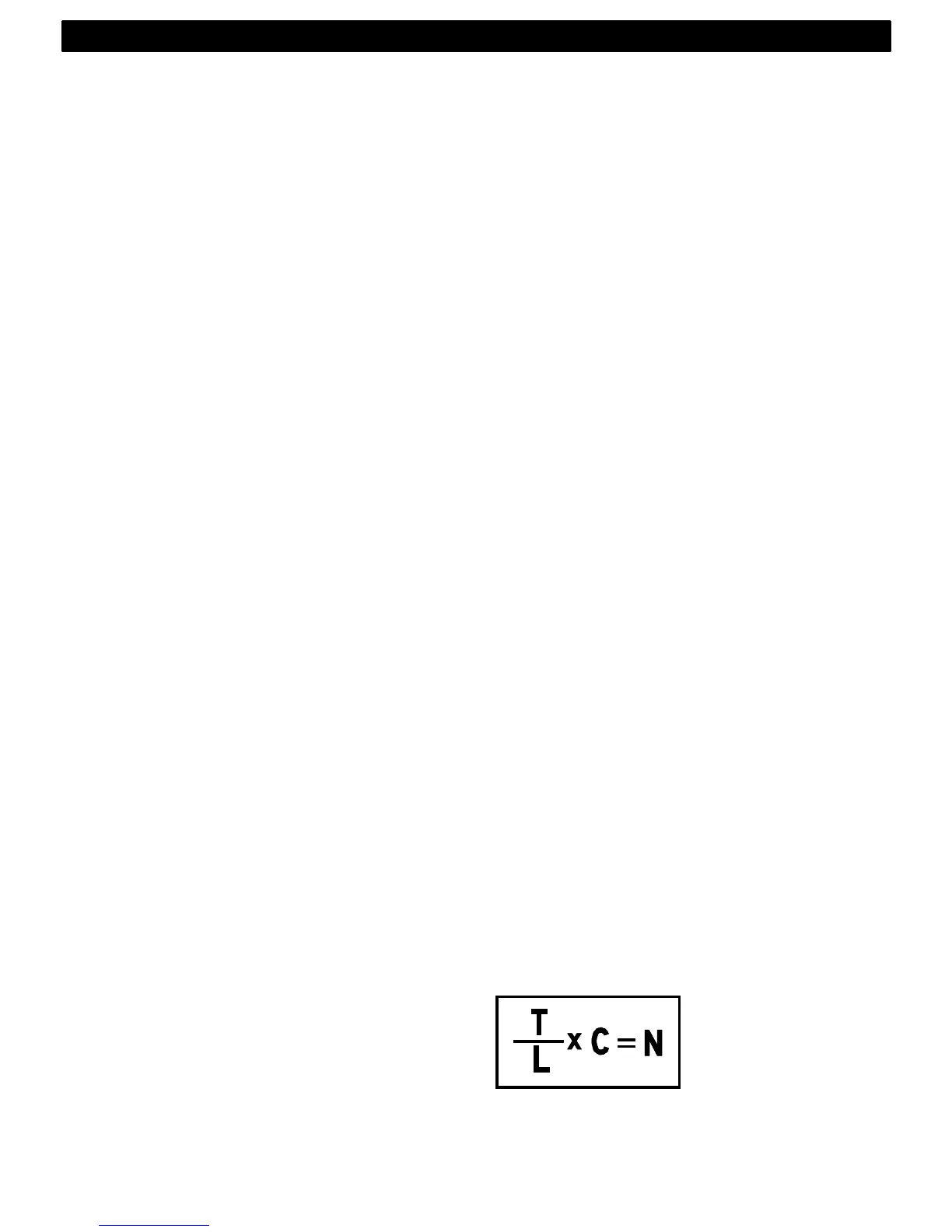
Calculate the value with the following formula:
True distance from the sea chart : T
Log trip counter distance: L
The current calibration value: C
New calibration value. N
If you suspect a current in the water, drive the boat in both
directions and divide trip counter distance by 2.
CALIBRATION



 To Next Page