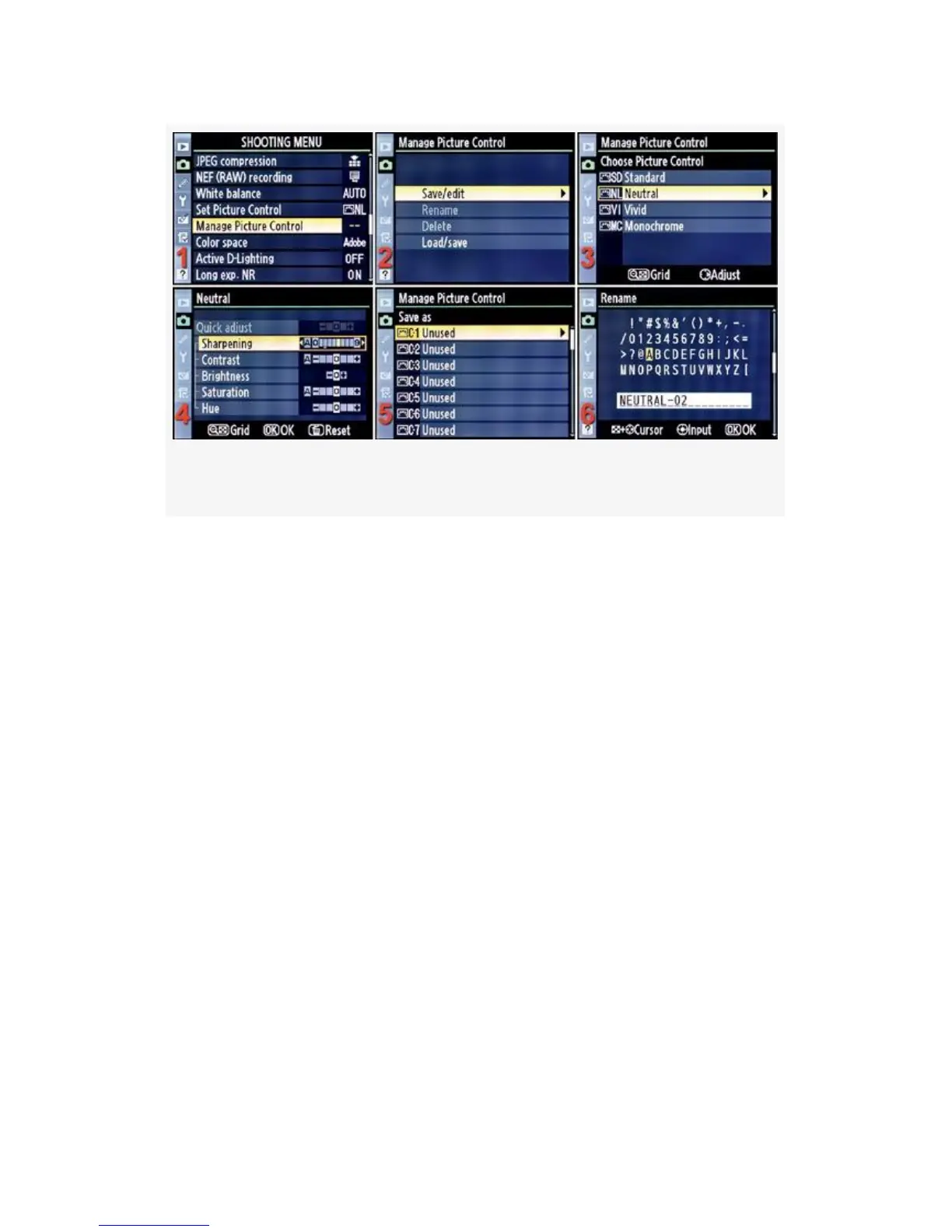
Figure 3-28. Save/edit a Custom Picture Control
1. Select Manage Picture Control from the Shooting Menu
and scroll to the right (see Figure 3-28, image 1).
2. Highlight Save/edit and scroll to the right (see
Figure 3-28, image 2).
3. Choose a Picture Control that you want to use as a base
for your new settings and then scroll to the right (see
Figure 3-28, image 3). I am modifying the Neutral
Picture Control and will save it under a different name.
4. Make your adjustments to Sharpening, Contrast, etc.
When you are done, press the OK button (see
Figure 3-28, image 4).
5. Select one of the nine storage areas named C-1 to C-9
and scroll to the right (see Figure 3-28, image 5). They
are all currently marked as Unused. I can save as many
as nine different Custom Picture Controls here for later
selection (Set Picture Control).
175



 To Next Page