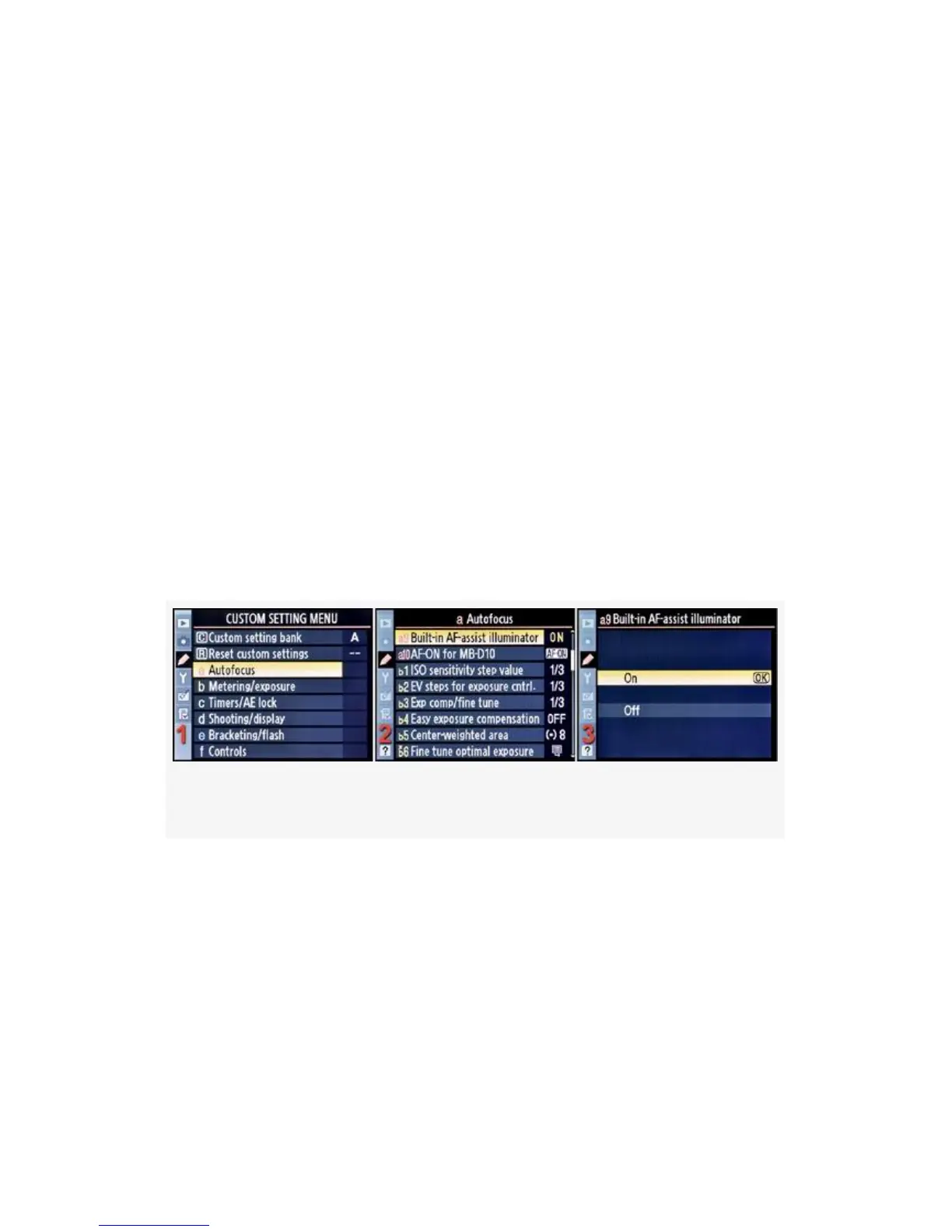
Built-in AF-Assist Illuminator
Custom setting a9 (D300S and D300)
(User’s Manual – D300S page 268; D300 page 273)
You’ve seen the little AF-assist illuminator light on the front
of the D300(S), near the grip. Well, this setting allows you to
control when that little light comes on. Nikon calls this
function the Built-in AF-assist illuminator, and it lights up
when low-light conditions are sensed and when using certain
AF-area modes (not all) to help with autofocus.
We’ll look into the two modes of this setting, but first here
are the screens and steps to set Built-in AF-assist illuminator
to On or Off (see Figure 4-15):
Figure 4-15. Built-in AF-assist illuminator
1. Select a Autofocus from the Custom Setting Menu and
scroll to the right (see Figure 4-15, image 1).
2. Highlight Built-in AF-assist illuminator and scroll to the
right (see Figure 4-15, image 2).
3. Choose On or Off from the menu. In Figure 4-15, image
3, On has been selected.
279



 To Next Page