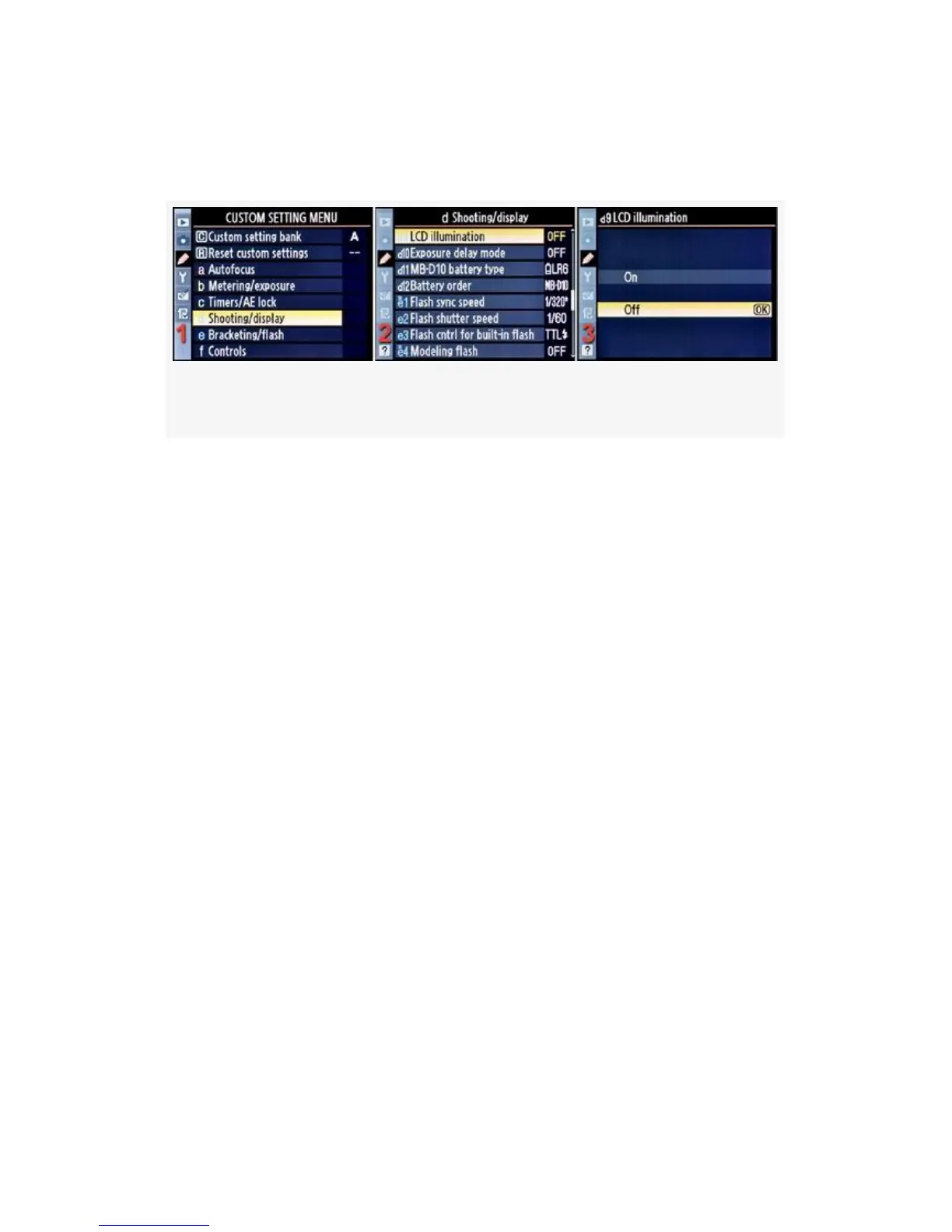
Here are the screens and steps used to configure LCD
illumination (see Figure 4-44):
Figure 4-44. Shooting/display screens
1. Select d Shooting/display from the Custom Setting Menu
and scroll to the right (see Figure 4-44, image 1).
2. Highlight LCD illumination and scroll to the right (see
Figure 4-44, image 2).
3. Choose one of the two choices on the list. In
Figure 4-44, image 3, Off has been selected.
4. Press the OK button to lock in the setting.
My Recommendation: This setting will affect battery life
since backlights pull a lot of power, so I wouldn’t suggest
using the On setting unless you really need it. You always
have the Power switch (On/Off/Backlight)—surrounding the
Shutter-release button—to manually turn the light on when
needed.
Exposure Delay Mode
Custom setting d10 (D300S) and d9 (D300)
(User’s Manual – D300S page 278; D300 page 285)
338



 To Next Page