▪ 1/100 s
▪ 1/80 s
▪ 1/60 s
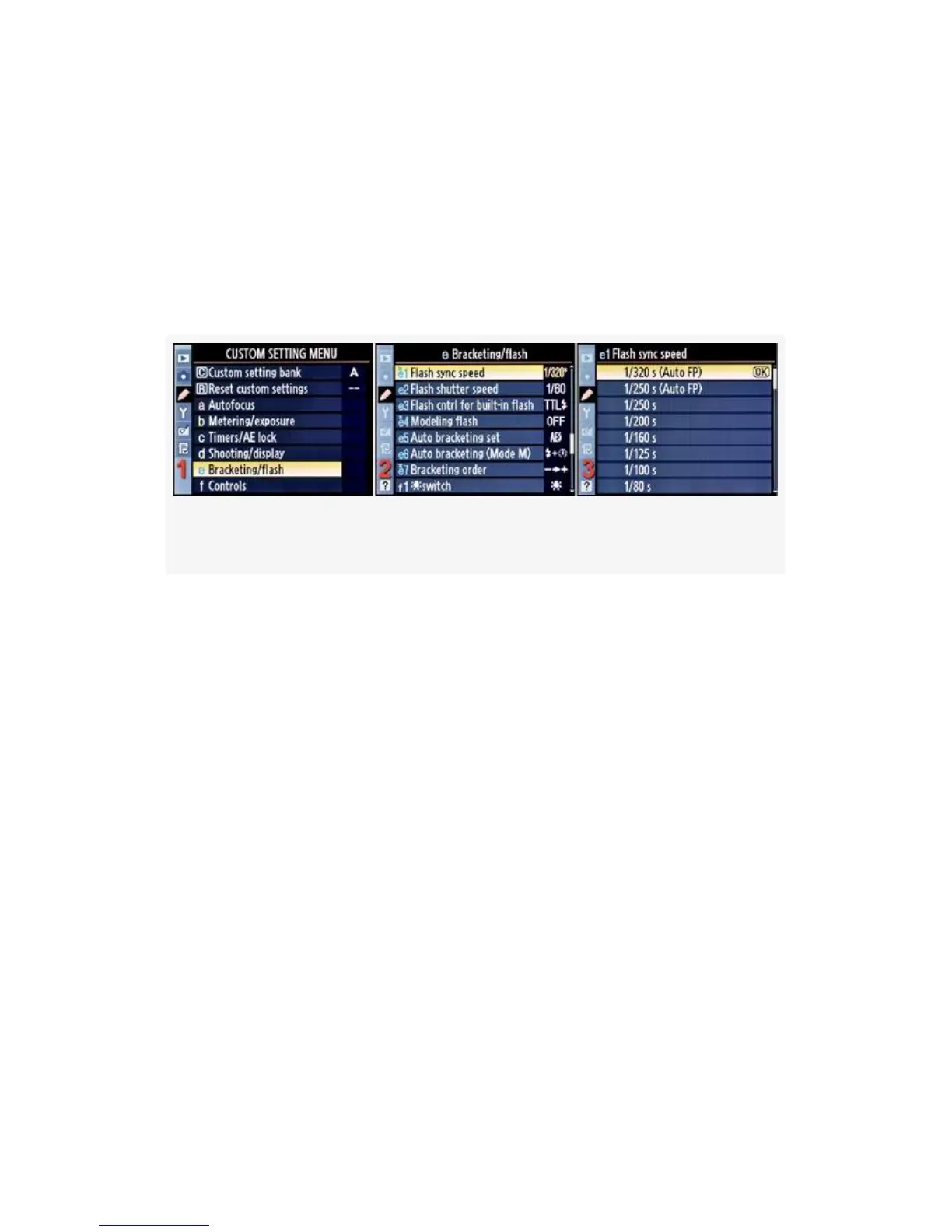
Here are the screens and steps used to adjust your camera’s
Flash sync speed (Figure 4-48):
Figure 4-48. Flash sync speed
1. Select e Bracketing/flash from the Custom Setting Menu
and scroll to the right (see Figure 4-48, image 1).
2. Highlight Flash sync speed and scroll to the right (see
Figure 4-48, image 2).
3. Choose one of the nine choices on the list—1/60 s to
1/320 s (Auto FP). In Figure 4-48, image 3, 1/320 s
(Auto FP) has been selected.
4. Press the OK button to lock in the setting.
When you’re using Auto FP mode, the output of your flash is
reduced, but it doesn’t cut off the frame for exposures using a
shutter speed higher than the normal flash sync speed (x
sync). Why? Let’s review.
346



 To Next Page