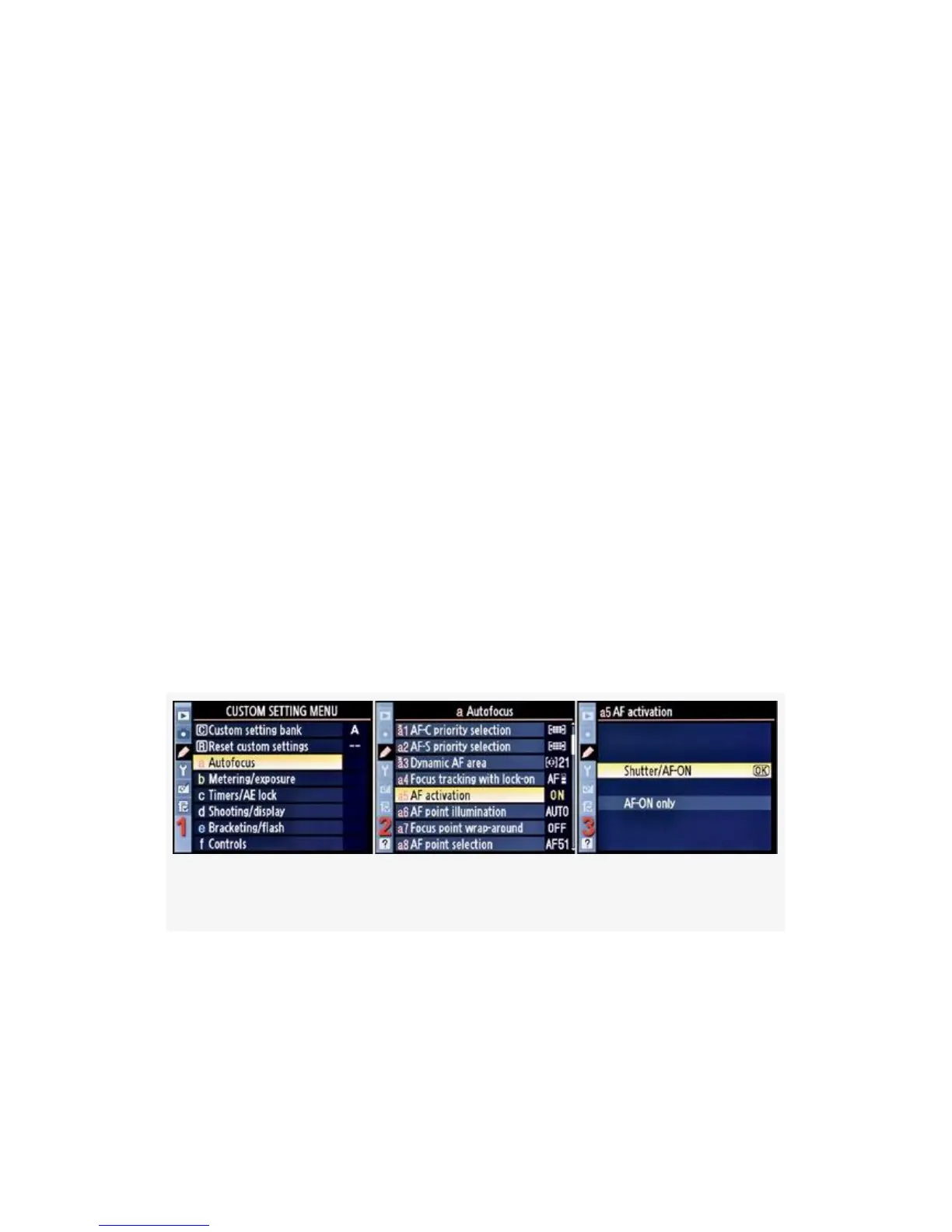
will be activated when you press the Shutter-release button
halfway down or if you press the AF-ON button. You can
also select the setting that allows only the AF-ON button to
initiate autofocus and the Shutter-release button will not
activate autofocus.
The primary purpose of this function is to allow a very
experienced photographer to separate shutter release and
autofocus operations. A sports photographer may only want
to autofocus the camera when she presses the AF-ON button
and not when she presses the Shutter-release button.
Various styles of photography require the photographer to
find a good autofocus point with the AF-ON button and then
fire many frames with the Shutter-release button, with no
danger of the camera changing the autofocus during shutter
release.
Here are the screens and steps used to configure AF activation
(see Figure 4-10):
Figure 4-10. AF activation screens
1. Select a Autofocus from the Custom Setting Menu and
scroll to the right (see Figure 4-10, image 1).
2. Highlight AF activation and scroll to the right (see
Figure 4-10, image 2).
270



 To Next Page