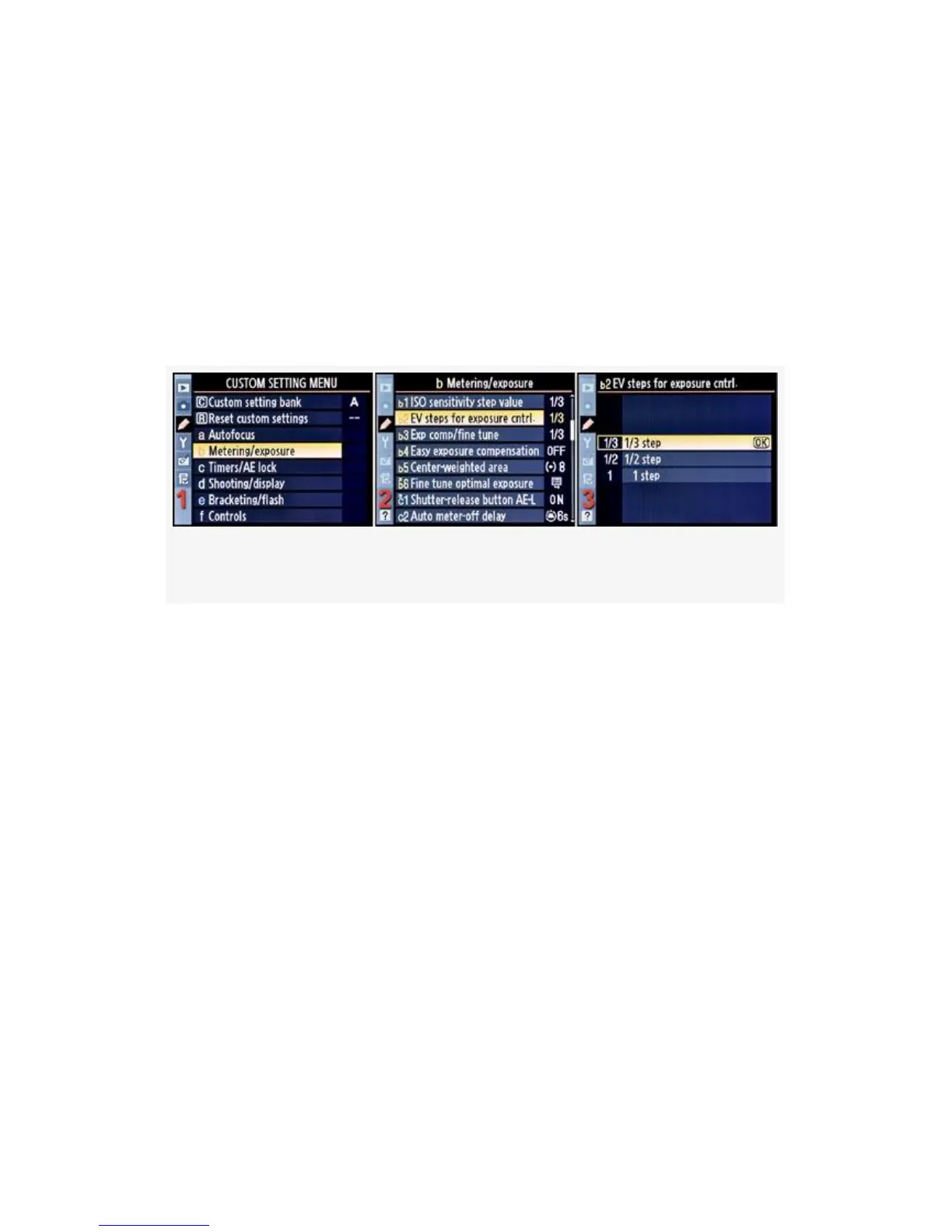
▪ 1/3 step (EV is 1/3 step; bracketing can be 1/3, 1/2, or 1
EV)
▪ 1/2 step (EV is 1/2 step; bracketing can be 1/2 or 1 EV)
▪ 1 step (EV and bracketing are 1 EV each)
Here are the screens and steps used to adjust EV steps for
exposure cntrl. (see Figure 4-18):
Figure 4-18. EV steps for exposure cntrl.
1. Select b Metering/exposure from the Custom Setting
Menu and scroll to the right.
2. Highlight EV steps for exposure cntrl. and scroll to the
right (see Figure 4-18, image 2).
3. Choose one of the three items on the menu.
4. Press the OK button to lock in the setting.
Now, let’s examine the concept in more detail. All EV steps
for exposure cntrl. really means is that when you are adjusting
the shutter speed and aperture manually, they will work
incrementally in the following steps.
Shutter and Exposure (starting at a random shutter speed or
aperture)
288



 To Next Page