configured by setting b3 so that they work in a finer or
coarser way for exposure fine-tuning. Compensation can be
added or subtracted in 1/3, 1/2, or 1 EV steps—up to 5 EV (5
stops).
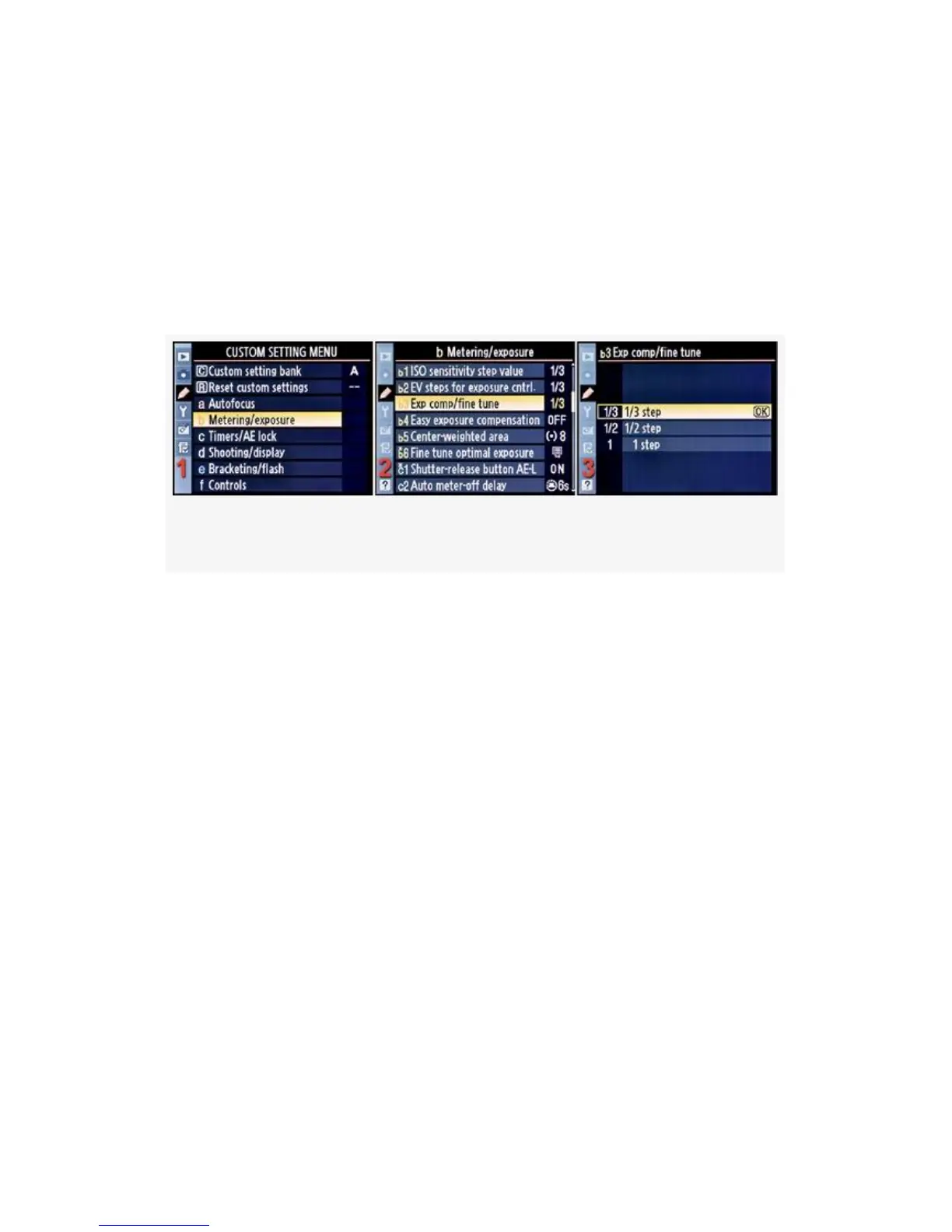
Here are the screens and steps used to adjust Exp comp/fine
tune (see Figure 4-19):
Figure 4-19. Exp comp/fine tune
1. Select b Metering/exposure from the Custom Setting
Menu and scroll to the right (see Figure 4-19, image 1).
2. Highlight Exp comp/fine tune and scroll to the right (see
Figure 4-19, image 2).
3. Choose one of the three items on the menu. In
Figure 4-19, image 3, 1/3 step has been selected.
4. Press the OK button to lock in the setting.
Here is more information on the step values you can use with
Exp comp/fine tune for exposure or flash compensation once
you’ve selected your favorite increment:
▪ 1/3 step: +/- Exposure/Flash EV compensation of 0.3,
0.7, 1.0, 1.3, 1.7, 2.0, 2.3, 2.7, 3.0, etc. (up to 5.0), plus
or minus
▪ 1/2 step:
291



 To Next Page