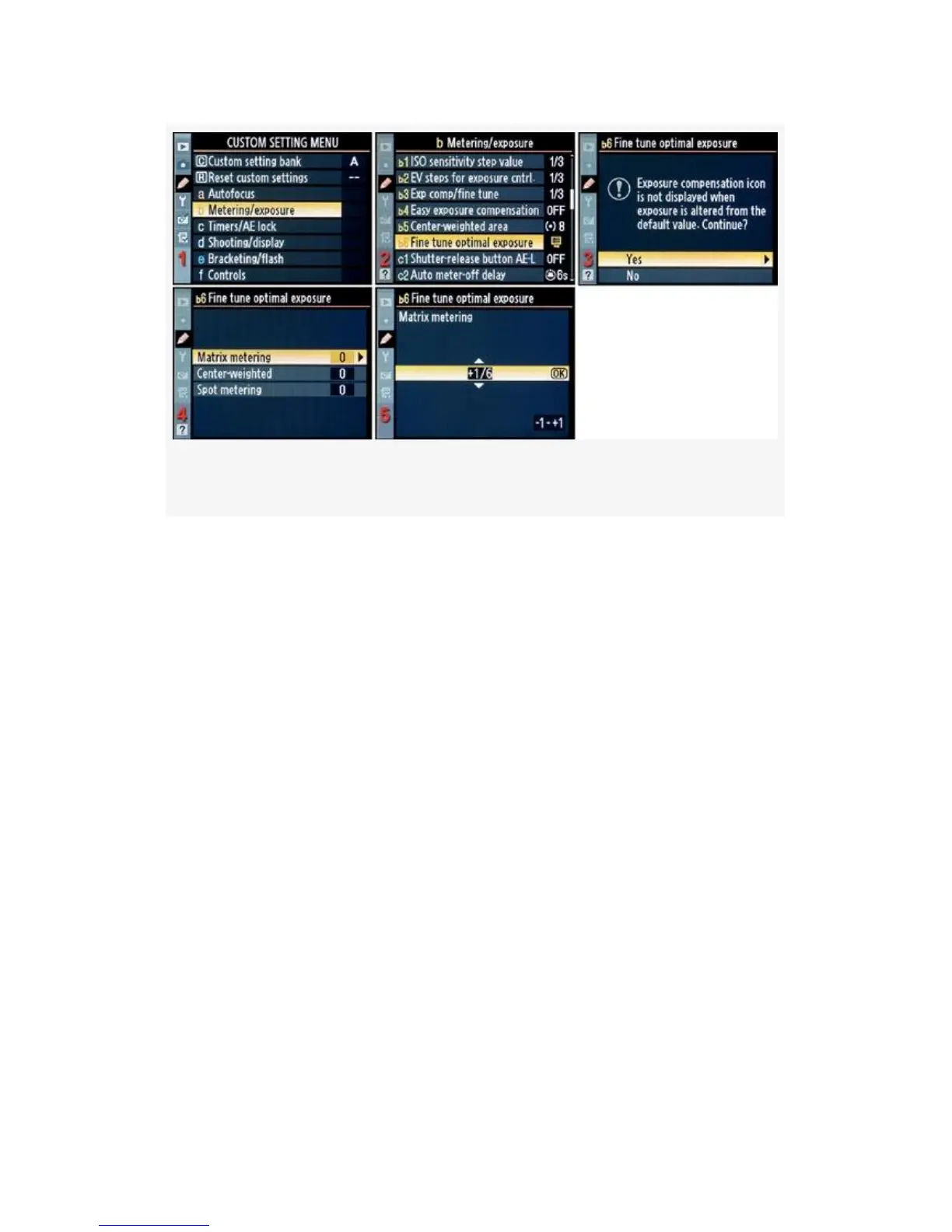
Figure 4-25. Center-weighted area fine-tuning screens
1. Select b Metering/exposure from the Custom Setting
Menu and scroll to the right (Figure 4-25, image 1).
2. Select Fine tune optimal exposure and scroll to the right
(Figure 4-25, image 2).
3. Select Yes from the warning screen and scroll to the
right (Figure 4-25, image 3).
4. Select the metering system you want to adjust. In
Figure 4-25, image 4, I selected Matrix metering. Now,
scroll to the right.
5. Scroll up or down in 1/6 EV steps, until you reach the
fine-tuning value you would like to use (Figure 4-25,
image 5).
6. Press the OK button to lock in the fine-tuning value for
that metering system you selected in step 4. You must
fine-tune each metering system separately.
301



 To Next Page