▪ 8s – 8 seconds
▪ 16s – 16 seconds
▪ 30s – 30 seconds
▪ 1 min – 1 minute
▪ 5 min – 5 minutes
▪ 10 min – 10 minutes
▪ 30 min – 30 minutes
▪ ∞ – No limit (meter stays on)
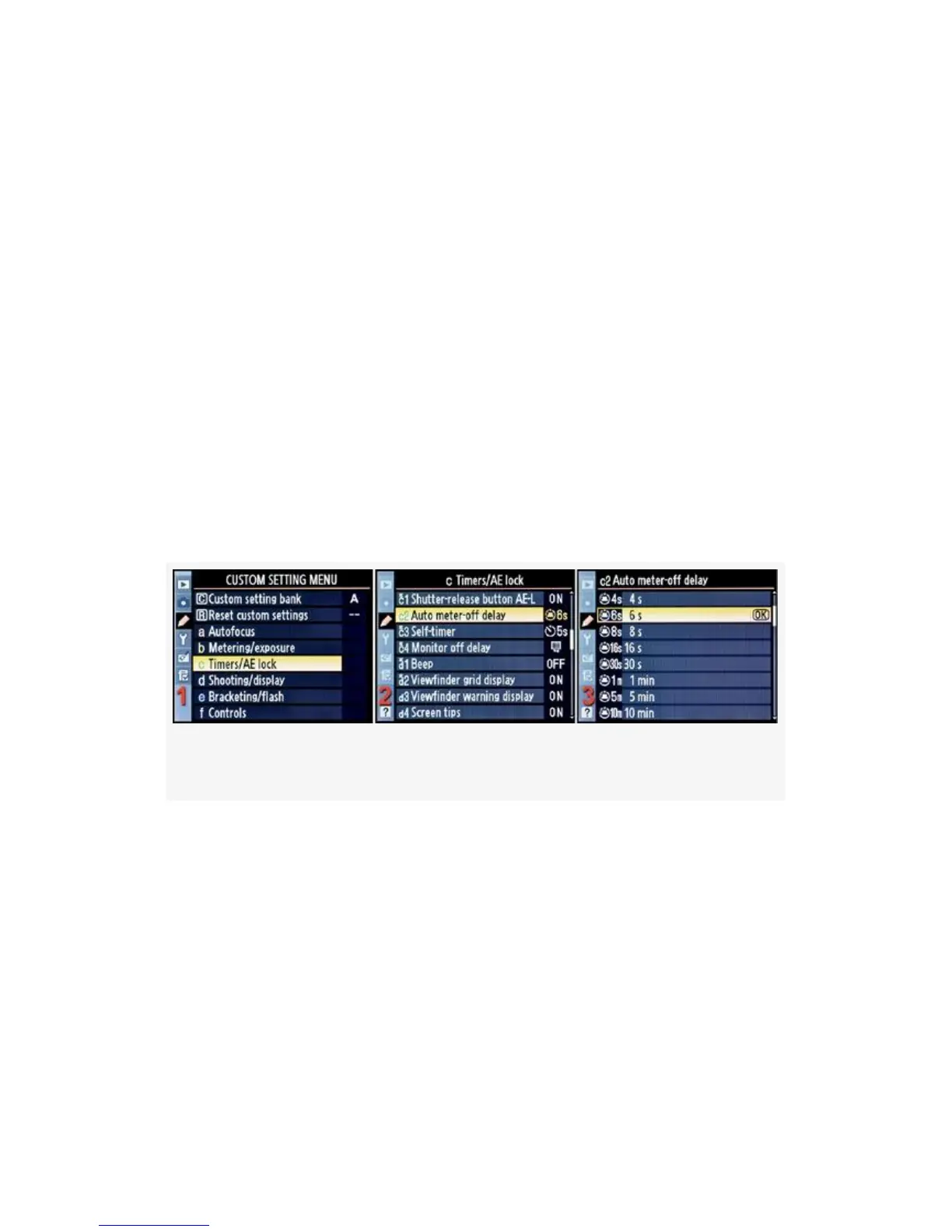
Here are the screens and steps to set the Auto meter-off delay
(see Figure 4-27):
Figure 4-27. Auto meter-off delay
1. Select c Timers/AE lock from the Custom Setting Menu
and scroll to the right (see Figure 4-27, image 1).
2. Highlight Auto meter-off delay and scroll to the right
(see Figure 4-27, image 2).
3. Choose one of the 10 choices on the menu. In
Figure 4-27, image 3, 6 s has been selected. You can’t
see all the available menu selections in image 3. Scroll
307



 To Next Page