▪ Off – Whenever you format or insert a new a memory
card, the number sequence starts over at 0001. If you
exceed 999 images in a single folder, the camera creates
a new folder and starts counting images at 0001 again.
▪ Reset – This works in a similar way to the On setting.
However, it is not a true running total to 9999 because
the image number is dependent on the folder in use. The
camera simply takes the last number it finds in the
current folder and adds 1 to it, up to 999. If you switch to
an empty folder, the numbering starts over at 0001.
Since a folder cannot hold over 999 pictures, you will
not exceed 999 as a running sequence of images in any
one folder. Each folder has its own number series and
causes a File number sequence Reset.
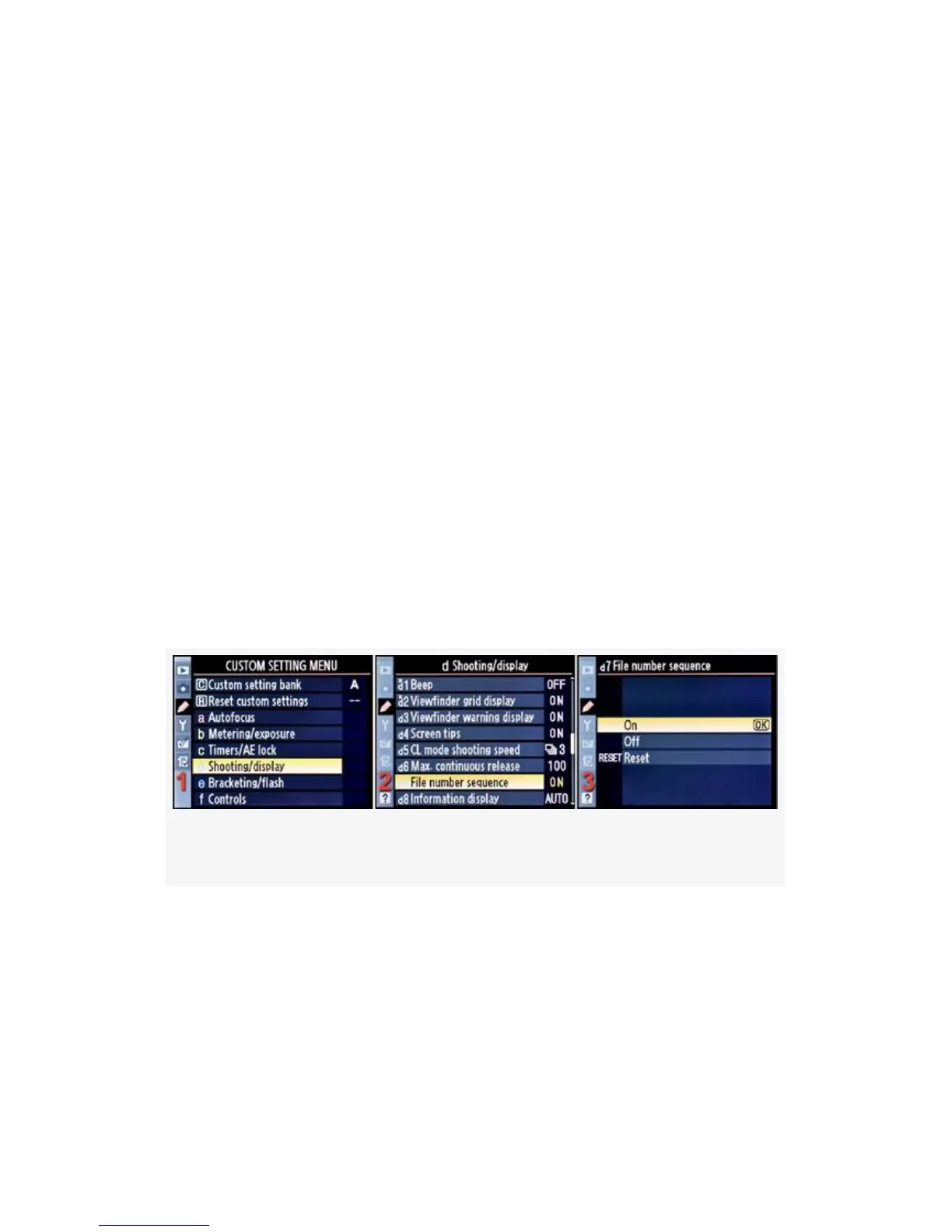
Here are the steps and screens used to configure File number
sequence (Figure 4-39):
Figure 4-39. File number sequence
1. Select d Shooting/display from the Custom Setting Menu
and scroll to the right (see Figure 4-39, image 1).
2. Highlight File number sequence and scroll to the right
(see Figure 4-39, image 2).
330



 To Next Page