The user’s manual is a bit confusing on this subject, but the
mode and minimum shutter speed information in the previous
list is evident after study and testing. Therefore, Custom
setting e2 is only partially used by the flash modes, because
the default is preset to 30 seconds in Shutter priority auto and
Manual modes.
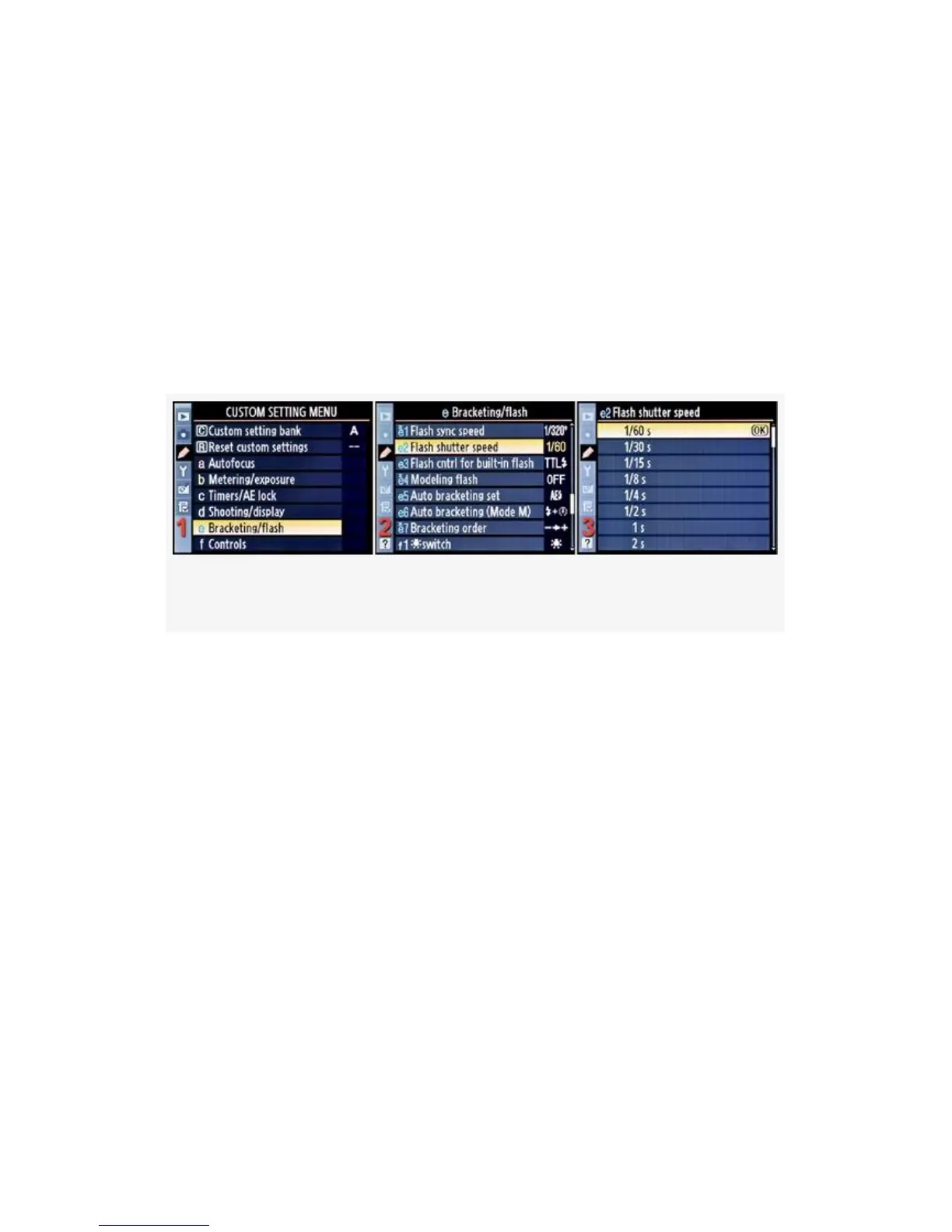
Here are the screens and steps to set the Flash shutter speed
minimum (see Figure 4-49):
Figure 4-49. Flash shutter speed
1. Select e Bracketing/flash from the Custom Setting Menu
and scroll to the right (see Figure 4-49, image 1).
2. Highlight Flash shutter speed and scroll to the right (see
Figure 4-49, image 2).
3. Choose one of the choices on the list—1/60 s to 30 s. In
Figure 4-49, image 3, 1/60 s has been selected.
Remember that slower shutter speeds can cause subject
ghosting when using flash in high ambient light
conditions.
4. Press the OK button to lock in the setting.
My Recommendation: I normally use 1/60 s. Shutter speeds
lower than 1/60s can cause ghosting if the ambient light is too
high. The subject can move after the flash fires, but with the
352



 To Next Page