of shines. You can press the Depth-of-field preview button to
see the effect if you set Modeling flash to On.
This function works with Nikon’s main Speedlight flash unit
group: SB-900, SB-800, SB-600, or SB-R.200. It also works
with the pop-up flash for limited periods. My SB-400 flash
unit does not work with Modeling flash.
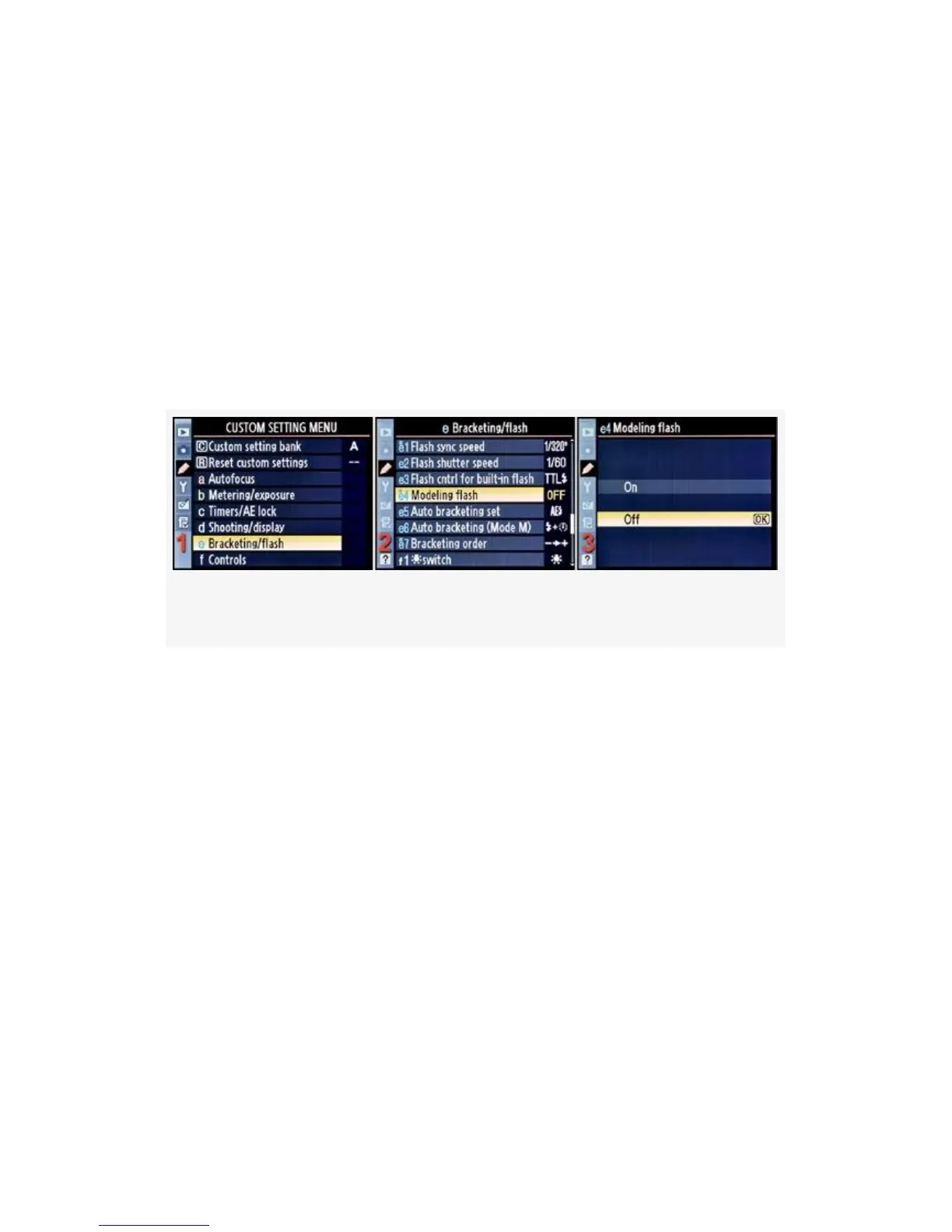
Here are the screens and steps used to configure Modeling
flash (see Figure 4-54):
Figure 4-54. Modeling flash
1. Select e Bracketing/flash from the Custom Setting Menu
and scroll to the right (see Figure 4-54, image 1).
2. Highlight Modeling flash and scroll to the right (see
Figure 4-54, image 2).
3. Choose one of the two choices on the list. In
Figure 4-54, image 3, Off has been selected.
4. Press the OK button to lock in the setting.
Here’s what each of the settings for Modeling flash
accomplishes:
▪ On – This setting allows you to see (somewhat) how
your flash will light the subject. If you have this setting
turned On, you can press the Depth-of-field preview
361



 To Next Page