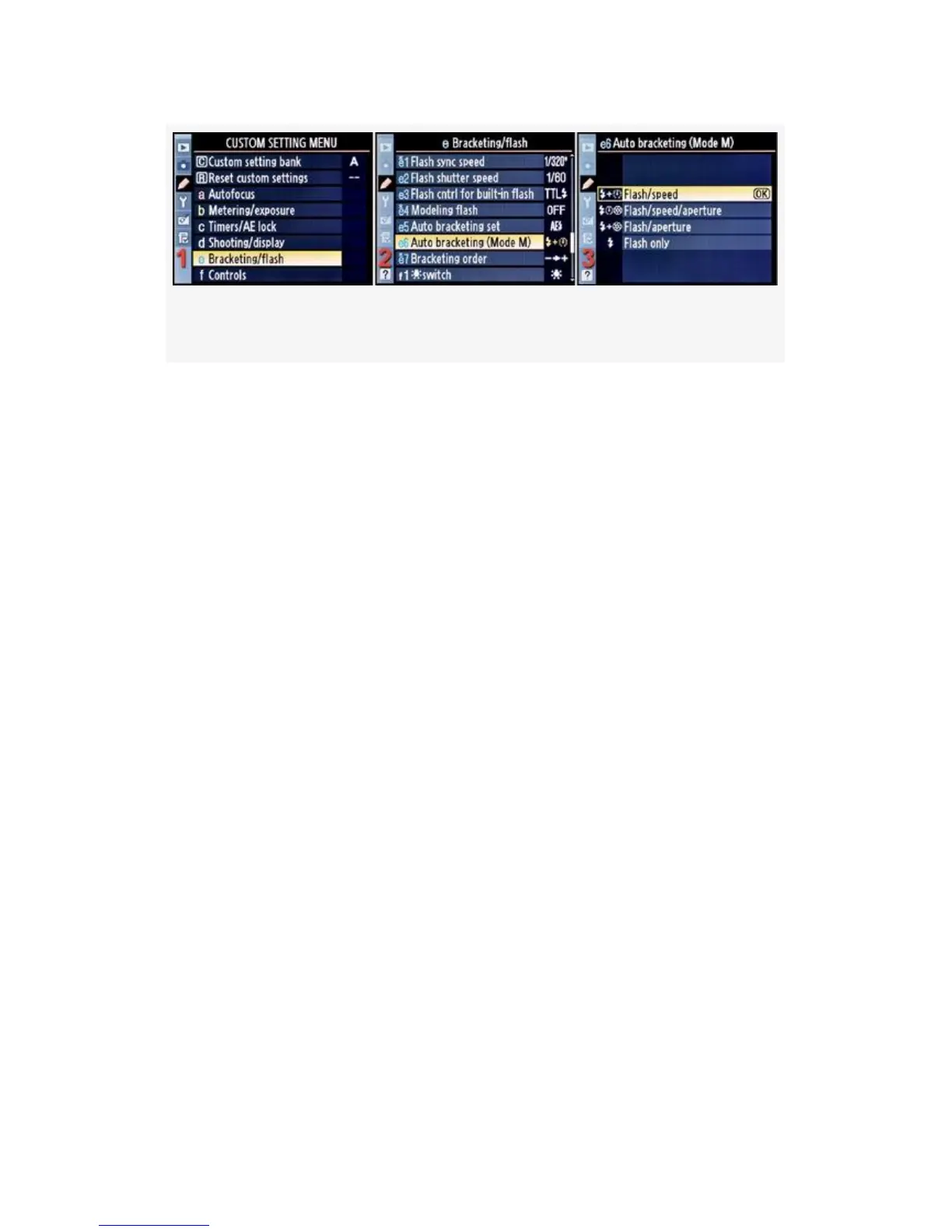
Figure 4-61. Auto bracketing (Mode M)
1. Select e Bracketing/flash from the Custom Setting Menu
and scroll to the right (see Figure 4-61, image 1).
2. Highlight Auto bracketing (Mode M) and scroll to the
right (see Figure 4-61, image 2).
3. Choose one of the four choices on the list. In
Figure 4-61, image 3, Flash/speed has been selected.
4. Press the OK button to lock in the setting.
Here is a list of the four settings and what each does. The
camera controls the selected setting when you are using
M-Manual exposure mode while bracketing. These functions
are dependent on how Custom setting e5 > Auto bracketing
set is configured.
▪ Flash/speed – This setting allows you to control the
aperture for best depth of field, while still doing
bracketing. The camera will control the shutter speed. If
Custom setting e5 > Auto bracketing set is set to AE &
flash, the camera will vary the shutter speed and flash
level to expose the bracketed images while you control
the aperture. If e5 is set to AE only, then the camera will
only vary the shutter speed to get the exposures.
376



 To Next Page