When you push the switch, as shown in Figure 4-63, you’ll
turn on the backlight for just the Control panel or both it and
the Information display. I’ve greatly enlarged the Backlight
switch’s icon in Figure 4-63, image 2 so that you can see it
better. The red triangle points to the tiny icon on the camera’s
Power switch.
The Control panel and Information display have different
backlight time-outs controlled by separate functions. The
Control panel backlight time-out is controlled by Custom
setting C2 (Auto meter-off delay). The Information display
backlight time-out is controlled by Custom setting C4
(Monitor off delay). You can set these two time-outs first, and
when you activate the Backlight switch, both timers will start
counting down separately.
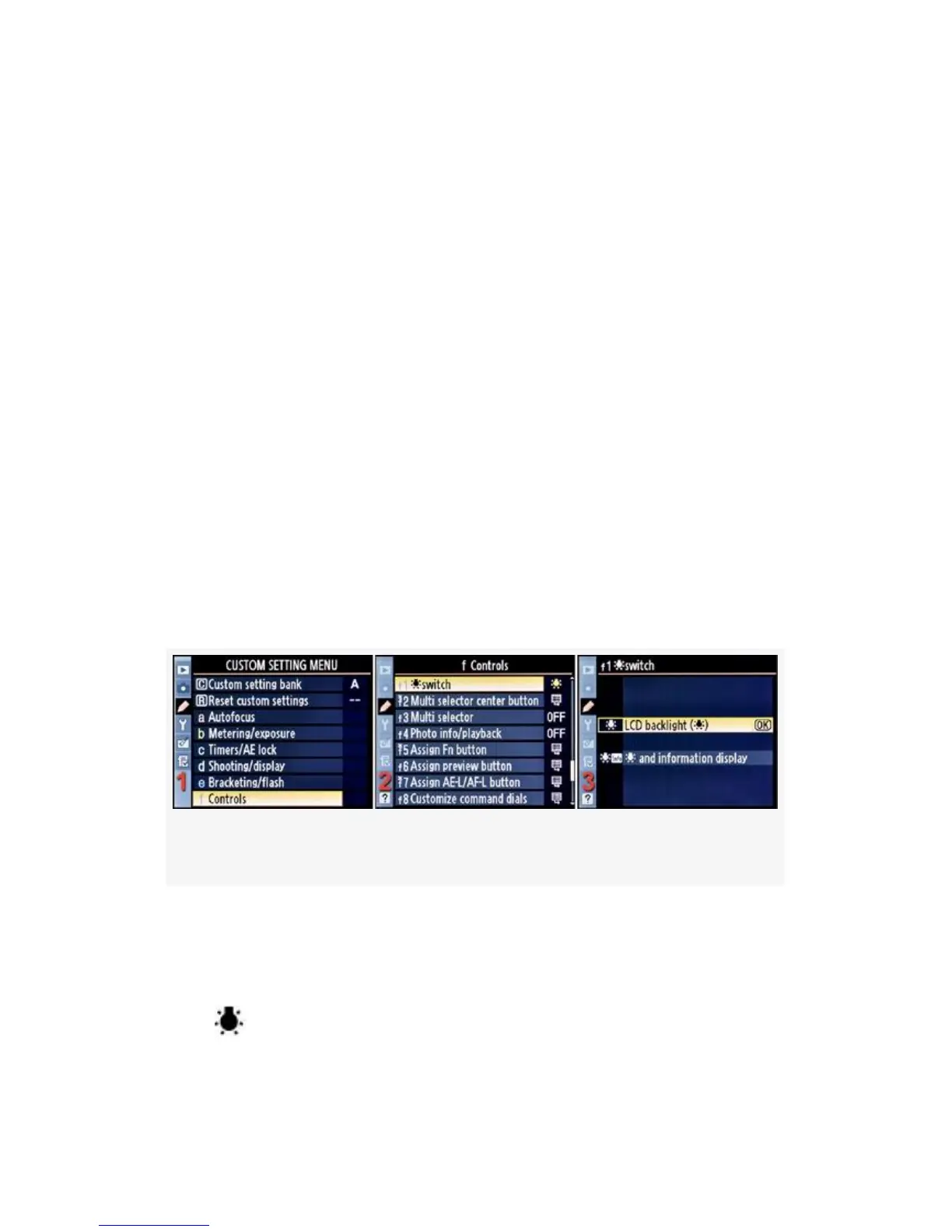
Here are the screens and steps to select what the Backlight
switch controls (Figure 4-64):
Figure 4-64. Backlight switch screens
1. Select f Controls from the Custom Setting Menu and
scroll to the right (see Figure 4-64, image 1).
2. Highlight
switch and scroll to the right (see Figure 4-64, image
2).
383



 To Next Page