30
CHAPTER
4.
Troubleshooting
This chapter offers explanations to potential problems you may experience with your PR53xx
series printer. The LCD panel will alert the operator and will display the error condition. The
suggestions in this chapter should, in most cases, solve the problem. If you still have difficulty
after trying these suggestions, contact your authorized reseller for technical assistance.
Note Prior to contacting your authorized reseller for assistance, make note of the error
message along with the error code located under the actual description.
In most cases, press the Clear button after identifying the error to return the printer to the Ready
to Print status. If the message “Cannot Recover/Please Reset” appears, press and hold the Clear
button for more than 3 seconds while the printer resets.
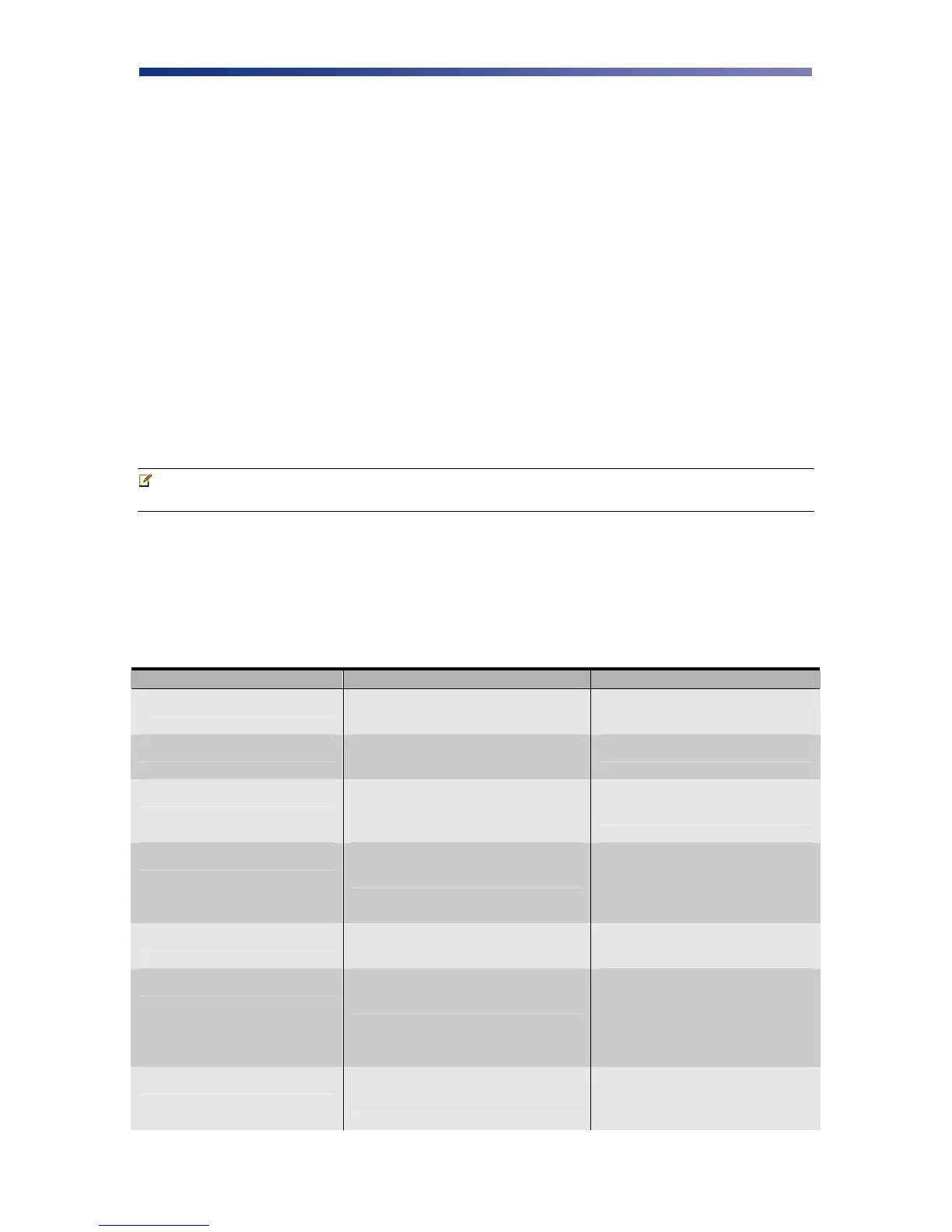
4.1 Interpreting General LCD Messages
LCD SCREEN MESSAGE PROBABLE CAUSE ACTION
Initializing The printer is performing an internal
test before use.
Wait for the Ready to Print
message.
Ready to Print The printer will accept data and
begin printing.
Card Empty Indicates there is not an adequate
supply of cards in the printer’s
feeder.
Add more cards to the input
feeder.
Front access panel is Open The front access panel on the printer
is open or incorrectly closed.
Close the front access panel
and press the Clear button to
return the printer to the
ready state.
Top Cover is Open The cover to the flip/turn unit is
open.
Close the top cover until it
snaps closed.
Temperature out of Range Temperature of the print head is out
of range.
Turn the printer off and
allow the print head to cool.
Turn the printer back on and
wait for the Ready to Print
message.
Encoder Write Error Data cannot be written or read from
the card’s magnetic stripe
Check the cards are loaded
with the magnetic stripe in
the correct orientation.



 To Next Page