Move cursor with and on the front panel and select item with and .
System Time:Press to get into input interface for time inputting.
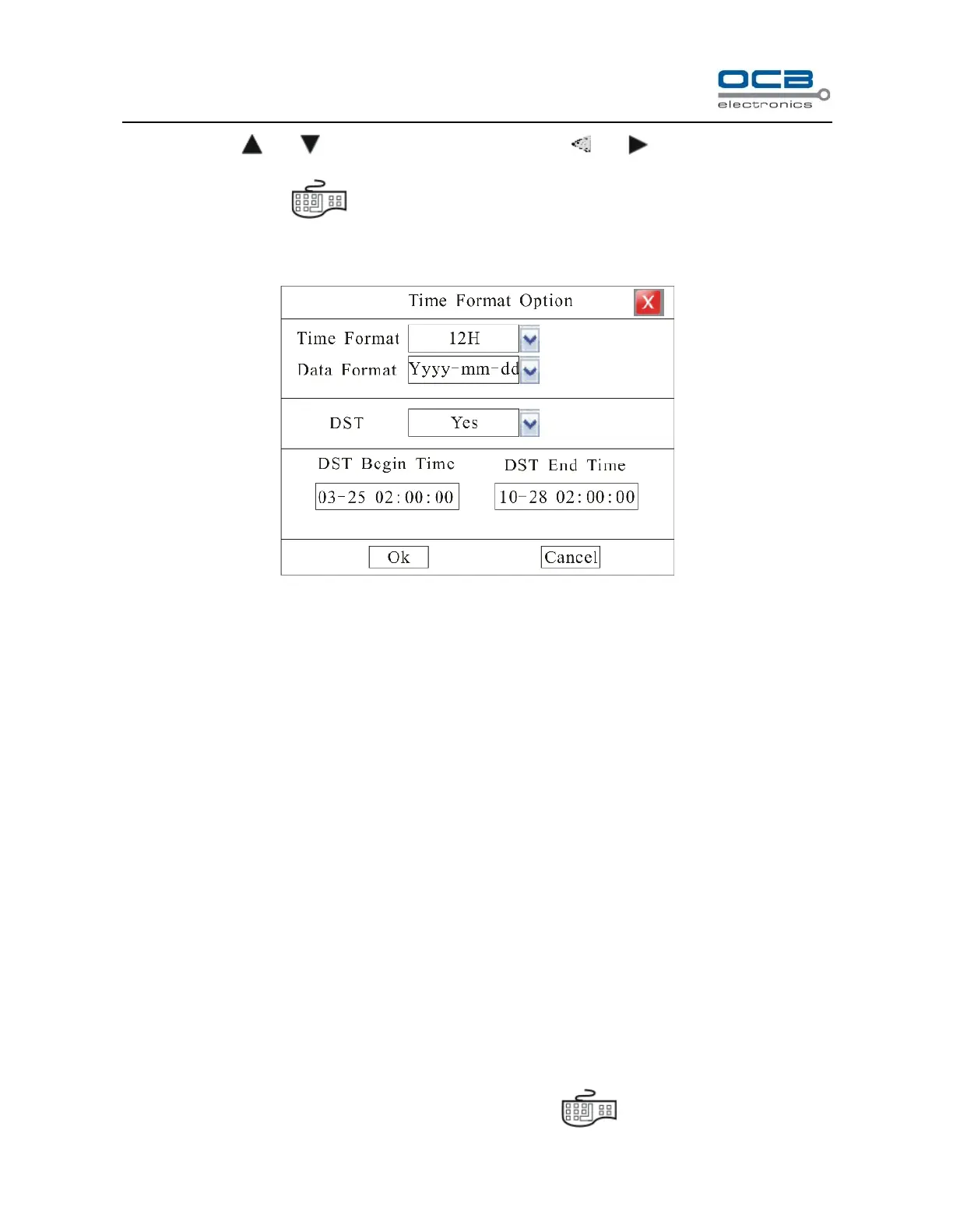
Time Format:Setting the time format and DST. Please refer Fig. 15.
Fig. 15
Time Format: 12H and 24H is selectable
Data Format: yyyy-mm-dd, mm-dd-yyyy, yyyy-mm-dd and mm-dd-yyyy is selectable. Default Format:
yyyy-mm-dd
DST Setting (Summer time setup): Default DST setting: NO.
Note: If you need to modify system time please close the record.
Time Display.
Enter ”Main Menu-Advanced-Display”. In the interface, when recording or remote monitoring chose, time
display or not is selectable. To display time Enter “Set” to adjust display location on the screen.
Whenever the Time box and Channel name box are overlapped, the system will separate them automatically.
Note: Time position of realtime monitoring screen is unalterable.
Channel Name Setup and Display
Enter “Main Menu-Advanced-Display”. In the interface, channel name and display location can be modified.
Modify channel name: move cursor to “Name” item box. Press on front panel to enter text input



 To Next Page