Alpha: Adjust menu contrast. (Range from00 to 99. 99 stands for low contrast).
Auto logout: “Off”: Only can logout manually in “Maintain” →”Logout”. “On”: Logout automatically in
the time set in idle time box which will show only “On” is chose.
Idle time: Length of time during which no operation is executed. Default Idle time: 5 minute.
VGA Resolution (Option): Setup VGA output resolution. There are following options: 800*600, 1024*768,
and 1280*1024. Default: 1024*768.
Section 7 HDD Management
HDD State Inquiry
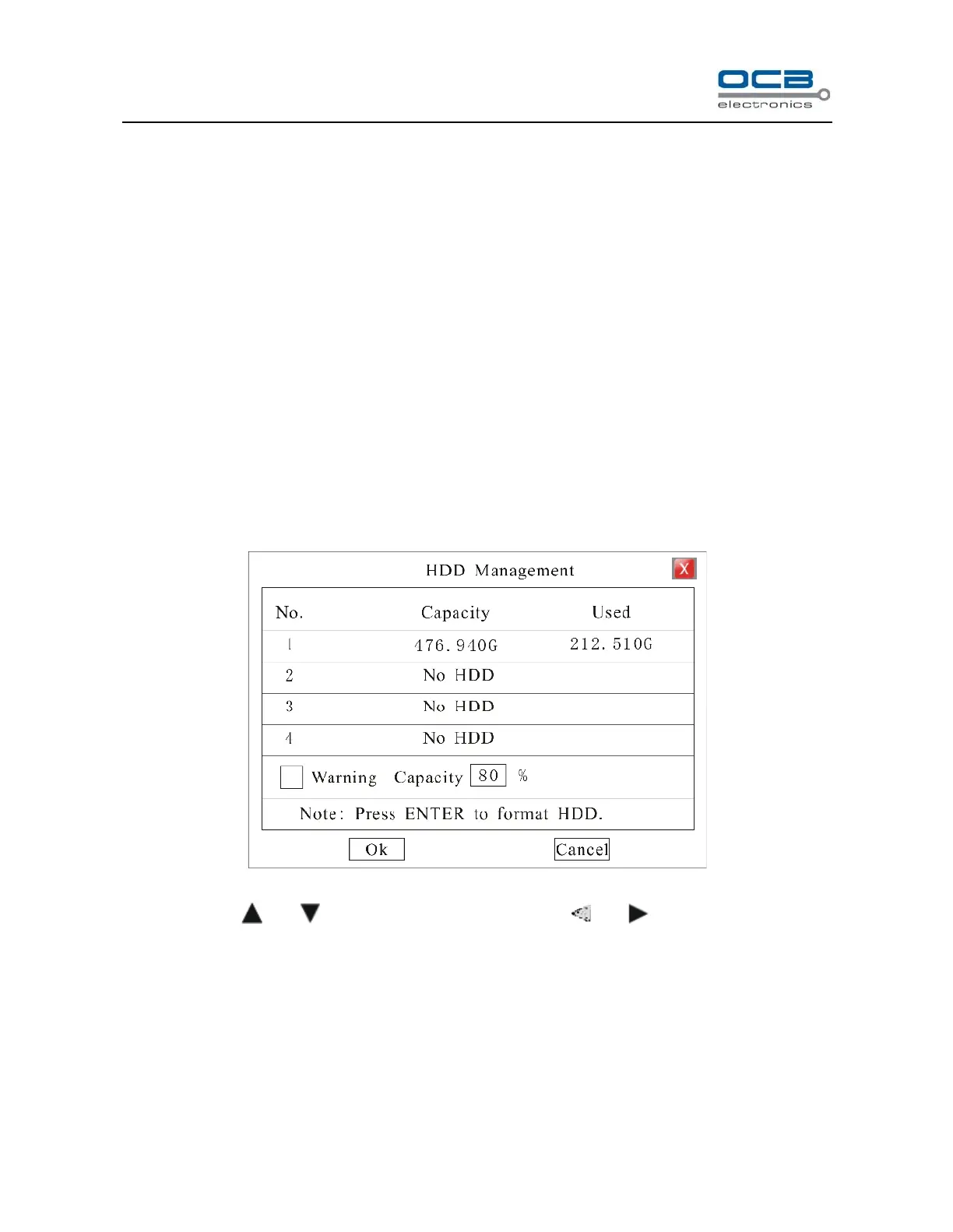
Enter “Main Menu-Information—HDD” as shown in Fig. 17.
Fig. 17
Move cursor with and on the front panel and select item with and .
HDD Alarm: HDD alarm will activate once the capacity of HDD is lower than a value set by user. The
range of warning capacity is among 30 to 99. Alarm mode: buzzer alarm. Default buzzer time is 10 second
which can be modified in “Main Menu”→ “Rec. &Alarm”→ “Alarm”.
HDD Format: Move cursor to the HDD which will be formatted, press “Enter” key to get into HDD format
interface as shown in Fig. 18.



 To Next Page