interface then channel name can be defined with uppercase or lowercase letter, number and symbol.
Channel name display: Display channel name or not is selectable. Enter “Set” menu to adjust display location
on the screen.
Note: When the Time box and Channel name box are overlapped, the system will separate them automatically.
Section 6 Basic Parameter Setup
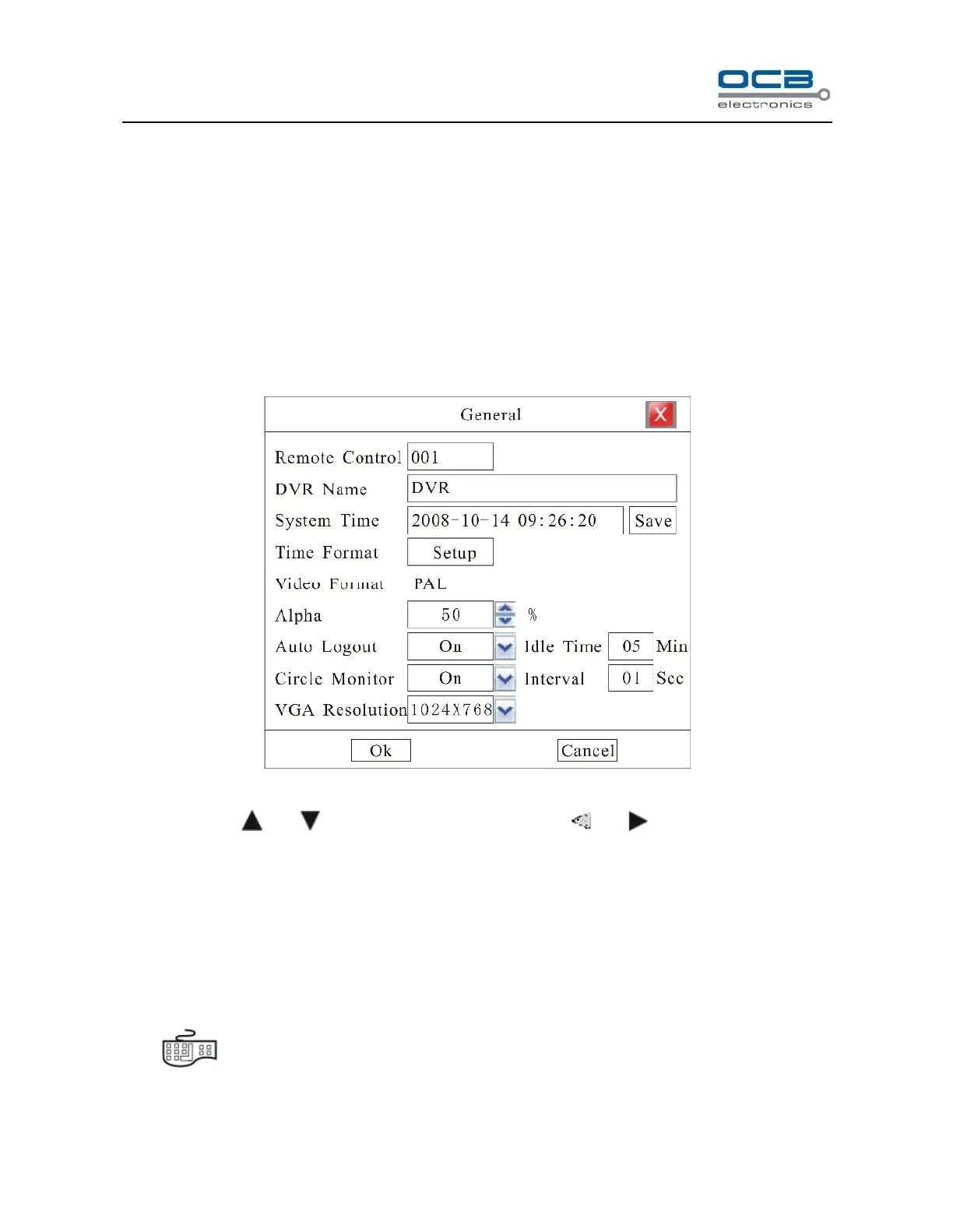
Enter “Main Menu-Advanced-General” as shown in Fig. 16.
Fig. 16
Move cursor with and on the front panel and select item with and .
Remote Control: When you use IR controller to operate DVR, you must use DVR address to select DVR. If
there are more than one DVR in one place, please define different address for each DVR. The default address
is “001”, the value field among 000-255.
DVR Name:Define DVR name. When you access DVR remotely, you can find all the DVR intuitively by
their names .If you want to modify the DVR name, please move cursor to DVR name edit box and press
“ ” key to enter into input mode.
Video Format:Auto adapt according to video input.



 To Next Page