Introduction 9
General operation
A complete scanning and printing system comprises the Océ 3050 Microfilm
Scanner, the controlling PC with the Océ
3050 Windows software and an Océ
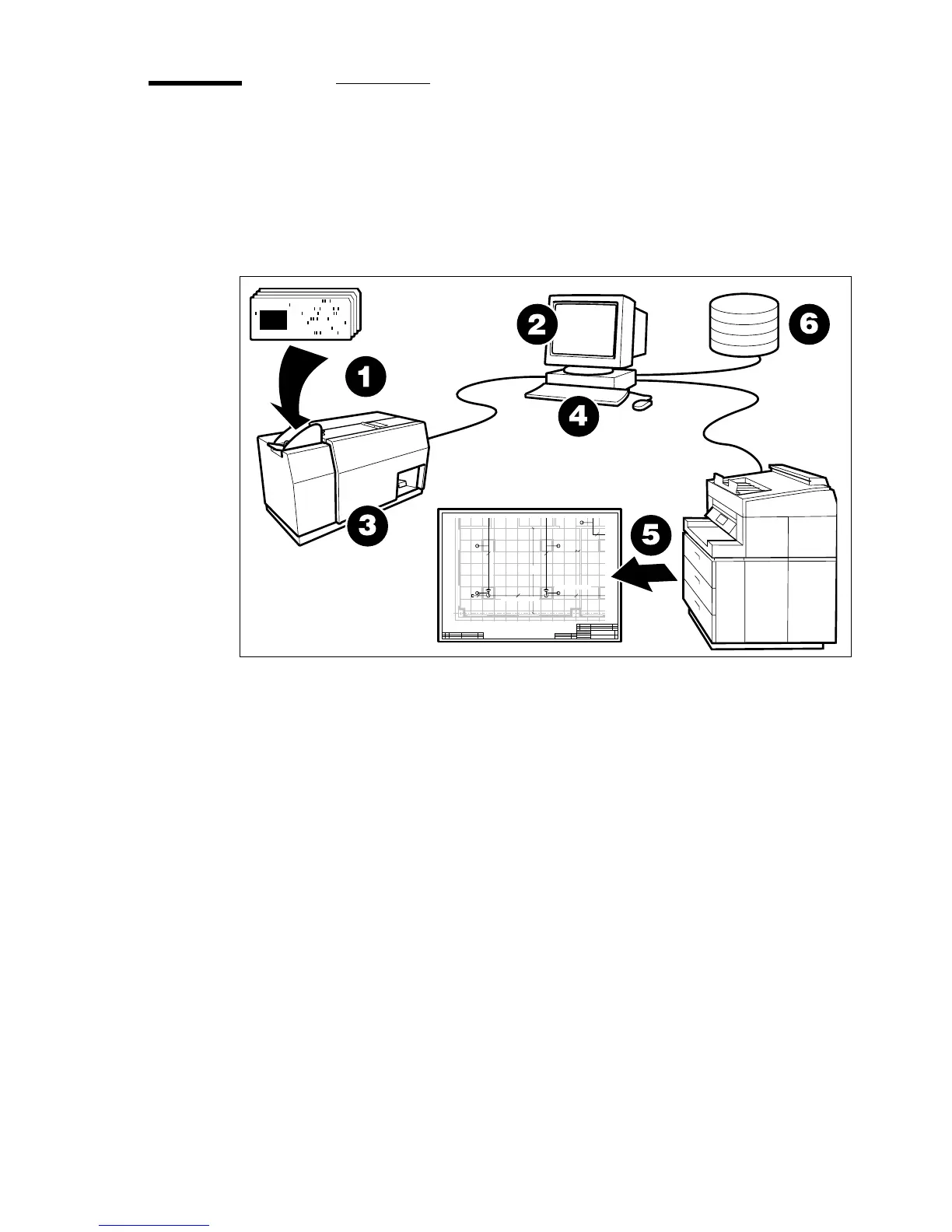
digital printer. The figure below shows an overview of the whole system.
[1] Scanning, printing and filing
The cards to be scanned are placed in the input hopper of the scanner (1). You
start the scanning in the Control window of the Océ
3050 Windows
software
(2). The scanner then scans one card or a batch of cards (3). The
images are displayed on the screen of the controlling PC as the cards are
scanned. The controlling software provides a ‘zoom and pan’ facility to inspect
the produced images carefully.
According to the control settings in the software (4), the Océ 3050 Microfilm
Scanner allows you to produce prints of the scanned images using a digital
printer (5). You can also produce data files of the scanned images to store into
an image data directory. You can store the data files in the controlling PC, or
link the PC to a network, so that image data files can be sent to and stored in
any node of the network (6). All necessary controls for the scanning process
are available in menus in the controlling PC.
CROSSMAIN EL. 7500
SPRINKLER EL. 7150
SPRINKLER
BRANCHLINE EL. 7940
Ø2" Ø2"
Ø2"
434.2
18.5
Ø2"
Ø2"
Ø2"



 To Next Page