79
DEMO
PSI
10 2005
ATR
FEET
MAX
O
2
N
2
Descending
Hint: Quick taps (<2 seconds) of the Right (Select) button
starts/stops Descents and Time Acceleration. Quick taps of
the Left (Advance) button accesses Alternate displays.
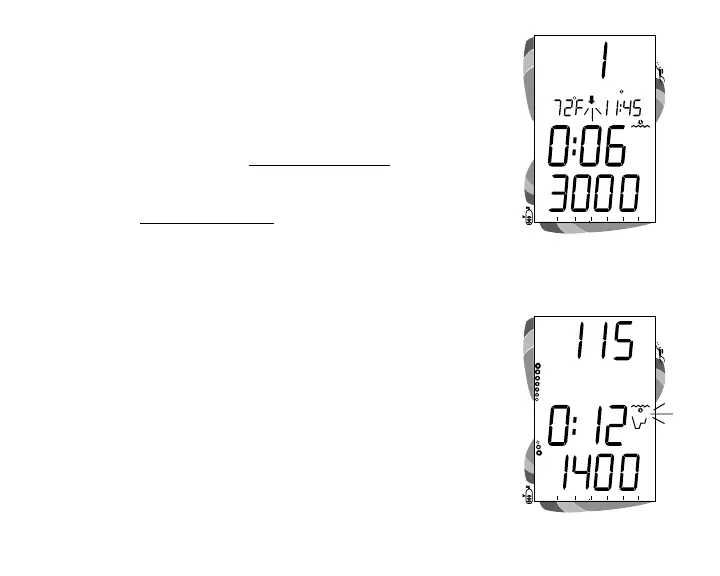
• While the Down Arrow is flashing, tap (press/release)
the Right (Select) button to begin a Descent at a rate of
5 feet (1.5 meters) per real second.
• Tap (press/release) the Right (Select) button during the
Descent to stop the Descent.
• Tap (press/release) the Left (Advance) button during the
Descent, or stopped, to access the Alternate Displays.
• Press and hold the Right (Select) button for 4 seconds to
access Time Acceleration. The small clock icon begins
flashing (Fig. 91).
• Tap (press/release) the Right (Select) button to increase
Elapsed Dive Time 1 minute per real time second.
• Tap (press/release) the Right (Select) button during Time
Acceleration to restore normal time rate of 1 second per
real second.
• To start an Ascent, tap (press/release) the Right (Select)
button to stop a Descent.
• To revert operation to real Surface Mode, press and hold
Both buttons simultaneously for 2 seconds.
Fig. 91 - Time Acceleration
DEMO
PSI
10 20 30 40 50 6005
ATR
O
2
N
2
Fig. 90 - Dive Mode Setup



 To Next Page