63
Make sure to set the correct parameters of the reference span gas used to calibrate the CO2-O2-MODULE
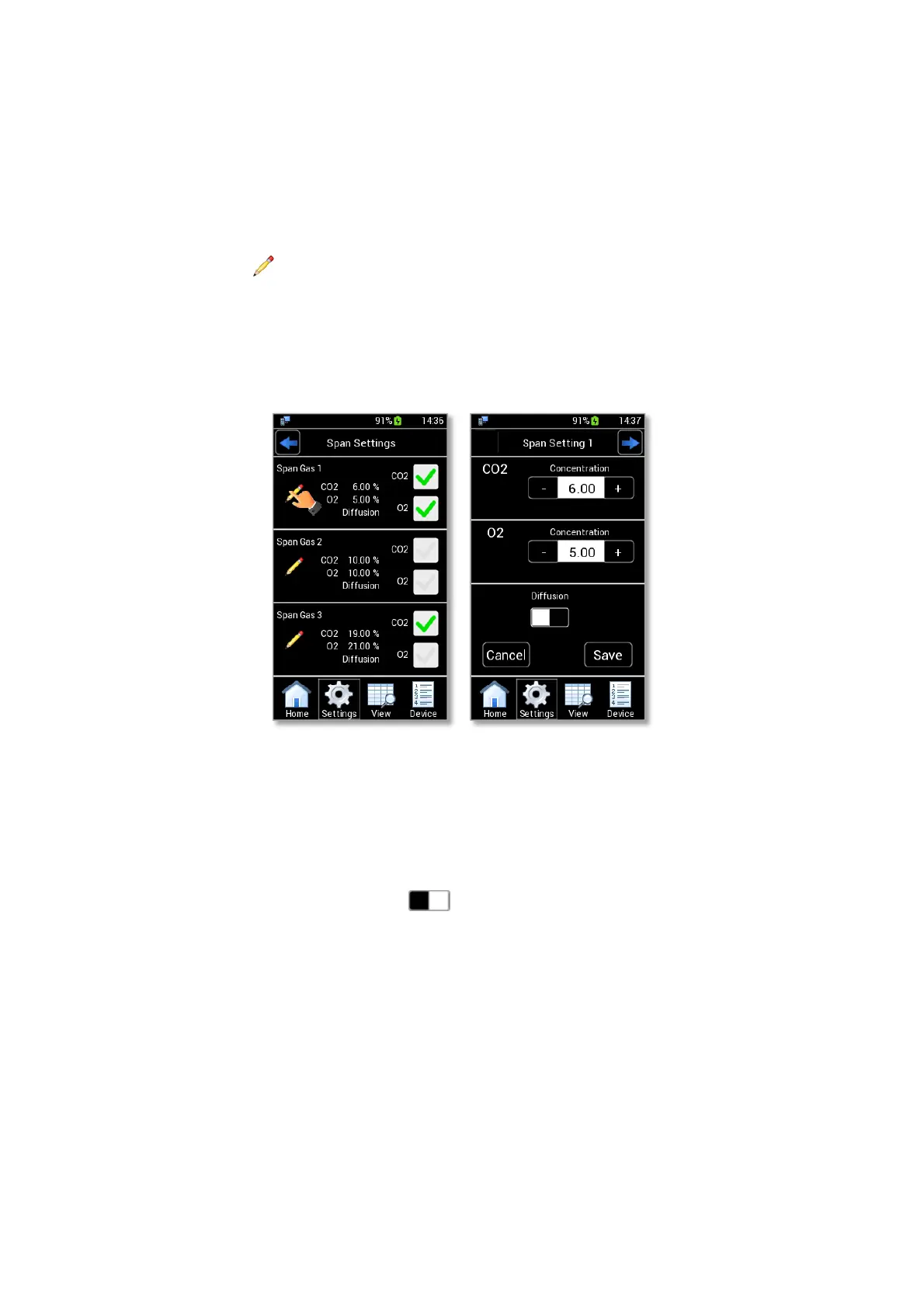
in the Span Settings page (see Figure 83 a).
Tip ►LEO can be calibrated for CO2 sensor, O2 sensor or both.
2. In Span Settings page, you can set up to three span gases and for each span gas you can set CO2, O2 or
both by clicking on the corresponding check box. The gases reference values can be modified pressing
on the icon , as shown in Figure 83 a, and inserting the CO2 and O2 concentrations of the span
gases used for the calibration procedure.
Tip ►For example, the Figure 83 a shows the settings for a span calibration by two span gases (Span Gas 1
and Span Gas 3); during the procedure the Span Gas 1 will be used for calibrating both sensors (CO2 at 6.00
% and O2 at 5.00 %), the Span Gas 3 only for calibrating the CO2 sensor (at 19 %).
Figure 83. Span Settings page (a – b).
3. If you use a gas with an overpressure for the CO2/O2 User Calibration, you can calibrate LEO in
Diffusion Mode, as shown in Figure 83 b.
4. If you use a gas at atmospheric pressure for the CO2/O2 User Calibration, you can calibrate LEO in
Aspiration Mode by pressing on icon as shown in Figure 84 a. The Pump indication appears (see
Figure 84 b) and you can press on Save to confirm.
Note ► Okolab recommends to use 150 ml/min as pump flowrate value during a calibration in Aspiration
Mode. See paragraph 9.3.3 to change the pump flowrate value.



 To Next Page