15
TV Installation and Connection Guide
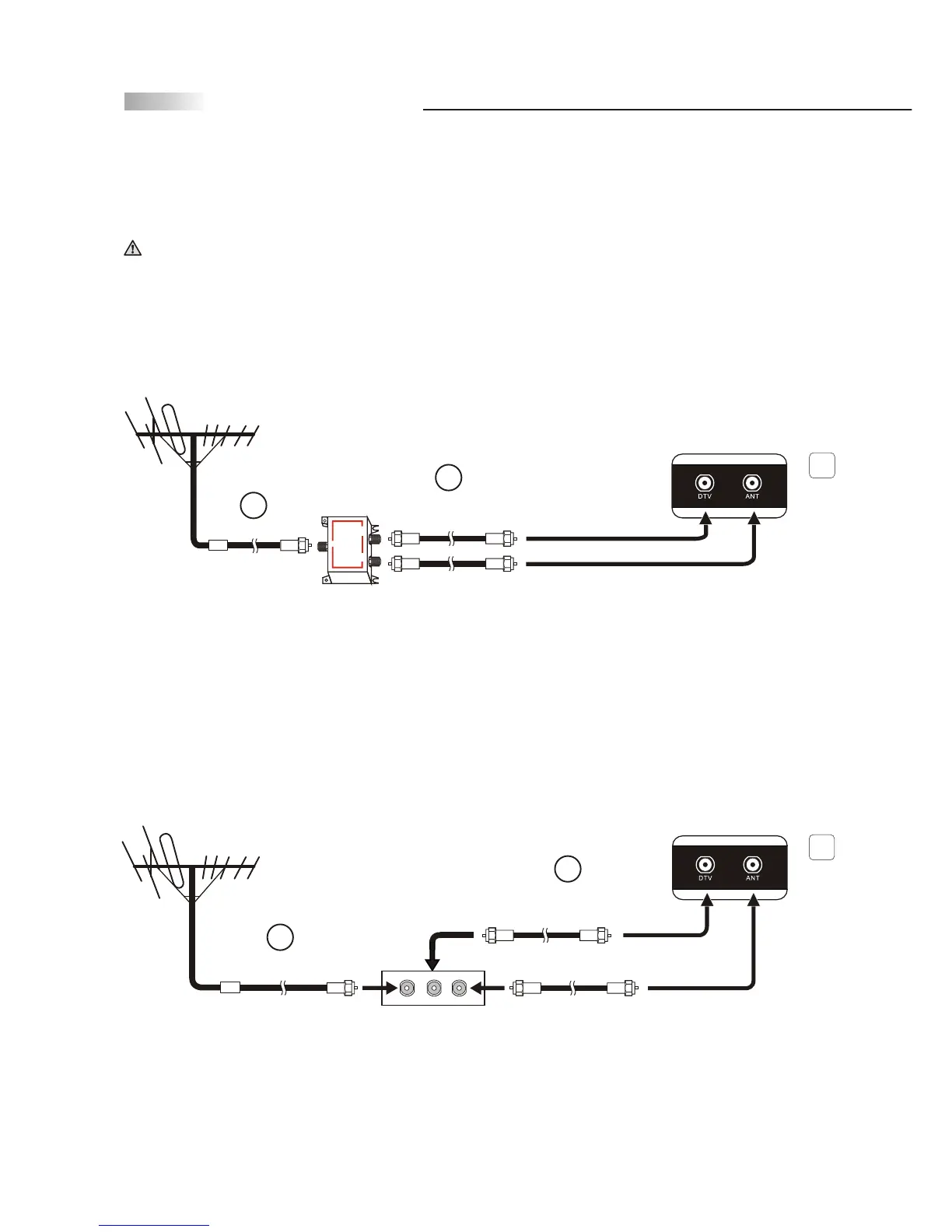
Connecting to an Antenna or Video Equipment with Antenna
outlet (for TV and DTV source)
1. Connect a 75-ohm coaxial cable (or choice of Antenna Cable) onto the splitter's IN jack.
2. Using two of the 75-ohm coaxial cables, connect two of the splitter's OUT jacks to the
TV's ANT and DTV jacks (RF Terminal).
1. Connect a 75-ohm coaxial cable (or choice of Antenna Cable) onto the Video Equipment's
IN jack.
2. Using two of the 75-ohm coaxial cables, connect two of the Video Equipment's OUT
jacks to the TV's ANT and DTV jacks (RF Terminal).
(75-ohm coaxial cable)
(Video Equipment with
Antenna In/Out Socket)
IN
jack
OUT
jack
(75-ohm coaxial cable)
(75-ohm coaxial cable)
Disconnect all power sources before making any connection.
IN
OUT
OUT
2 WAY SPLITTER
(75-ohm coaxial cable)
(75-ohm coaxial cable)
(2 Way Splitter)
OUT
jack
(75-ohm coaxial cable)
If connecting to Video Equipment with Antenna outlet
1
2
2
1
2
2
Rear of TV
Rear of TV



 To Next Page