24
Remote Control Guide
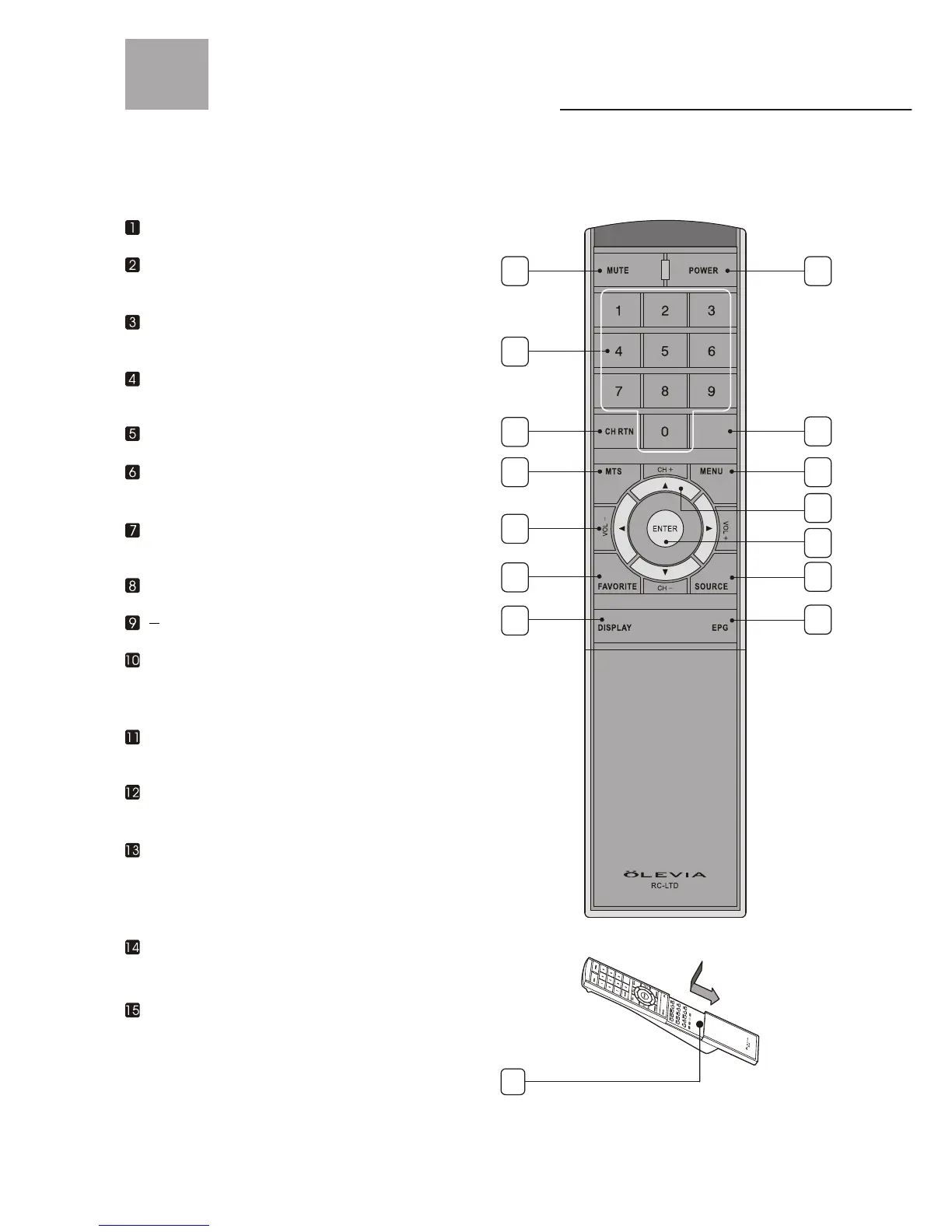
Remote Function Keys & Description
Regular Buttons
SOURCE Press to show the source input from
TV, Video 1, Video 2, S-Video 1, S-Video 2,
Component 1, Component 2, HDMI, VGA,
and DTV.
MUTE Press to mute the sound.
NUMBER BUTTONS Press the number buttons
to select channels on the display.
CH RTN ( Channel return ) Press to return the
previous-channel.
MTS Press to switch the TV Audio System between
SAP, Mono or Stereo mode.
VOL+/ VOL Press to adjust the volume.
FAVORITE Press to select favorite channels.
Can be preset in OSD Menu.
POWER Press to turn display on/off.
MENU Press to activate or close the On Screen
Display menu. In OSD Menu, acts as a cancel
button while navigating through the OSD.
CH + / CH - Press to adjust channel up and
channel down.
ENTER Press to enter the channel number,
highlighted menu or submenu item.
15
DISPLAY Press to display the information of
current channel number and time.
-
EPG (Optional function currently unavailable)
-
1
2
3
4
5
6
7
8
9
10
11
12
13
14
Hotkeys Press to directly access certain
Shortcut TV functions.
Press to select sub-channel.



 To Next Page