71
1.Before using wall mount, please read manual of wall mount and following assembly guide.
2.For safety purpose, please purchase wall mount which can bear the LCD HDTV weight.
3.Following installation instruction is only for your reference.
4.Please consult authorized service personnel for the installation of wall mount.
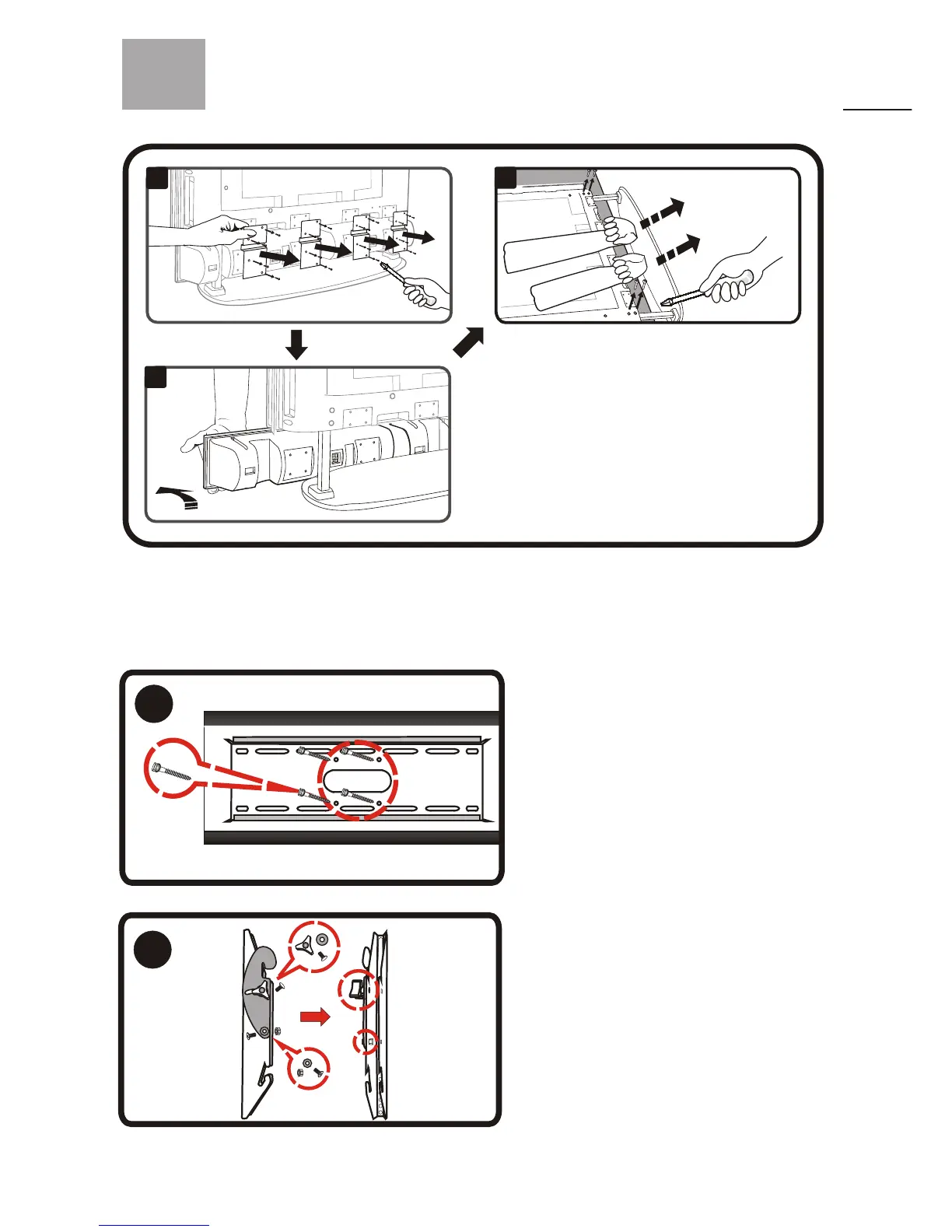
Note: Please follow the instruction of removing
the " STAND" before attaching the " WALL
MOUNT" on to your LCD HDTV.
1. Pre-drill four of the 3/16" (5 mm) holes
on the solid cement wall.
2. Level and secure the wall mounting
plate to the center of the solid cement wall
using the four lag bolts and washers
supplied.
Note: Please make sure the solid cement
wall can burden with the weight of the
unit at least 4 times.
1
(Wall Mounting
Plate)
2
1. Secure two iron plates of the display
bracket together with the strews, lock
washers, and tri knobs supplied and then
tighten them.
1
2
3
WM30D Wall Mount Kit (Optional)



 To Next Page